
Category: AI Marketing

  • How Performance Marketers use Competitive Price Analysis to Win in Google Shopping

    How Performance Marketers use Competitive Price Analysis to Win in Google Shopping

    Google Shopping has become one of the most competitive acquisition channels in ecommerce. Feeds are cleaner than ever, automation is everywhere, and most advertisers use the same bidding strategies. That means pricing is no longer just a commercial decision sitting with the pricing team. It directly shapes marketing performance.

    Performance marketers who consistently win in Google Shopping understand one thing very clearly. You cannot outbid the market if your prices are out of sync with competitors. This is where competitive price analysis stops being a nice to have and becomes a daily operating tool for growth.

    This article breaks down how experienced marketers use competitive price analysis to make smarter decisions around Google Shopping campaigns, budgets, and product prioritization.

    Why price matters more in Google Shopping than most marketers admit

    Google Shopping is not a typical auction. Yes, bidding matters. Feed quality matters. But price competitiveness influences almost every layer of performance, from impression share to conversion rate.
    When two products look similar in the Shopping carousel, price becomes the deciding factor for the user. If your product is consistently more expensive than comparable listings, Google sees lower click through rates and weaker conversion signals. Over time, that pushes your ads into less favorable positions or increases your cost per click.

    Many marketers try to solve this with higher bids. That works temporarily, but it creates a fragile setup. You end up paying more to compensate for weak price positioning, which drags down ROAS and limits scale.

    Competitive price analysis changes the conversation. Instead of asking how much more you should bid, you start asking whether the product deserves more budget at its current price.

    What competitive price analysis looks like in a Shopping context

    At its core, competitive price analysis means systematically tracking how your product prices compare to relevant competitors across the same products or close substitutes.

    For Google Shopping, this usually focuses on identical SKUs or highly comparable items. The goal is not to monitor every competitor in the market, but to understand your relative price position where it directly affects ad performance.

    A solid competitive price analysis setup answers questions like these. Are we priced above, below, or in line with competitors on our top selling SKUs. How often do competitors change prices. Which products are consistently uncompetitive. Where do we have room to push volume without hurting margins.

    When marketers have access to this data, Shopping optimization becomes far more precise.

    Using price data to prioritize the right products

    One of the biggest mistakes in Google Shopping is treating all products equally. Budgets get spread across thousands of SKUs without a clear view of which ones can realistically win auctions and convert.

    Competitive price analysis helps you segment products based on price position.

    1. Identifying natural winners

    Products that are priced competitively tend to convert better and scale faster. When you see that your price sits among the lowest in the market for a product, that SKU becomes a strong candidate for increased bids and budgets.

    Marketers who use competitor pricing data often create separate Shopping campaigns or product groups for these items. The logic is simple. If the market already favors your price, you want maximum visibility.

    2. Flagging budget drains early

    The opposite is equally valuable. Products that are consistently overpriced compared to the market often consume spend without delivering results. Without price context, these look like bidding or creative problems.

    With competitive price analysis, the diagnosis becomes clearer. The issue is not the campaign setup. The issue is that users see cheaper alternatives next to your listing.

    This insight allows marketers to pause spend, reduce bids, or escalate pricing discussions internally before more budget is wasted.

    Improving bidding decisions with real price context

    Smart Bidding works best when it receives strong conversion signals. Price competitiveness directly influences those signals.

    When your prices align with or beat the market, users are more likely to click and convert. That sends positive feedback into Google’s algorithms, which then reward your campaigns with better placements at lower costs.

    Competitive price analysis allows marketers to support Smart Bidding instead of fighting it.

    For example, if a product suddenly loses impression share, marketers often react by increasing bids. With pricing data, you might see that a competitor undercut the market overnight. In that case, bidding harder rarely fixes the problem.

    Instead, you can decide whether the product should be repriced, temporarily deprioritized, or excluded from aggressive bidding until price competitiveness returns.

    Feeding pricing insights into Google Shopping structure

    Price data becomes even more powerful when it shapes how campaigns are structured.

    Many advanced teams group products not just by category or brand, but by price competitiveness. Highly competitive products get their own campaigns with flexible budgets and aggressive targets. Less competitive products sit in controlled campaigns with conservative bids.

    This structure gives marketers control without fighting automation. Google still optimizes within each group, but the input signals are cleaner and more realistic.

    Over time, this approach creates more predictable performance. Budget flows toward products that can win in the market instead of being evenly distributed across the catalog.

    Competitive price analysis and promotions

    Promotions are a major lever in Google Shopping, but they often get planned in isolation from competitor behavior.

    With access to competitor pricing data, marketers can plan promotions with clearer intent. Instead of discounting blindly, you can identify exactly how much of a price adjustment is needed to regain competitiveness.

    Sometimes the insight is surprising. A small adjustment can move a product from above market average to clearly competitive, unlocking significantly better performance without heavy margin sacrifice.

    Other times, the data shows that even aggressive discounts would not be enough. In those cases, marketers can avoid running unprofitable promotions and focus attention elsewhere.

    Aligning marketing and pricing teams around shared data

    One of the most practical benefits of competitive price analysis is internal alignment.

    Marketing teams often feel the impact of pricing decisions first, through rising CPCs or declining conversion rates. Pricing teams, on the other hand, may not see these effects immediately.

    Shared competitor pricing data creates a common language. Instead of vague feedback like performance is down, marketers can point to clear market shifts. Competitors lowered prices on key SKUs. Our relative position changed. Shopping performance followed.

    This makes pricing discussions faster, calmer, and more productive.

    Why manual price checks do not scale

    Some teams still rely on occasional manual competitor checks or Google’s own price competitiveness reports. These can be helpful, but they rarely provide the full picture.

    Manual checks miss frequency and nuance. Prices change multiple times per day in many categories. By the time insights reach marketing teams, they are already outdated.

    Structured competitive price analysis tools provide continuous visibility across products and competitors. That consistency is what allows marketers to make confident decisions inside fast moving channels like Google Shopping.

    Turning competitive price analysis into a growth habit

    The strongest performance marketing teams treat pricing insight as a daily input, not a quarterly project.

    They review price competitiveness alongside search terms, feed diagnostics, and conversion data. They use it to explain performance shifts and to decide where to push harder or pull back.

    Over time, this creates a feedback loop. Better prices lead to better signals. Better signals lead to stronger campaign performance. Stronger performance makes pricing decisions easier to justify internally.

    In Google Shopping, where differentiation is limited and automation levels the playing field, competitive price analysis gives marketers one of the few levers that still delivers an edge.

    When pricing and performance work together, growth stops being reactive and starts becoming intentional.

  • AI and Data Science: Bridging Investment Banking and Digital Marketing Careers

    AI and Data Science: Bridging Investment Banking and Digital Marketing Careers

    Two industries that seem worlds apart—investment banking and digital marketing—are experiencing remarkably similar transformations. Both fields are data-intensive, both rely on strategic insights, and both are being fundamentally reshaped by artificial intelligence and data science. For professionals looking to build versatile, future-proof careers, understanding these parallel evolutions offers unexpected opportunities.

    The Convergence of Finance and Marketing in the AI Era

    Investment bankers analyze financial statements, market trends, and deal structures. Digital marketers analyze consumer behavior, search patterns, and campaign performance. While the end goals differ, the underlying skill sets are converging rapidly. Both professionals now need to:

    • Process and interpret large datasets
    • Make data-driven predictions
    • Leverage AI tools for efficiency
    • Communicate complex insights clearly
    • Balance automation with strategic judgment

    This convergence is creating a new category of professionals who can move fluidly between finance and marketing roles, or apply skills from one domain to solve problems in the other.

    How Investment Banks Use Digital Marketing and SEO

    Investment banks may not seem like marketing-heavy organizations, but they increasingly rely on digital strategies for:

    • Talent Acquisition and Employer Branding – Top banks compete fiercely for the best graduates. Their career pages, social media presence, and content marketing efforts now rival tech companies. SEO-optimized recruitment content helps them attract candidates searching for “investment banking careers” or “finance analyst positions.”
    • Thought Leadership and Brand Positioning – Banks publish research reports, market commentaries, and economic analyses. Optimizing this content for search engines extends their reach beyond existing clients to potential customers and industry influencers.
    • Deal Sourcing and Business Development – In an era where mid-market companies research advisors online, having strong digital visibility matters. Banks with well-optimized content about M&A advisory, capital raising, or sector expertise can generate inbound leads.
    • IPO Marketing and Investor Relations – When companies go public, digital marketing plays a crucial role in building awareness, managing narrative, and reaching retail investors. Banks advising on IPOs need teams who understand both financial communications and digital distribution.

    For professionals with an investment banking course background, adding digital marketing skills opens doors to corporate communications, business development, and fintech marketing roles within financial institutions.

    How Digital Marketers Serve Financial Services

    On the flip side, digital marketing agencies and in-house teams serving financial services clients need deep industry knowledge. A marketer working for a bank, asset manager, or fintech company must understand:

    • Regulatory compliance in financial advertising
    • Complex product offerings and their value propositions
    • Industry-specific search intent and keyword strategies
    • Trust-building in high-stakes financial decisions

    Marketers who can interpret financial data, understand market dynamics, and speak the language of finance bring strategic value that pure marketing generalists cannot match.

    The Role of Data Science in Both Fields

    Data science is the common thread connecting modern investment banking and digital marketing. In investment banking, data science powers:

    • Predictive financial modeling and valuation
    • Risk assessment and portfolio optimization
    • Market trend analysis and forecasting
    • Automated due diligence and document processing

    In digital marketing, data science enables:

    • Customer segmentation and predictive analytics
    • Attribution modeling and campaign optimization
    • Search trend forecasting and content strategy
    • Personalization engines and recommendation systems

    Professionals who complete a data science course gain skills that transfer seamlessly between these domains. The ability to work with Python, SQL, machine learning libraries, and data visualization tools is valued equally in both industries.

    Generative AI: The Great Equalizer

    According to a recent industry analysis, global banks are already using generative AI to improve deal research, automate documentation, and enhance decision-making speed.

    Generative AI is transforming workflows in both investment banking and digital marketing, creating parallel skill requirements.

    In banking, AI tools are used for:

    • Summarizing earnings calls and financial documents
    • Generating initial drafts of pitch books and presentations
    • Analyzing market sentiment from news and social media
    • Automating routine financial modeling tasks

    In marketing, the same underlying technology powers:

    • Content creation and SEO optimization
    • Ad copy generation and A/B testing
    • Customer service chatbots and personalization
    • Competitive analysis and market research

    A generative AI course teaches professionals how these tools work, their limitations, and how to use them ethically and effectively. This knowledge is becoming non-negotiable in both fields, as organizations expect employees to leverage AI for productivity gains.

    Hybrid Career Paths: Finance Meets Marketing

    The intersection of these skills is creating entirely new career opportunities:

    • Fintech Marketing Specialists – Professionals who understand both financial products and growth marketing are highly sought after by digital banks, payment platforms, and investment apps.
    • Financial Content Strategists – Creating authoritative content about complex financial topics requires both domain expertise and SEO knowledge.
    • Data-Driven Investment Communications – Investor relations and corporate communications teams need people who can analyze data, craft narratives, and optimize digital distribution.
    • Growth Analysts in Financial Services – Roles that blend financial analysis, user analytics, and marketing strategy are emerging at the intersection of product, finance, and marketing teams.
    • AI Implementation Consultants – Advisors who can help both banks and marketing agencies adopt AI tools effectively, understanding the use cases in each domain.

    Building a Versatile Skill Set

    For aspiring professionals, the strategic approach is clear:

    • Start with a foundation – Whether through formal education in finance or marketing, establish core domain knowledge first.
    • Add analytical depth – Data literacy is non-negotiable. Understanding statistics, databases, and analytical tools creates optionality.
    • Embrace AI fluency – Learn how to work alongside AI tools, prompt them effectively, and understand their capabilities and limitations.
    • Develop cross-functional awareness – Finance professionals should understand marketing fundamentals; marketers should grasp basic financial concepts.

    This combination makes you valuable in traditional roles while opening doors to hybrid positions that didn’t exist five years ago.

    What Employers Are Looking For

    Organizations across both sectors increasingly seek candidates who can:

    • Translate complex data into actionable insights
    • Navigate both quantitative analysis and creative strategy
    • Use AI tools to amplify their productivity
    • Communicate effectively with technical and non-technical stakeholders
    • Adapt quickly to new technologies and methodologies

    These are not separate skill sets for separate industries—they represent a unified competency profile for the modern knowledge worker.

    The Future Belongs to Versatile Professionals

    As AI and data science continue to evolve, the boundaries between industries will blur further. The skills that make you effective in investment banking—analytical rigor, attention to detail, strategic thinking—are the same skills that drive success in data-driven marketing. Similarly, the creativity, communication ability, and user-centric thinking valued in marketing enhance financial advisory and client relationship management.

    The most successful professionals will be those who refuse to be boxed into a single domain, who see patterns across industries, and who build skill sets that create value wherever data-driven decisions matter.

    Conclusion

    AI and data science are not just transforming investment banking and digital marketing separately—they are creating a bridge between these fields. Professionals who invest in developing capabilities across finance, marketing, data analytics, and AI position themselves at the forefront of this convergence. Whether your background is in banking or marketing, the opportunity to expand your toolkit has never been greater, and the career possibilities have never been more diverse.

  • Is Lovable-Prompts.com A Great Prompt Library and Generator?

    Is Lovable-Prompts.com A Great Prompt Library and Generator?

    Building applications with AI tools has fundamentally changed how entrepreneurs and developers bring ideas to life. The quality of your initial prompt often determines whether you spend minutes or hours achieving your desired outcome.

    Lovable AI has emerged as a popular platform for creating web applications through natural language instructions. However, many users discover that getting consistently good results requires more than just describing what they want it requires understanding how to communicate effectively with AI systems.

    Here’s a truth every Lovable user learns eventually: a strong prompt is money, and prompt loops are expensive.

    Every iteration cycle consumes credits, time, and mental energy that could be spent on higher-value activities.

    What Lovable-Prompts.com Actually Offers

    Lovable-Prompts.com positions itself as a dedicated resource for users of Lovable AI, offering both a curated prompt library and an AI-powered prompt generator. The platform focuses specifically on the Lovable ecosystem rather than trying to serve multiple AI tools simultaneously.

    The core offering centers on helping users craft more effective lovable ai prompts that reduce the back-and-forth iterations common when working with AI app builders.

    The platform transforms rough ideas into structured, optimized prompts that follow Lovable AI best practices.

    The Prompt Generator: Core Functionality

    The standout feature at Lovable-Prompts.com is its prompt generator, which takes a different approach than generic template libraries. Rather than offering one-size-fits-all templates, the generator creates customized prompts based on specific inputs about your project.

    Users can specify details about their target audience, which the generator then incorporates into the prompt structure. This audience-aware approach addresses a common weakness in basic prompts: they often focus purely on features while ignoring who will actually use the application.

    Technical Configuration Options

    One aspect that distinguishes this tool from simpler prompt collections is its handling of technical specifications. The generator allows users to define UI preferences, database requirements, authentication methods, and integration needs before crafting the final prompt.

    This pre-configuration approach means generated prompts arrive with technical decisions already embedded. For users who lack deep technical knowledge, this removes the guesswork about what specifications to include.

    Product-Channel Fit Analysis

    The platform incorporates product-channel fit analysis into its prompt generation process. This feature accounts for where and how your application will reach users, not just what functionality it provides.

    This consideration matters because applications designed for different distribution channels require different structural approaches. A tool meant for viral social sharing needs a different architecture than one designed for enterprise sales processes.

    Specific Prompt Categories and Examples

    The platform organizes prompts into practical categories that address real use cases. Understanding these categories helps users find relevant starting points quickly.

    • SaaS Dashboard Applications include prompts for analytics platforms, admin panels, and subscription management tools. These templates handle complex data visualization and user permission structures.
    • E-commerce Solutions cover online stores, product catalogs, shopping carts, and checkout flows. The prompts address inventory management, payment integration, and order tracking features.
    • Landing Pages and Marketing Sites focus on conversion-optimized designs with lead capture forms and CTA placements. These prompts emphasize visual hierarchy and persuasive content structure.
    • CRM and Business Tools provide foundations for contact management, pipeline tracking, and customer communication features. The templates include relationship mapping and activity logging components.
    • Portfolio and Personal Branding Sites help creators showcase work with project galleries and testimonial sections. These prompts balance aesthetic presentation with professional credibility signals.
    • Internal Tools and Workflows address employee dashboards, approval systems, and operational tracking needs. The prompts handle role-based access and process automation requirements.

    Who Benefits Most from This Resource

    Beginners to Lovable AI likely stand to gain the most from Lovable-Prompts.com. New users frequently struggle with the gap between their mental vision and the words needed to communicate that vision to an AI system.

    The structured approach helps newcomers understand what information matters when crafting prompts. Even if users eventually outgrow the generator, the patterns it demonstrates teach valuable principles about effective AI communication.

    Value for Experienced Users

    Experienced Lovable users may find different value in the platform. For those who already understand prompt engineering principles, the generator serves more as a time-saver than an educational tool.

    The ability to quickly generate comprehensive prompts with technical specifications built in can accelerate workflows even for skilled users. Speed matters when you’re iterating through multiple concepts or working under deadline pressure.

    The Economics of Prompt Quality

    Remember: a strong prompt is money, and prompt loops are expensive. Every iteration cycle with Lovable consumes credits, and poorly constructed prompts often require multiple rounds of refinement.

    A well-engineered initial prompt that captures your requirements accurately can significantly reduce these iteration costs. The time savings compound when you consider the hours spent reviewing, providing feedback, and waiting for regeneration.

    Pricing Structure

    Lovable-Prompts.com offers a free plan for users wanting to explore the platform. The one-time Builder’s Pack costs $59 and includes over 100 prompts with lifetime access.

    For ongoing access, the Pro Plan runs $19.99/month and includes all 100+ prompts plus future updates and premium features. This tier suits users who build frequently and want continuous access to new templates.

    Limitations Worth Considering

    No tool solves every problem, and Lovable-Prompts.com has inherent limitations worth acknowledging. The platform focuses exclusively on Lovable AI, so users working across multiple AI development tools won’t find cross-platform utility here.

    Additionally, generated prompts still require human judgment to evaluate and refine. The generator cannot read your mind about unstated preferences or business context that affects design decisions.

    The Learning Curve Question

    Some users might wonder whether relying on a prompt generator prevents them from developing their own prompting skills. This concern has merit. There’s educational value in struggling through prompt construction yourself.

    However, the generator can also serve as a teaching tool when used thoughtfully. Examining the structure and content of generated prompts reveals patterns that users can internalize and apply independently over time.

    Comparing to Alternative Approaches

    Several alternatives exist for users seeking prompt assistance with Lovable AI. The official Lovable documentation provides prompting guidance, community Discord servers share user-generated prompts, and various tutorial creators publish prompt breakdowns.

    Lovable-Prompts.com differs from these options by offering active generation rather than passive reference. Instead of browsing examples and adapting them manually, users input their specifications and receive tailored output.

    The Prompt Library Component

    Beyond the generator, the platform maintains a library of prompt examples organized by category and use case. This collection provides inspiration and reference points for users who prefer learning from examples.

    Browsing curated prompts can spark ideas about features or approaches you hadn’t considered. The organizational structure makes finding relevant examples more efficient than searching through forum threads or Discord histories.

    Practical Workflow Integration

    For users building multiple applications or iterating frequently, Lovable-Prompts.com can integrate into existing workflows as a starting point rather than a complete solution. The generated prompts serve as foundations that users customize further based on specific requirements.

    This workflow approach acknowledges that no generator perfectly captures every nuance of a unique project. The value lies in providing a strong starting point that handles common elements effectively.

    Assessing Overall Value

    The value proposition of Lovable-Prompts.com depends heavily on your current skill level and usage patterns. Frequent Lovable users who struggle with prompt construction will likely find meaningful time savings and improved results.

    Occasional users or those already proficient at prompt engineering may find less incremental benefit. The decision ultimately comes down to whether the time savings justify adding another tool to your workflow.

    Areas for Potential Improvement

    Based on available information, a few areas could strengthen the platform’s offering. More transparency about the specific prompt patterns and principles underlying the generator would help users learn rather than just consume.

    Integration with version control or prompt history features would help users track what worked and refine their approach over time. These additions would transform the tool from a one-time generator into a more comprehensive prompt management system.

    The Broader Context of AI Prompting

    Lovable-Prompts.com exists within a larger trend of specialized prompting resources emerging for specific AI tools. As AI development platforms mature, the ecosystem of supporting tools and resources naturally expands.

    This specialization benefits users by providing targeted assistance rather than generic advice. Platform-specific resources can account for the particular behaviors and preferences of individual AI systems.

    Final Assessment

    Lovable-Prompts.com addresses a genuine need in the Lovable AI ecosystem, the gap between user intent and effective prompt construction.

    The combination of an intelligent generator and a curated library provides multiple entry points for different learning styles.

    The platform appears most valuable for beginners and intermediate users who want to accelerate their results without deep-diving into prompt engineering theory.

    Experienced users may find utility in the time savings, though they’ll likely customize the generated output significantly.

    For anyone spending substantial time with Lovable AI and finding themselves stuck in iteration loops, exploring Lovable-Prompts.com makes practical sense.

    The potential reduction in wasted cycles and improved initial outputs could justify the time invested in learning the tool.

    Whether this resource fits your specific needs depends on an honest assessment of where you currently struggle.

    If prompt construction represents a genuine bottleneck in your workflow, dedicated assistance tools deserve consideration as part of your toolkit.

  • Why Content Engineers Matter in AI Search

    Why Content Engineers Matter in AI Search

    The SEO landscape is shifting fast. Traditional tactics like keywords, backlinks, and on-page optimization no longer guarantee visibility.

    AI-powered tools such as ChatGPT, Perplexity, and Google’s Search Generative Experience (SGE) are changing how content is accessed.

    These systems favor structured, machine-readable data, making way for a new expert: the Content Engineer. This hybrid role builds scalable content systems optimized for search engines and AI.

    What is a Content Engineer?

    A Content Engineer designs and structures digital content systems to ensure they are scalable, easy to find, and ready for AI.

    Unlike traditional content roles, they don’t just create content; they build the framework that allows content to be understood and used by machines.

    To better understand their role, it helps to compare it with others. While there’s some overlap, a Content Engineer uniquely blends content strategy, technical skills, and systems thinking.

    • Content Marketer: Focuses on content strategy, branding, audience engagement, and promotional efforts. A Content Engineer ensures AI can process the marketer’s brilliant ideas.
    • SEO Specialist: Traditionally concentrated on ranking factors like keywords, link building, and site performance. While a Content Engineer deeply understands SEO, their focus extends beyond clicks to direct AI answers and programmatic scale.
    • Technical Writer: Specializes in creating clear, concise documentation for technical audiences. Content Engineers draw on technical writing principles but apply them to broader content systems for AI consumption. Platforms like Coursiv demonstrate how structured educational content can be optimized for both human learners and AI systems, bridging the gap between traditional instructional design and machine-readable formats.
    • Web Developer: Builds and maintains websites and applications. Content Engineers collaborate heavily with developers, often leveraging their coding skills to implement content systems rather than building entire sites from scratch.

    A Content Engineer is the person who ensures that your content isn’t just on the internet, but ready for the intelligent internet.

    Why the Role is Emerging Now

    The emergence of the Content Engineer is not coincidental; it’s a direct response to fundamental shifts in how information is consumed and processed online.

    A. Generative AI is Changing Search Behavior

    AI tools like ChatGPT, Perplexity, and Google’s AI Overviews replace traditional search results with direct answers. Users get what they need without clicking through to websites.

    When AI Overviews appear, organic click-through rates can drop by as much as 34.5%, highlighting the rise of zero-click searches. Meanwhile, Perplexity sends 96% less traffic to publishers than traditional search engines.

    Content must be structured for AI using schema markup, clear formatting, and machine-readable elements to remain visible. If not, these systems are unlikely to surface or cite it.

    B. Programmatic & Structured Content is Scaling

    Manual creation can’t keep up as content demands grow more specific and personalized. Programmatic content strategies solve this by automating the generation of structured, scalable content. Content Engineers build systems that can create and manage thousands of variations efficiently.

    For instance, an e-commerce site may need different product descriptions for each feature or color variant. A travel platform might require localized “things to do in [city]” pages across thousands of locations. These tasks are handled through structured templates and automation, ensuring consistency and accuracy at scale.

    C. AI Search Feeds on Structured Data

    ChatGPT, SGE, Perplexity, and other AI models thrive on structured data. They interpret schema markup, tables, FAQs, and clean information architecture more efficiently than unstructured text.

    As BrightEdge notes, properly implemented schema isn’t just about rich results anymore; it’s about explicitly signaling your content’s meaning to search engines and, by extension, to knowledge graphs that feed AI.

    Research indicates that while an AI search engine won’t “parse” your JSON-LD verbatim, schema makes your content more digestible to crawlers, increasing the likelihood that your information will be included or cited by AI overviews and answer engines.

    Structured content is no longer a “nice-to-have” for SEO; it’s rapidly becoming AI’s fundamental language to understand and deliver information.

    Key Responsibilities of a Content Engineer

    A Content Engineer focuses on structuring, organizing, and optimizing content for humans and machines. Here are the key responsibilities that define the role:

    1. Content Modeling

    This foundational step involves identifying the content types a system will manage, mapping out their relationships, and specifying the required structured fields.

    For example, a job listing model might include fields like “job title,” “location,” “salary range,” “responsibilities,” and “qualifications.” Structuring content this way ensures consistency and makes it reusable across systems..

    2. Structured Data & Schema Implementation

    This is where technical expertise becomes essential. Content Engineers implement schema markup (such as JSON-LD), Open Graph tags, and other metadata to help AI and search engines interpret content accurately.

    They ensure these signals are consistently applied and maintained across dynamic pages, improving visibility and discoverability.

    3. Headless CMS & Automation

    Content Engineers use headless CMS platforms like Sanity, Strapi, or Contentful to manage content independently from its presentation.

    They design flexible systems that automate the generation and deployment of large-scale content variants, streamlining workflows and increasing efficiency.

    4. Programmatic SEO Execution

    Programmatic SEO uses structured templates and data to efficiently generate large pages. Content Engineers define these templates and work with developers to build systems that automate page creation.

    For example, a system might dynamically generate location-based or product comparison pages using live data, allowing for consistent and scalable content delivery.

    5. AI Visibility Optimization

    This forward-looking role focuses on structuring content so AI can easily understand and surface it.

    Techniques include breaking content into digestible segments, crafting concise fact statements, and formatting them for embeddings, as well as numerical representations used by language models.

    The goal is to make content easily retrievable, cite-worthy, and usable by LLMs as reliable data.

    How Content Engineers Work with Other Teams

    The Content Engineer doesn’t operate in a silo. Their role is inherently cross-functional, requiring close collaboration with various departments:

    • SEO Teams: They work hand-in-hand to ensure the structured content aligns with overall keyword strategies, search engine guidelines, and evolving algorithm requirements.
    • Developers: Collaboration with development teams is constant, as Content Engineers often rely on developers to implement the automation scripts, deploy content templates, and ensure the technical infrastructure supports the content systems.
    • Design/Product Teams: Content Engineers ensure that the structured content supports user experience (UX) goals and product functionality, providing clean, organized data for designers to build intuitive interfaces.
    • AI/ML Teams (if applicable): In organizations with dedicated AI or machine learning teams, Content Engineers play a vital role in ensuring that the content is clean, structured, and relevant for training models, and that it’s easily retrievable for AI-powered applications.
    How Content Engineers collaborate with SEO, dev, design, and AI teams

    Real-World Examples of Content Engineering

    Several prominent companies are already demonstrating the power of practical content engineering:

    • Zapier: uses programmatic SEO to generate thousands of integration pages like “Connect Gmail to Slack.” This approach drives over 16.2 million organic visitors and 1.3 million keyword rankings, according to SEOMatic—results that would be impossible to scale manually.
    • Notion: Structures help docs in a clear, logical way. AI models like ChatGPT often reference them due to their discoverability.
    • NerdWallet: Uses templates and schema for credit cards and loans, making pages rich in data and optimized for both users and search engines.
    • Canva: Generates thousands of landing pages for design templates (e.g., “free Christmas card template”) using programmatic SEO to capture search traffic.

    Skills Needed to Be a Great Content Engineer

    A Content Engineer must blend technical expertise with strategic thinking to succeed in the evolving world of AI-driven content. These skills help creators structure content effectively and optimize it for user experience and machine readability.

    • Technical Foundations: A solid understanding of HTML, JSON-LD, and basic JavaScript is crucial for implementing structured data and working with content APIs.
    • CMS Expertise: Familiarity with modern headless CMS platforms (e.g., Sanity, Strapi, Contentful) is essential for managing and delivering structured content.
    • SEO Fundamentals (Deep Dive): While distinct from a traditional SEO specialist, a Content Engineer needs a firm grasp of technical SEO, programmatic SEO, and how search engine algorithms interpret content signals.
    • Content Modeling Proficiency: The ability to design and maintain robust content models that support scalability and machine-readability is paramount.
    • API & Automation Experience: Familiarity with APIs, webhooks, or static site generators (like Next.js, Hugo) is key to building automated content pipelines.
    • Bonus: AI/ML Concepts: Experience with AI embeddings, vector stores, or Retrieval-Augmented Generation (RAG) demonstrates a forward-thinking approach and direct relevance to optimizing content for advanced AI models.

    Why Every Company Will Need One

    AI search is changing how people find and engage with content, now rewarding structure, accuracy, and machine-readable formats.
    Content engineers are key; they help businesses stay visible to AI, not just traditional search engines.
    As a result, companies that build structured content systems will stay ahead. Demand for this skill is rising fast, with roles growing 8.6% above average by 2033.
    At ClickRaven, we help software and service companies adapt to this shift, drive more traffic and conversions, and build content systems that thrive in AI-powered search.

    Conclusion

    The Content Engineer is no longer a specialized niche or a “nice-to-have” role; it’s rapidly evolving into a strategic necessity for any business serious about digital visibility and growth.

    In an era dominated by generative search and increasingly intelligent AI agents, organizations that fail to invest in the systematic structuring and scalable delivery of their content will inevitably fall behind.

    The future of online visibility belongs to those who can speak the language of AI, and the Content Engineer is the fluent translator.

  • Text to Video for B2B Marketing: Practical Strategies

    Text to Video for B2B Marketing: Practical Strategies

    B2B (business-to-business) buyers have changed how they evaluate vendors, so your content strategy has to adapt. Gartner’s 2025 research shows 61% of buyers prefer a rep-free buying experience, while 6sense found 81% choose a preferred vendor before speaking with sales.

    These buyers self-educate through content that answers their questions directly. Short, clear video helps them evaluate complex concepts quickly, but only if you maintain accuracy and brand consistency throughout production.

    Most text-to-video advice ignores the realities of regulated, complex industries. B2B teams need a repeatable operating model that covers prompts, workflow, governance, distribution, and measurement. The goal is a practical system that ships videos quickly without sacrificing accuracy, brand integrity, or accessibility.

    Why Text-to-Video Matters for B2B Right Now

    Text-to-video matters now because it lets you win mindshare with self-directed buyers before they invite vendors into the conversation.

    The window for early-stage influence has shrunk, which makes video essential for shaping buyer preferences before competitors do. When prospects have already chosen a vendor before talking to sales, your content must deliver proof and differentiation instead of hype. Video accomplishes this faster than text because it combines visual demonstration with concise messaging.

    AI adoption has accelerated across enterprises. McKinsey’s 2024 research found 65% of organizations regularly used generative AI (systems that create content from prompts) in at least one function, and late-2024 surveys show that figure climbing to roughly 78% overall. Gartner’s Q4 2023 data identified generative AI as the most deployed AI type, with 29% of organizations using it.

    Yet demonstrating business value remains the top barrier. Text-to-video offers a visible path to outcomes because you can directly measure how video content influences pipeline and revenue.

    What Text-to-Video Actually Means in B2B

    In B2B, text-to-video usually means using AI to speed scripting and assembly, not to replace every frame with synthetic footage.

    Text-to-video in B2B splits into two distinct modes, and understanding the difference determines your success. Most teams should start with AI-assisted editing and assembly because it offers tighter brand control and lower intellectual-property risk than fully generated footage.

    AI-Assisted Editing and Assembly

    This mode takes your brief, key messages, claims with sources, and brand assets as inputs. The AI helps generate narration scripts, shot lists, suggested visuals, draft timelines, and caption files.

    Outputs work best for explainers, product walkthroughs, security updates, and enablement microvideos where accuracy matters more than cinematic flair. You maintain control over every claim and visual element.

    Model-Generated Footage

    Generative video tools create footage from prompts. This approach works for abstract concepts, illustrative transitions, and mood shots where live footage is not feasible.

    However, risks include likeness and intellectual-property concerns, off-brand visuals, and hallucinated details. In regulated industries like healthcare, financial services, or cybersecurity, limit AI-generated footage to background B-roll. Keep product UI, data visuals, and claims in controlled motion graphics where you can verify accuracy.

    Brand and IP Considerations

    Maintain a brand motion system that includes lower-thirds, transitions, and color usage rules. Use internal or licensed asset libraries and verify that any AI-generated imagery passes rights and consent checks.

    Document model versions and prompts for auditability in compliance reviews. This documentation protects you during legal review and helps teams reproduce successful outputs.

    Use Cases Across the B2B Journey

    Different video types work best at different stages of the B2B journey, so format and length should match buyer intent.

    Different stages of the buyer journey require different video formats, and matching length to context determines engagement. Start by mapping your existing content assets to these categories to identify pilot opportunities.

    Awareness and Category Point of View

    Sixty-second category videos frame buyer pains and your unique approach. The first three seconds must hook viewers with a provocative stat or problem statement.

    Create 15-second social cuts with a single claim and proof point to drive traffic to watch pages. Measure success through reach and qualified traffic lift rather than raw impressions.

    Evaluation and Conversion Assets

    Thirty-second feature explainers focus on one capability and outcome with a single proof point. Ninety-second product walkthroughs use clean UI captures and motion callouts. LinkedIn recommends captions for sound-off viewing, so include them in every version.

    Sales enablement microvideos work as six-slide narrated sequences that reps embed in decks. Track watched percentage and follow-up actions to measure effectiveness.

    Post-Sale and Internal Use

    Customer-facing security updates explaining new controls work well at 45 seconds with links to documentation. Onboarding content should cover one task per video with knowledge checks integrated into your LMS (learning management system). Internal release recaps and enablement clips keep sales, support, and product aligned without lengthy meetings.

    Convert Your Brief into a Beat Sheet

    A beat sheet turns a long, dense brief into a sequence of on-screen moments that keep your story tight and provable.

    A structured beat sheet ensures every video has clear messaging anchored by proof before production begins. This discipline eliminates the rework that kills velocity and introduces errors.

    Standard Beat Template

    For a 35-second video, structure your beats as follows:

    • Hook (0–3s): Problem-framing headline or provocative stat
    • Context (3–8s): Define who’s affected and why now
    • Value (8–18s): Show how the capability solves the pain without jargon
    • Proof (18–28s): Quantified outcome or customer quote with source
    • CTA (28–35s): One clear next step

    Pull proof from whitepapers, case studies, and product telemetry. Convert measurable outcomes into on-screen callouts with lower-thirds. Maintain a claim registry with source, date, and approval status for compliance review.

    Prompting and Scripting Patterns That Work

    Prompt templates reduce variance in AI outputs, so your scripts stay on-brand and legally safe even as volume scales.

    Structured prompts preserve brand voice and legal requirements while accelerating first drafts. Without guardrails, you’ll spend more time fixing errors than you saved.

    Reusable Prompt Template

    Include these elements in every prompt:

    • Audience: Role, industry, region, and awareness stage
    • Intent: Educate, compare, or convert with primary CTA and metric
    • Claims: Each claim with source and date, specifying required callouts
    • Constraints: Brand lexicon, tone, banned phrases, region-specific legal text
    • Visuals: Required UI screens, motion style, aspect ratios, color contrast minimums

    Front-load required disclosures so they’re drafted with the script. Use a term bank for regulated language. The difference between “may help reduce risk” and “eliminates risk” matters enormously in compliance review.

    Where AI Fits in Your Tooling Stack

    Clarifying which tasks AI handles and which stay human-owned keeps your production workflow predictable and auditable.

    For teams with limited editing capacity, AI agents can convert a structured brief, key messages, and approved claims into a first-pass script, timeline, and shot list that still respects brand and compliance rules. If you want that workflow automated end to end, you can use Opus Pro’s AI workflow platform, the text to video agent, to assemble a rough cut your editor or motion designer then refines for accuracy and storytelling clarity.

    AI agents, editors, motion tools, and asset managers each play distinct roles in a production workflow. Understanding the handoff points prevents bottlenecks.

    AI Agents for Drafting and Assembly

    Use an AI agent to transform briefs into beat lists, scripts, and rough timelines with proposed visuals. The agent should support brand kits, lower-third templates, and caption presets.

    Modern text-to-video agents can auto-assemble a rough cut and shot list from your brief and key messages, which your editor or motion designer then polishes for brand accuracy and storytelling clarity. Hand off the first cut to human editors for accuracy review and maintain prompt and output logs for audits.

    Non-Linear Editor for Refinement

    Your non-linear editor (NLE) requires frame-accurate control, versioning, shared markers, and review comments. Set export presets for each channel, including aspect ratio, bitrate, and loudness normalization. Use adjustment layers for brand consistency and lock guides for title-safe areas.

    Motion Graphics and Asset Management

    Simple, legible animations explain flows and data transformations better than ornamental effects. Create reusable transitions and callout presets as part of your brand motion system.

    Centralize masters, variants, captions, and source files with tags by use case and funnel stage. Maintain audit logs of claims, sources, and approval steps.

    Human-in-the-Loop QA Protects Truth and Brand

    Human review anchors your AI-accelerated workflow in verifiable facts and consistent branding.

    Two review loops catch errors before they damage credibility or create compliance risk. Skip them and you’ll pay in corrections, recalls, or worse.

    SME Accuracy Review

    Verify each claim with a source link and date. Align product terminology and version numbers.

    Have a subject matter expert (SME) check UI captures against the current release and remove any sensitive or customer-identifiable data. Confirm that risk language matches legal guidance.

    Brand and Accessibility Review

    Ensure lower-thirds, transitions, and color usage follow your motion system. Validate tone of voice against the brand lexicon. WCAG (Web Content Accessibility Guidelines) requires captions for prerecorded video at Level A compliance.

    Check color contrast and ensure no content flashes more than three times per second. Verify rights for any third-party assets.

    Distribution Strategy by Channel

    Treat each distribution channel as its own product, with cuts, formats, and hooks tuned to how that audience scrolls.

    Each channel has different consumption patterns that require format-specific optimization. Publishing the same cut everywhere wastes the effort you invested in production.

    LinkedIn

    Use 15–30 second cuts with strong hooks and captions in square or vertical formats. Bold on-screen text should deliver the value point within 8–12 seconds. Measure view-through rate at 25%, 50%, and 100% plus click-through to watch pages.

    YouTube and Website

    Sixty to 120-second deep dives work with chapters for key moments. Use vertical Shorts under 60 seconds to tease full explainers.

    On your website, silent 10–20 second hero loops aligned to headlines drive engagement. Link each to a stable watch page for analytics consistency.

    Video SEO and Implementation

    Search engines need structured signals to understand and surface your videos, no matter how strong the creative is.

    Structured data makes your videos discoverable across Google surfaces including Search, Images, Video tab, and Discover. Without proper implementation, your content remains invisible.

    Add VideoObject JSON-LD with name, description, thumbnailUrl, uploadDate, duration, contentUrl, and embedUrl. Provide a video sitemap with required fields. Use Clip or SeekToAction markup to enable chapters in search results.

    Publish each video on a stable, indexable watch page with valid thumbnails and transcripts. Test pages with Google’s URL Inspection and Rich Results tools before launch.

    Measurement That Connects to Revenue

    Measurement only matters if it ties video engagement to qualified pipeline and closed revenue, not just view counts.

    Track three levels to prove value: Attention, Engagement, and Impact. Views without downstream action don’t justify continued investment.

    Attention metrics include impressions, views at various completion points, and average watch time. Aim for a 25–50% view-through rate on assets under 60 seconds. Engagement covers CTA (call to action) clicks, watch-page dwell, and next-content consumption.

    Impact connects to demo requests, qualified meetings, pipeline created, and revenue influenced. Standardize event names and UTM (Urchin Tracking Module) parameters so multi-channel data rolls up cleanly into your CRM.

    Your 10-Day Pilot Blueprint

    A short, tightly scoped pilot proves what works with AI-driven video before you commit budget and stakeholder trust.

    A time-boxed pilot proves value from one source asset with governance built in from day one.

    • Days 1–3: Convert source text into beat sheet, draft script with prompts, generate first cut
    • Days 4–6: SME and legal review, brand polish, produce 15s, 30s, and 60–120s variants
    • Days 7–10: Build watch page with schema, final QA for captions, launch with UTMs, baseline report

    Define threshold metrics for Attention, Engagement, and Impact before you start. Schedule a postmortem to decide whether to scale, pivot, or retire the approach. Operationalize your term bank, claim registry, and motion system so every new asset ships faster and safer than the last.

  • How to Build Effective AI Marketing Workflows

    How to Build Effective AI Marketing Workflows

    Marketing teams face mounting pressure to ship more content faster while still protecting quality and brand safety. Many organizations get stuck in scattered AI experiments that produce inconsistent results and create more chaos than efficiency. The solution is not more tools, it is structured, repeatable workflows with clear checkpoints and measurable outcomes.

    This guide outlines a practical method for designing AI marketing workflows that actually perform in production. You will learn how to select your first high impact use case, set up the right infrastructure, and scale what works without sacrificing quality or search visibility.

    Understand Why AI Marketing Workflows Matter Right Now

    AI marketing workflows matter now because they turn ad hoc prompting into accountable, repeatable systems that leadership can trust.

    Structured workflows beat ad hoc prompting because they define owners, inputs, outputs, and success metrics. McKinsey reports 78% of organizations used AI in at least one function by late 2024, with marketing among the leading adopters. Gartner projects more than 80% of enterprises will deploy generative AI applications by 2026.

    Consumer behavior is shifting quickly. The St. Louis Fed found U.S. adult usage of generative AI jumped from 44.6% in August 2024 to 54.6% by August 2025. Your audience now expects AI informed experiences, and your competitors are already building the systems to deliver them.

    The risk of getting this wrong is significant. CMO surveys show 36% of marketing leaders expect headcount reductions in the next 12 to 24 months, due partly to AI efficiencies.

    Yet only 3% say AI is active across most marketing functions, so the gap between expectation and execution stays wide. That gap creates an opening for teams that build durable, governed workflows instead of chasing shiny demos.

    Define What Makes an AI Marketing Workflow Effective

    Effective AI marketing workflows turn clear inputs and guardrails into publishable assets with predictable quality and performance.

    An effective workflow transforms inputs into outputs through a repeatable sequence that combines automation, model calls, and human approvals at critical points. The core components include structured briefs and data as inputs, large language model (LLM) prompts with retrieval augmented generation (RAG) for processing, and publish ready content plus quality reports as outputs.

    AI performs best in clearly scoped scenarios. High volume production with consistent patterns, such as SEO articles, ad variants, and lifecycle emails, benefits most from automation. Data to text work, like weekly performance summaries and structured transformations from outlines to drafts, also delivers strong returns.

    You should avoid or sharply limit AI for brand new strategy that requires fresh research, sensitive claims in medical or financial contexts without robust review, and situations involving sparse or highly proprietary data that you cannot safely share. Knowing where not to automate is as important as knowing where to deploy.

    Select One High-Impact Job to Start

    Starting with one high impact job keeps your pilot focused, measurable, and easier to socialize across the organization.

    Start with a single focused use case to avoid pilot fatigue and prove quick wins that build momentum. Score candidate jobs across five factors, including monthly output volume, data availability, legal or brand risk, approval complexity, and proximity to measurable KPIs.

    Use cases that typically score well include work such as:

    • SEO article pipelines, with a hypothesis to reduce cost per article by 25% to 40%
    • Ad variant generation targeting a 10% to 20% click through rate improvement
    • Lifecycle email refresh efforts aiming for three to five percentage point open rate gains
    • Weekly performance summaries that save two to four hours per manager

    Before you commit, confirm you have a single accountable owner, access to required data sources and brand guidance, and defined baseline metrics with a 90 day target. Without these elements, even well designed workflows struggle to prove their value.

    Set Measurable KPIs and Quality Standards

    Clear KPIs and quality standards turn AI content debates from opinion into measurable performance conversations.

    Measurable outcomes cut subjective debates about quality and define clear success criteria for your pilot. Tie your workflow to a primary KPI, such as cost per publishable article, ad click through rate uplift, or first pass acceptance rate. Track leading indicators like time to first draft and the number of review cycles.

    A sample 90 day target structure might look like this. Baseline cost per SEO article drops from $900 to $600. Cycle time from brief to publish shrinks from 10 business days to 5, and first pass acceptance rate climbs from 40% to 70%. These concrete targets make success unambiguous.

    Equally important are your guardrails. Auto fail any output where factual claims lack sources or contradict official documentation. Reject content that deviates from brand voice or includes banned phrases. Block publishing if spam policy risks are detected, such as scaled thin pages or unoriginal content patterns.

    Build Your Minimum Viable Stack

    A minimum viable stack gives you enough infrastructure to learn quickly without locking you into premature complexity.

    A lightweight stack that covers essential components prevents over engineering while still supporting iteration and learning. You need source of truth data from analytics and customer relationship management (CRM) systems, model access for text generation, prompt templates, a RAG store for grounding outputs, tool connectors, and basic logging.

    For your pilot architecture, assemble analytics data, product documentation, and brand guidelines in a central repository. Choose your LLM based on accuracy, cost, latency, and security requirements. Index trusted sources in a vector database with metadata and versioning, and use lightweight orchestration frameworks or simple scripts with queues to move work between stages.

    Keep vendor lock in manageable by mixing managed APIs with open source options, using standardized interfaces, and keeping your RAG store decoupled from your content management system (CMS). Track token usage and cost per output from day one, cache intermediate artifacts, and set soft limits with alerts to prevent budget surprises.

    Prioritize Data Quality and Governance

    Strong data quality and governance stop AI from amplifying noise, compliance risk, and outdated guidance at scale.

    Scaling noise destroys value faster than scaling quality content builds it, so governance must come before volume. Catalog your data sources, including analytics, CRM, product documentation, FAQs, and brand voice guides, and assign clear owners. Define what data can flow to external models and implement allow and deny lists.

    For RAG source curation, create a trusted source pack that contains product specifications, pricing policy, claims with citations, and case studies with outcomes. Version and date stamp these packs, and require owner re approval for major updates. Track coverage so top FAQs and policy statements are always retrievable.

    Your pre flight checklist should confirm the data inventory is complete and approved, personally identifiable information (PII) redaction is configured, RAG sources are curated and versioned, and policy risk checks are automated with clear escalation paths. This groundwork prevents the quality failures that often derail AI initiatives.

    Design Prompts That Scale Reliably

    Well designed, modular prompts behave like reusable components that you can optimize, test, and govern over time.

    Modular, versioned prompts create consistency across outputs and enable systematic improvement over time. Structure each prompt with role, objective, constraints, and examples. Enforce JSON outputs whenever machines will parse results.

    Proven patterns include draft then critique sequences, where a second prompt scores the draft against a rubric, few shot style mimicry with two or three brand approved snippets, and chain of density summaries for executive briefs. Document each pattern in a prompt card with inputs, success criteria, failure modes, and version history.

    Treat prompts like code. Store them in version control, track which models they have been tested against, and maintain a gold set of valid examples for regression testing. This discipline turns prompting from a loose art into an engineering practice.

    Wire the Workflow End to End

    End to end wiring turns isolated AI tasks into a governed pipeline that you can monitor and improve.

    A complete pipeline with testable gates at each stage becomes your template for all future channel workflows. The sequence flows from intake through planning with RAG, outline creation, drafting, fact checking, brand quality assurance (QA), SEO optimization, link hygiene, CMS formatting, approvals, publishing, and analytics annotation.

    At intake, use a structured brief form that captures audience, goal, offer, key messages, sources, call to action (CTA), and target keywords. During drafting, include explicit citation placeholders and run automated fact check passes against trusted sources. For quality assurance, verify tone, banned phrases, reading level, metadata, headers, and internal links.

    Define acceptance tests clearly. Auto fail any asset that contains unsupported claims, policy conflicts, or missing citations. A passing asset must cover the brief goals, cite credible sources, comply with brand voice, and maintain clean link hygiene. Return failures to drafting with reason codes to enable systematic improvement.

    Place Humans Where Judgment Matters

    Human reviewers add the most value when they focus on judgment, risk, and nuance rather than basic proofreading.

    Human in the loop checkpoints belong at decision points that require judgment, accountability, or domain expertise, not on every step. Define three gates. Outline approval happens within one business day, final draft review within two business days, and the publish decision within one business day.

    Assign clear reviewer roles. Editors check clarity, structure, and brand tone. Subject matter experts verify factual accuracy and product nuance. Legal or compliance reviewers handle regulated topics and required disclosures. Use standardized checklists to reduce subjective variance and speed approvals.

    Capture feedback with structured reason codes, such as F1 for factual issues, B2 for brand tone problems, and P3 for policy concerns. Aggregate these trends monthly to prioritize prompt or RAG updates. This feedback loop turns rejections into systematic improvements.

    Automate Quality Assurance and Evaluation

    Automation handles repeatable checks so human reviewers can spend time on higher value decisions and coaching.

    Automated checks shift review culture from subjective taste to evidence based verification, catching issues before human reviewers spend time on fundamentally flawed outputs. Implement linters for reading level thresholds, link hygiene, claim and source presence, and spam policy risk patterns.

    Build an evaluation set of inputs and outputs with pass or fail labels for regression testing. Track pass rate by template and model version, and alert on regressions. A and B test prompt variants, and measure both engagement metrics and acceptance rates to guide improvements.

    Complement automation with weekly random sampling of published pieces for deeper human review. Capture reviewer notes as structured feedback to refine prompts and RAG sources. This combination balances speed with sound judgment.

    Align with Search Quality Expectations

    Search visibility now depends on demonstrating usefulness, originality, and trust signals in every AI assisted asset.

    Google’s March 2024 update targeted low quality, unoriginal content and scaled content abuse, and it produced an estimated 45% reduction of such content in search results. Your AI marketing workflows must generate content that meets these quality standards or risk traffic loss and manual action.

    Google permits AI generated content when it is helpful and people first. Using automation primarily to manipulate rankings violates spam policies. Include first party insights, data, or interviews in your assets. Cite external sources consistently. Add author bylines with credentials, date stamps, and revision notes.

    Before publishing, validate meta and header structure, confirm experience, expertise, authoritativeness, and trustworthiness (E E A T) signals are present, audit internal links, and verify external links point to credible sources. Throttle publishing cadence to match quality assurance capacity, because volume without quality compounds your problems.

    Prove Value Within 90 Days

    A 90 day window forces focus on hard numbers, not vague impressions of AI efficiency.

    Track cycle time from brief to publish, cost per asset, and publish rate, and tie results to channel KPIs such as organic click through rate (CTR) and email open rates. HubSpot’s 2024 research found that generative AI saved marketers roughly three hours per content piece, which provides a useful external benchmark.

    Calculate time saved per asset as baseline cycle time minus current cycle time, multiplied by the fully loaded hourly rate. Compute cost savings in the same way. Return on investment (ROI) equals total savings minus program cost, divided by program cost over the 90 day period. Document assumptions and include a brief sensitivity analysis for leadership review.

    Report Results That Drive Action

    Tight, repeatable reporting makes AI results legible to leadership and easier to scale across teams.

    Standardized reporting artifacts make outcomes portable across teams and help leadership act quickly on insights. Create one page release notes for each asset that capture objective, audience, key changes, quality assurance results, and performance snapshots. Compile monthly rollup decks that show KPIs versus baseline, notable wins, experiments, and roadmap changes.

    Once your workflow can automatically assemble status decks from campaign briefs, experiment logs, and performance data across channels, many teams want a more detailed, hands-on example of what that process looks like end to end in practice. For a practical walkthrough of turning an outline into slides with AI, an AI slide generator guide can show a vendor neutral approach you can adapt to your workflow. Automate weekly highlights with top movements, hypotheses about causality, and action items with named owners. Standardize templates and store them in a shared repository for consistency.

    Execute the 90 Day Plan

    A simple 90 day roadmap keeps your AI initiative moving while you learn and adjust.

    Weeks 1 and 2 focus on mapping current processes, agreeing on your primary job to be done, setting baselines, and drafting governance requirements. Week 3 finalizes your first workflow with KPI targets and initial prompt cards. Weeks 4 and 5 focus on curating RAG sources, versioning prompt cards, and setting up automation for logs.

    Week 6 wires the complete pipeline and runs smoke tests. Weeks 7 and 8 automate quality assurance gates and establish your evaluation set. Week 9 runs a pilot that produces 10 to 20 assets end to end. Week 10 tests prompt variants in production. Weeks 11 and 12 scale volume, clone to an adjacent channel, and deliver an executive readout with ROI and next quarter plans.

    Start this week by selecting your job to be done and defining your KPI target. Stand up your minimum viable stack and governance checklist. Commit to a monthly executive rollup with decisions, deltas, and next actions. Operational excellence beats flashy demos, because baselines, quality assurance, governance, and tight feedback loops compound results over time.

  • AI slop: How Can You Fix It?

    AI slop: How Can You Fix It?

    The widespread adoption of AI content generation tools has introduced a concerning phenomenon: AI slop.

    This term describes low-quality, generic and often incoherent content generated by AI systems without proper human oversight or refinement.

    The increase in AI slop has created significant challenges across multiple domains.

    Search engines struggle to distinguish between valuable, human-crafted content and algorithmically generated text that merely fills space.

    Readers encounter increasingly frustrating experiences as they navigate through seas of repetitive, shallow content that fails to address their genuine needs and questions.

    Content creators find themselves competing not just with human competitors, but with an endless stream of machine-generated material that can be produced at unprecedented scale and speed.

    In this guide, we will explore:

    • What constitutes AI slop
    • Examine its various components and manifestations
    • Analyze its impact on the content creation ecosystem
    • Provide actionable strategies for creating high-quality content that stands apart from the algorithmic noise.

    What is AI Slop?

    The term AI slop emerged from the content creation community as a way to describe the noticeable decline in content quality that accompanied the mass adoption of AI writing tools.

    AI slop is not just about grammatically incorrect or factually inaccurate content. It also describes content that lacks the depth, nuance and originality associated with human essence.

    This type of content often feels hollow, repetitive and disconnected from genuine human experience or expertise.

    What Makes Your Content Look Like AI Slop

    Understanding the specific components that characterize AI slop is essential for creators who want to avoid producing such content. These include:

    1. Generic and Formulaic Language Patterns

    This is one of the most recognizable aspects of AI slop.

    It includes overuse of certain phrases that have become synonymous with AI-generated content, such as “In today’s digital landscape,” “It’s worth noting that,” or “In conclusion, it’s important to remember.”

    These phrases, while not inherently problematic, become markers of AI slop when they appear frequently and without purpose.

    Additionally, AI slop often exhibits repetitive sentence structures, predictable paragraph organization, and a lack of varied vocabulary that would naturally occur in human writing.

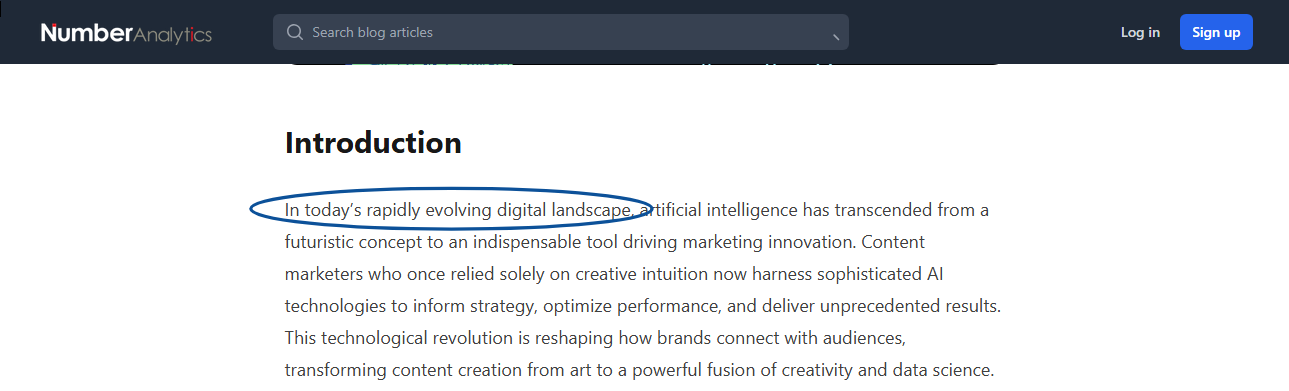
    Here is an example of one of the generic phrases in use on a live webpage:

    A visual example of generic AI terms in use.

    2. Lack of Original Insight or Perspective

    This type of content often rehashes widely available information without adding new analysis, personal experience or unique viewpoints.

    In cases, where the content is factually accurate, it may fail to provide readers with anything unique that they couldn’t find in numerous other sources.

    This in turn contributes to information redundancy for readers.

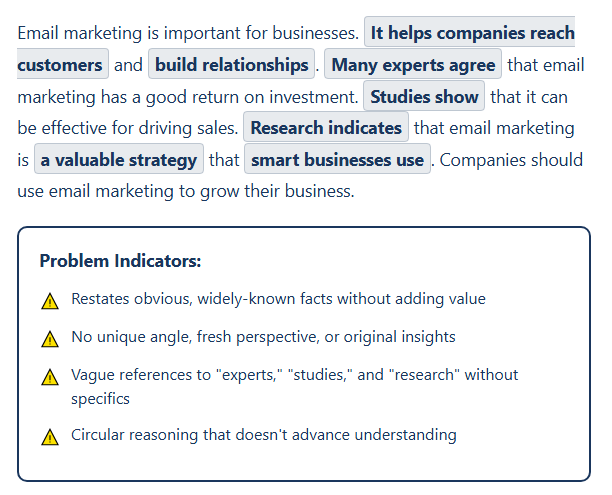
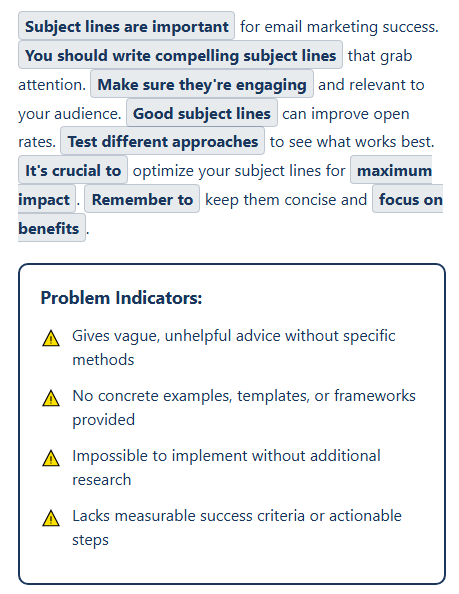
    To indicate the lack of perspective, here is a brief example with markers of an AI response to a question about the importance of email marketing to a business:

    3. Superficial Treatment of Complex Topics

    Most AI systems often lack the deep domain expertise required to navigate complex topics appropriately.

    The result is that complicated subjects are reduced to oversimplified explanations that miss important nuances and fail to address the subtleties, exceptions or contextual factors that human experts would naturally include.

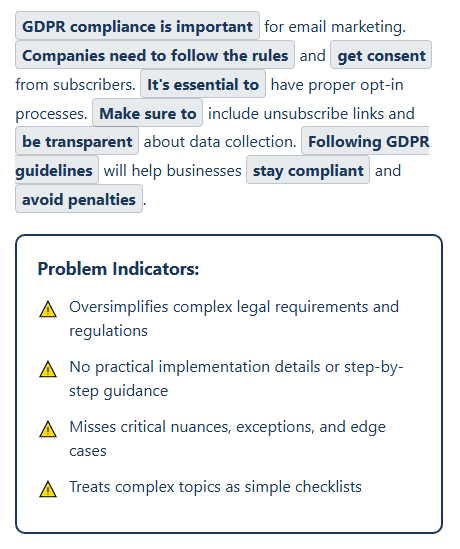
    Below is a screenshot example of how this kind of AI slop manifests:

    4. Inconsistent Tone and Voice

    This shows as sudden shifts between formal and informal language, inconsistent use of first or third person or tonal changes that don’t align with your brand’s purpose or audience.

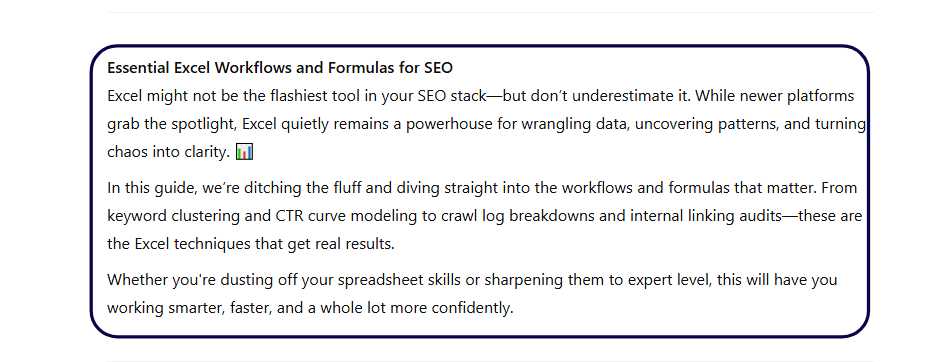
    An example, is the screenshot below of an introduction segment about Excel workflows (quite a serious topic).

    As shown, the tone jumps from casual to formal which unless it is your preferred style to produce edgy content, is something to watch for.

    Introdution segment for an article by ChatGPT that shows inconsistent tone

    5. Factual Inaccuracies and Outdated Information

    Ever heard of AI “hallucinating answers”study shows that 42.1% of web users have experienced inaccurate or misleading content in AI Overviews.

    This includes citations to non-existent sources, outdated statistics, or information that was never accurate to begin with.

    These errors can often go unnoticed in cases where proper data verification is not done and may prove disastrous in real life applications.

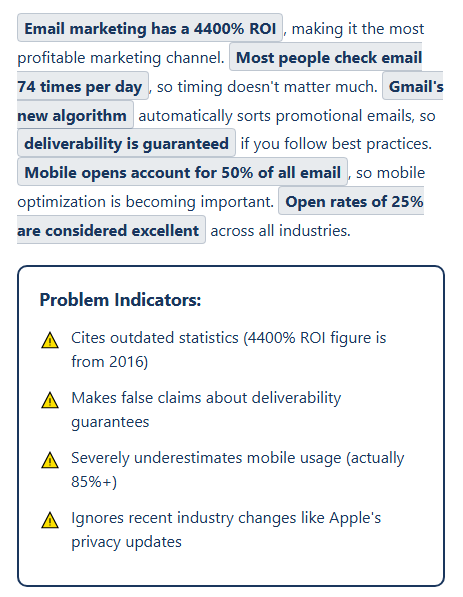
    Check this screenshot of how this inaccuracies might manifest in an AI-genereated content that requires data:

    Visual example of inaccurate data presented in AI content

    6. Excessive Length Without Substance

    Sometimes these LLMs do generate verbose content that could communicate the same information more effectively in fewer words.

    Especially for in-depth content, it might serve you a full page of additional words that do not add any meaning to the article.

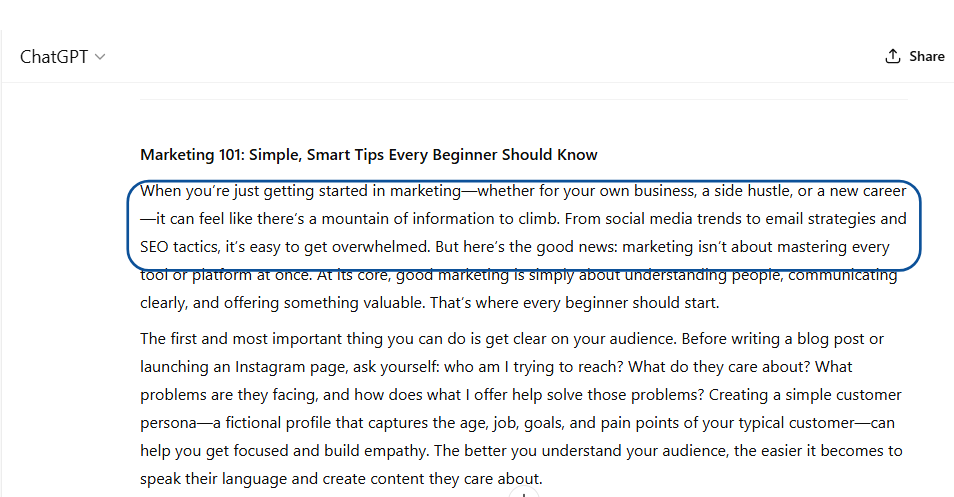
    The example below, for my article that required simple marketing hacks from ChatGPT, includes fluff (outlined in blue) that would make no difference to the article’s content when taken out.

    A screenshot of ChatGPT's lengthy response to a simple question

    7. Lack of Practical Application or Actionability

    This is especially applicable for instructional or educational content.

    AI often fails to provide concrete steps, real-world examples or give practical guidance that readers can actually implement, creating a disconnect between the content’s apparent educational value and its actual utility.

    8. Inappropriate SEO Optimization

    While using AI for SEO optimization can be a time saver, it might leave you with content that has keywords stuffed unnaturally and headings created solely for search engines rather than reader comprehension.

    Example: “We offer digital marketing, SEO digital marketing, and digital marketing strategies in our digital marketing agency.” If you can hear the keyword when reading aloud and it sounds clunky or repetitive, it’s overused.

    Impact of AI Slop on Content Creation

    • Degradation of Content Quality Standards

    As the internet becomes flooded with generic content, the baseline expectation for what constitutes acceptable content has shifted downward.

    The abundance of mediocre content makes it more difficult for genuinely valuable content to stand out and reach its intended audience.

    • Reduced Trust and Engagement from Audiences

    Many users have developed a heightened sensitivity to content that feels artificial or generic, leading to decreased engagement rates, shorter time spent on content and reduced sharing behaviors.

    This skepticism extends beyond obviously poor content to affect perceptions of all content, requiring creators to work harder to establish credibility and trust with their audiences.

    • Search Engine Algorithm Adaptations

    Search engines have begun implementing more sophisticated detection mechanisms and ranking factors that prioritize content demonstrating E-E-A-T, which is good challenge for content creators, who must now align their content to meet these quality standards.

    • Information Saturation and Discovery Challenges

    AI slop makes it increasingly difficult for users to find high-quality, relevant information.

    This problem is particularly acute in educational and instructional content, where poor-quality information can have real-world consequences.

    • Impact on Professional Industry

    The availability of AI tools has led some creators to rely heavily on automation to create generic marketing copies that lead to loss of brand credibility and originality.

    Conversely, successful creators have developed new skills in prompt engineering, AI collaboration and quality control.

    Industry responses have varied, with many organizations implementing new editorial guidelines and content policies specifically designed to address AI slop.

    Some platforms have introduced labeling requirements for AI-generated content, while others have adjusted their algorithms to better detect and deprioritize low-quality material.

    How to Create High-Quality Content

    Creating content that stands apart from AI slop requires a strategic approach that leverages AI tools effectively while maintaining human creativity, expertise, and judgment.

    Here are some strategies to help you get a headstart in creating content that adds value:

    Start with Human Expertise and Original Insight

    Before touching any AI tool, invest time in learning your subject deeply.

    • Stay updated on industry trends
    • Conduct original research and studies
    • Reflect on your personal experiences and technical expertise
    • Document perspectives shaped by your own journey, things no AI or competitor could fabricate

    Example:

    Instead of  “AI helps create informative content” in your article, go for “After leading 20 client workshops in fintech, I distilled insights into a guide on emerging compliance issues later refined using AI tools.”

    Develop a Clear Content Strategy Before Writing

    • Clarify who you’re writing for (Target audience)
    • What challenges they face and what unique solution you’re offering
    • Then build a brief that includes your main point, supporting arguments and the value your reader will walk away with.

    Why it works:
    Without this clarity, even advanced tools can lead you off track or toward generic fluff that do not reflect your authenticity as a brand.

    Use AI for Research and Ideation Not Final Drafts

    Use AI to brainstorm headlines, surface counterpoints or map out structural outlines.

    Reserve the actual thinking; the opinions, conclusions and bold statements for yourself or brand perspective.

    Instead of a flat response like this on your LinkedIn post “ChatGPT gave me a decent post on remote work” go for  “I used ChatGPT to explore opposing views on remote productivity, then built a piece from my experience managing hybrid teams across 3 continents.”

    Implement a Rigorous Fact-Checking Process

    • When it comes to AI sources, trust but verify
    • Cross-check data with primary sources like actual data from studies, dashboards etc.

    Why it matters:
    Accurate content isn’t just ethical, it’s also a signal of authority. Fact-checking improves your credibility and helps you learn the material more deeply.

    Maintain a Consistent Voice and Tone

    Even if AI drafts your first version, you must rewrite it to sound like you.

    Your tone, humor, cadence and values should be present in every paragraph.

    Why it matters:
    People connect with people. A consistent, authentic voice builds trust, something AI-generated content often lacks.

    Go Deep Instead of Broad

    Avoid skimming topics. Instead, offer detailed analysis, practical examples and actionable tips on a specific angle of the subject.

    As an introduction, “This post covers everything about marketing,” it is very general and lacks a certain hook for a reader.
    Go for depth, e.g “This guide breaks down how micro-SaaS startups can use newsletter ads to grow their first 500 users.”

    Incorporate Personal Experience and Case Studies

    • Share what happened when you applied a tactic (objectives)
    • Discuss what worked and what didn’t (KPIs)
    • Share your opinions on what you’d do differently (Follow-up actions)

    Why it works:
    Readers want proof. Lived experience outperforms hypothetical advice and the details make your content resonate with your target audience.

    Create a Quality Control Workflow

    • Build in checkpoints before you publish
    • Review for originality, clarity and alignment with your brand voice
    • Ask a peer to point out what feels vague or too polished to be personal

    Why it matters:
    This added friction makes your content sharper and prevents generic phrasing from slipping through.

    Engage in Continuous Learning

    Commit to reading widely, writing often and upgrading your tools and knowledge to deepen your own expertise.

    Take time to monitor or encourage feedback for your work and adapt accordingly.

    Final Thoughts

    Too often, we ignore the subtle warning signs in AI-generated content and skip the critical step of verifying what we read.

    Success lies in understanding how to use AI tools strategically as enhancements rather than replacement of you.

    The distinction between high-quality human-enhanced content and generic AI slop will likely become even more pronounced, as AI technology continues to evolve.

    Creators and marketers who master this balance find themselves at a significant advantage by being able to produce higher-quality content more efficiently while maintaining the authenticity and depth that audiences value.

  • Can ChatGPT Summarize a YouTube Video?

    Can ChatGPT Summarize a YouTube Video?

    Content consumption is at an all-time high with YouTube, a leading video platform, having approximately 2.7 billion monthly active users as of early 2025.

    From detailed video tutorials to hour-long podcasts, Youtube offers a wealth of information.

    The only challenge is that sometimes, it can be quite an endeavour navigating lengthy videos among the many looking for one specific answer to your particular question.  

    Enter ChatPT, its quick-fire text based outputs are tidily summarized and above all, direct answers to your questions.

    Hence the question, can ChatGPT summarize a YouTube video?

    Yes! ChatGPT can help decipher through a long video and give you a brief summary of its content but with some conditions in place.

    It is important to remember that ChatGPT is a text-based AI, therefore, it can’t “watch” a video in the traditional sense and tell you what it is about.

    However, with the right approach, it can be an incredibly powerful tool for extracting the essence of video content.

    In this article we will discuss:

    1. ChatGPT’s capabilities and limitations when working with YouTube video content
    2. Three practical methods for summarizing YouTube videos using ChatGPT:
    • Direct transcript copying and pasting
    • Browser extensions and third-party tools
    • Advanced API integration and custom scripts
    1. Step-by-step instructions for extracting YouTube transcripts with real examples of the process and prompt engineering techniques you can try on your own.
    2. Ideal use cases for different professionals, from students and marketers to content creators and researchers.

    By the end of this guide, you’ll have a complete toolkit for leveraging ChatGPT to efficiently digest and extract key insights from YouTube video content and save time without watching hours of footage.

    What ChatGPT Can and Can’t Do

    Before we get into how ChatGPT can help you summarise that long Youtube lecture on dentures, it’s vital to understand its inherent capabilities and limitations.

    What ChatGPT Can Do: Working with Text

    ChatGPT’s power lies in processing and understanding written language. To summarise your Youtube videos, ChatGPT can:

    Summarize YouTube transcripts if provided: This is its primary mode of operation for video content.

    If you give ChatGPT the full text of a video’s dialogue, it can analyze it then generate a concise summary.

    Interpret timestamps, captions, or scripts pasted into the chat: Beyond just raw transcripts, adding specific timestamps with brief descriptions or a pre-written script for a video in a ChatGPT prompt allows the AI to highlight key moments or summarize sections more effectively.

    Generate summaries based on user-provided descriptions or notes: Even without a full video transcript, you can feed ChatGPT your own notes about the video such as what topics were covered, key arguments, important names, etc.

    This helps it to structure and condense that information into a coherent summary.

    What ChatGPT Can’t Do: Direct Video Access

    Since ChatGPT is natively a text-based AI, it can’t perform the following:

    Directly access YouTube: You can’t paste a YouTube URL into ChatGPT and expect an automatic summary.

    This seemingly simple and direct approach does not work for ChatGPT.

    It cannot process visual or auditory information directly from a video file or stream, meaning that the video’s visuals, tone of voice or background music can not be used to enrich a summary.

    Here’s an example of what happens when you try to use a direct URL:

    A screenshot of me directly using Youtube URL in ChatGPT

    As shown below, ChatGPT did give me a summary as I asked but from an entirely different source (LinkedIn) and did not reference the actual video even after I cautioned against that in my prompt.

    Screenshot of ChatGPT's Inconsistent Results

    So, while ChatGPT is incredibly smart, it still requires your input or the use of an external tool to effectively summarize your Youtube videos.

    How to Summarize a YouTube Video with ChatGPT: Your Playbook

    With the background knowledge of how ChatGPT operates, let’s explore the practical methods you can use to generate useful YouTube video summaries.

    Option 1: Copy and Paste the Transcript

    This is the most direct method. It is simple enough to try out and requires no additional tools beyond YouTube and ChatGPT.

    How to get a transcript from YouTube:

    1. Open the YouTube video you want to summarize (in-app) .
    2. Look for the “…” (three dots) icon below the video title, often near the “Share” and “Save” buttons. Click it.
    3. From the dropdown menu, select “Show transcript”.
    4. A transcript pane will appear on the right side of the video (or sometimes below it).
    5. Click the “…” (three dots) within the transcript pane itself (usually at the top right of the pane) and select “Toggle timestamps” to remove the timestamps, which often clutter the text and can confuse ChatGPT.
    6. Highlight and copy the entire transcript. You might need to click the first line, scroll to the bottom, hold Shift, and click the last line to select it all.
    7. Paste the copied transcript into ChatGPT.
    A visual showing Youtube Transcript generation

    Once the transcript is in ChatGPT, you can then request your summary. 

    As with all AI prompts, keep it specific and well-detailed.

    For example: “Summarize the key points of this video transcript in 3-5 bullet points.” or “Provide a comprehensive summary of the following lecture, highlighting the main arguments and conclusions in 300 words.”

    Option 2: Use a Browser Extension or External Tool

    Many third-party tools and browser extensions that can automate the transcript extraction process have emerged to bridge the gap between YouTube and ChatGPT.

    How to work with these tools:

    There is an efficiency to using these third party tools and extensions. They automatically recognize when you’re on a YouTube video page and they do the work for you.

    Two ways they can get a video’s transcript is by automatically grabbing the transcript provided by YouTube’s API  or using their own transcription service for the video.

    Once the transcript is available, they send it to ChatGPT (often via the ChatGPT API which powers the extension) to generate the summary.

    The final summary is then presented neatly within your browser or it directs you to a dedicated summary page.

    Some of the popular tools include:

    • YouTube Summary with ChatGPT: This is a very direct and widely used Chrome extension by Glasp.

    It offers free access to YouTube transcripts and AI-generated summaries.

    How to use: Once installed, when you open a YouTube video, a button or sidebar will appear (as shown in the image below) and with one click you can instantly get a summary generated by ChatGPT, often with timestamps.

    Visual showing a browser extension (YouTube Summary with ChatGPT) in app
    • Meeting summarizers (e.g EightifyNoteGPTMonica, etc.): While these tools are primarily for meeting recordings, they offer YouTube integration.

    They can extract transcripts, often with higher accuracy than YouTube’s auto-generated captions, and then leverage AI to summarize the content.

    Option 3: Use the YouTube API or Third-Party Scripts

    A more advanced approach involves using the YouTube Data API to programmatically pull video metadata and captions/transcripts.

    This method gives you control over the data extraction and summarization process, allowing for custom filtering, cleaning and formatting of the transcript before it even reaches ChatGPT.

    It is especially useful for those with coding knowledge or specific project needs and is ideal for large-scale video analysis or integrating summarization into other applications.

    How it works: 

    • Developers can write scripts (e.g., in Python) to access YouTube’s API,
    • Download the available captions (which often serve as transcripts),
    • Then feed that text data into the OpenAI API (which powers ChatGPT) for summarization.

    Case Study Examples: From Long Lecture Videos to Quick Insights

    Take an instance where you are strapped for time but need to get quick industry insights about AI and marketing from a 30-minute video.  

    Without ChatGPT: You’d need to watch the entire video, pause, take notes and then manually synthesize the information. All of which sounds draining.

    With ChatGPT : All you would have to do is get the full transcript of the TED Talk from YouTube then paste it into ChatGPT with the prompt: “Summarize this into bullet points, including timestamps for main sections”

    Here is an example of the input and output version generated by ChatGPT:

    Before (Full Transcript Snippet):

    ChatGPT Summary Prompt request

    After (Bullet-point Summary with timestamps by ChatGPT):

    You could also use prompts like: “Summarize this TED Talk transcript into a 3-sentence summary highlighting the speaker’s main argument and two key supporting points.”

    Simple chatGPT summary

    or “Create a chapter-style breakdown with key takeaways for each segment.”

    Chapter-style summary of youtube video

    These specific prompts give you an output that is geared to the format you would like and control of how your answers look like in the final summary.

    ChatGPT’s Limitations and Accuracy Concerns

    While incredibly useful, ChatGPT summarization isn’t flawless:

    Misinterpretation from unclear transcripts: YouTube’s auto-captions are generally 60–70% accurate, meaning roughly 1 in 3 words is wrong. 

    These inaccuracies are often due to poor audio quality, speaker’s accent, background noise or technical jargon.

    This leads to ChatGPT summarizing transcripts with errors and giving you irrelevant content.

    Limits with poor auto-generated captions: Some videos have no manually created captions, relying solely on YouTube’s AI which is never 100% accurate.

    Context loss in long videos or fast-spoken content: Very long videos or those with rapid dialogue might exceed ChatGPT’s token limit for a single input.

    The typical option of breaking them down into smaller chunks can lead to some loss of overall contextual flow and a total miss on the complex visual cues that are not verbally explained.

    Oversimplification: To give a short summary, ChatGPT might sometimes oversimplify complex arguments.

    This can lead to the loss of crucial nuances or intermediate steps, especially in technical or philosophical videos.

    Ideal Use Cases

    Being able to quickly summarize a video’s content is impactful and can be leveraged by many people for different purposes.

    Who Benefits the Most?

    • Students: Summarizing lectures, educational videos, and documentaries for study notes and revision.
    • Professionals: Quickly grasping the essence of webinars, online courses, product tutorials, and industry talks without watching the full length.
    • Marketers: Analyzing competitor video strategies, extracting key messaging from brand videos, or summarizing market research presentations for reports.
    • Content Creators & Podcasters: Repurposing long video episodes into concise blog posts, social media updates, or show notes, significantly aiding in content distribution and SEO.
    • Journalists/Researchers: Rapidly sifting through long interviews or public address videos to extract sound bites or key policy points.

    Pro Tips To Master Prompts for Better AI Summaries

    To get the most out of ChatGPT for video summarization, remember that prompt engineering is key:

    Ask for summaries in different styles: Don’t just say “summarize.”

    Try: “Provide a bulleted list of the main points,” “Give me a paragraph summary for a non-expert,” “Generate a TL;DR (Too Long; Didn’t Read) version,” or “Extract the top 5 actionable insights.”

    Prompt ChatGPT to include specific elements: Ask for “main arguments,” “key statistics,” “actionable steps,” “speaker’s opinion,” or “next steps discussed,” and even “include timestamps” if the transcript you provide retains them.

    Combine transcript with title description for better context: Give ChatGPT the video title and description alongside the transcript.

    This provides additional context and helps the AI understand the video’s core theme, leading to more accurate summaries.

    Break down long transcripts: If a transcript is too long for one prompt (due to token limits), break it into logical sections.

    Summarize each section individually, then provide those summaries to ChatGPT and ask it to create an overarching summary from them.

    Final Thoughts

    By leveraging YouTube’s transcript feature or one of the many excellent browser extensions and third-party tools, you can effectively feed ChatGPT the information it needs to deliver quick insightful summaries.

    This capability is a massive time-saver and a productivity booster for anyone who consumes video content regularly.

    Whether you’re a student trying to ace an exam, a professional staying updated on industry trends, or a marketer looking for quick competitive intelligence, ChatGPT can help you stay ahead and transform how you interact with YouTube.

    Don’t just watch more videos; understand them better and faster.

    Start experimenting with ChatGPT’s Video summarizer and learn how to use intelligent prompts to upscale your output.