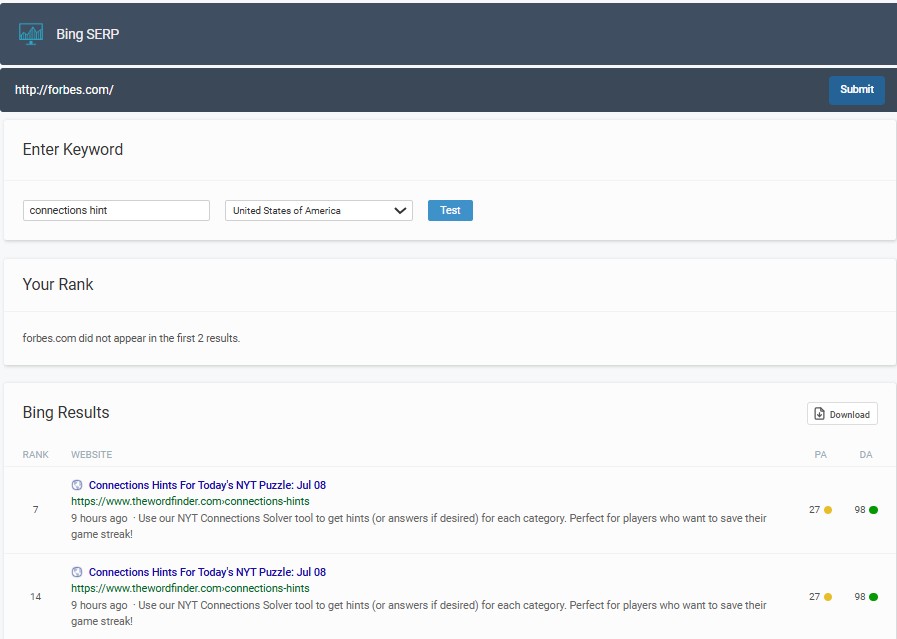
Free Bing Rank Checker and Bing Rank Tracker Online
Use Click Raven as your Bing rank tracker to check any URL and keyword on Bing, get the live position, and download a CSV in seconds. No signup, no credit card, just accurate Bing SERP checking for 2026. Start tracking now, run a real Bing SERP check below, then export the result for reporting or client updates.
How it works
Most Bing ranking checks complete in 3 to 10 seconds
Our tool performs a live Bing query, locates your URL in the top results, and returns the exact position for your chosen location. It also identifies the ranking page, not just the domain.
Submit your website URL & Keyword
Type your website URL into the field above.
Type the keyword you want to check and select your target location or country.
Generate Your Bing Ranking
Click on the “Test” button.
Our free Bing rank checker scans Bing live and returns the exact position your page holds for that keyword, along with additional insights into your performance. No caching.
download your free report
Click the “Download” button to save your results as a CSV for reporting, tracking, or analysis.
Exact URL tracking reduces false positives from homepage or sitelink matches.
Why Use Click Raven’s Bing Rank Checker?
✔ It’s Free. No Signup Required – Instantly check your website’s Bing ranking for any keyword without creating an account.
✔ User-Friendly Interface – Designed for ease, our tool offers a straightforward process for tracking Bing rankings.
✔ Real-Time Bing Ranking Data – Precise, real-time insights into your site’s Bing SERP positions for any page and keyword combination.
✔ Exact URL Tracking – See the exact page on your website that’s ranking in Bing without estimations or guesswork.
✔ Download for Free – One click to copy your results to a document or download your Bing rankings in CSV format for reporting and analysis.

More than just a Bing Rank Checker
Click Raven offers a powerful suite of free SEO tools to help you track rankings, boost visibility, and optimize for Bing and AI-driven search. Check out these additional tools :
✔ Keyword Density Checker– Find out the number of times your target keyword appears in your content when compared to your total number of words.
✔ Keyword Research Tool – Find new keywords specifically suited for Bing and alternative search engines to boost your Bing visibility and content relevance, for free.
✔ Meta Tags Extractor– Extract meta tags from any website’s HTML code for free to analyze how Bing reads your page title, description, and other metadata.
✔ Crawlability Checker– Check if your website is crawlable and extract the code in your robots.txt file.
✔ Bad Links Checker– Identify and fix broken internal or external links that may be hurting your Bing rankings.
Bing SERP checker comparison
This quick comparison shows how a lightweight Bing rank tracking workflow stacks up against native analytics or a paid suite.
| Feature | Click Raven’s Bing Rank Checker | Bing Webmaster Tools | Paid SEO Suite |
| Live position check | Yes, on demand | No, averages only | Yes, with limits |
| Exact ranking URL | Yes | Yes, in performance reports | Yes |
| Historical trend | Export per check | Yes, native history | Yes, full timelines |
| Cost | Free | Free | Recurring |
| Setup required | No account | Verification required | Account and project setup |
| Use case fit | Quick checks and proof | Owner level analytics | Agency scale tracking |
According to Bing Webmaster Tools, native performance reporting is ideal for long term analysis. A fast Bing SERP checker is ideal for spot checks and client proof points.
Use two tools, one for live position checks and one for validated averages
How Bing SEO works in 2026
Bing ranks pages by evaluating content quality, user engagement, technical health, and authority signals, with transparent weighting on fundamentals and growing emphasis on AI-ready structure.
According to Affinco, Microsoft Copilot has over 100 million daily active users in 2026, which increases the value of being cited by Bing powered AI experiences.
Copilot visibility can rival a classic page one ranking for some intents
Do Bing rankings matter in 2026
Yes, Bing rankings matter for desktop heavy and higher income audiences, and they are a measurable source of incremental traffic for both B2B and consumer brands.
According to Resourcera, Bing holds about 4.3 percent global share across all devices, and around the mid teens share on US desktop. That equates to hundreds of millions of monthly searches.
Bing can deliver meaningful traffic with lower competition than Google in many niches
Proof points and case studies
- B2C ecommerce case study, integrating Bing campaigns produced a 109 percent lift in Bing traffic and a 48 percent lift in revenue attributed to Bing users.
- Gaming publisher case study, early focus on Bing SEO generated traffic from high value regions like the US, UK, and Australia.
Turn Bing ranking data into action
Use the data from your Bing rank tracking to drive weekly improvements that move the needle.
- Low impressions and no rank: create a focused page for the query, then ping via IndexNow and add 2 internal links from related pages.
- Positions 11 to 20: rewrite the title to clarify the outcome, add a comparison or checklist section, and embed a relevant image with descriptive alt text.
- Stable but underperforming: check for broken internal links with the Bad Links Checker and refresh dated stats to 2026.
Small on page changes can lift page two rankings into page one within a single recrawl
How to Use Click Raven’s Bing Rank Checker Tool Effectively
Before you can improve your Bing rankings, you need to know where you actually stand. That’s where you need a free Bing rank checker.
How to Check Your Bing Rankings in Seconds
1. Use Click Raven’s Bing Rank Checker
This is the most straightforward Bing Rank checker since it’s free and you don’t need to log in or sign up to use it. Here is a visual step-by-step guide on how to use it:
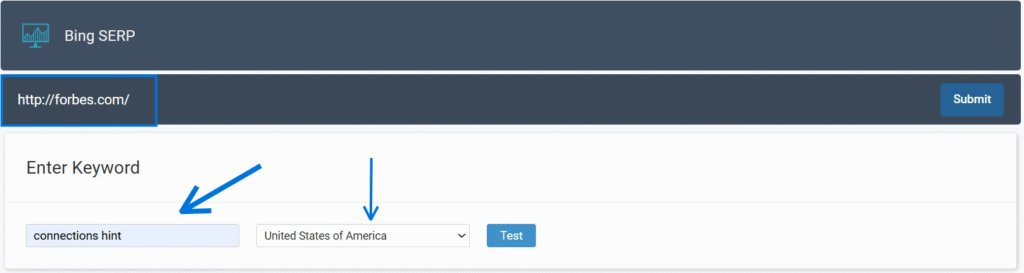
To illustrate, we will use the Forbes website and the keyword, connections hint.
Once you are on Click Raven’s Bing Rank Checker page:
Step 1: Submit your website URL & Keyword
Enter your website URL in our tool, type the keyword you want to check and choose your target location.
Step 2: Run the Check
Once you click the test button, our tool will scan Bing and detect the current ranking position of your website for that keyword. You will also receive additional insights into your performance.
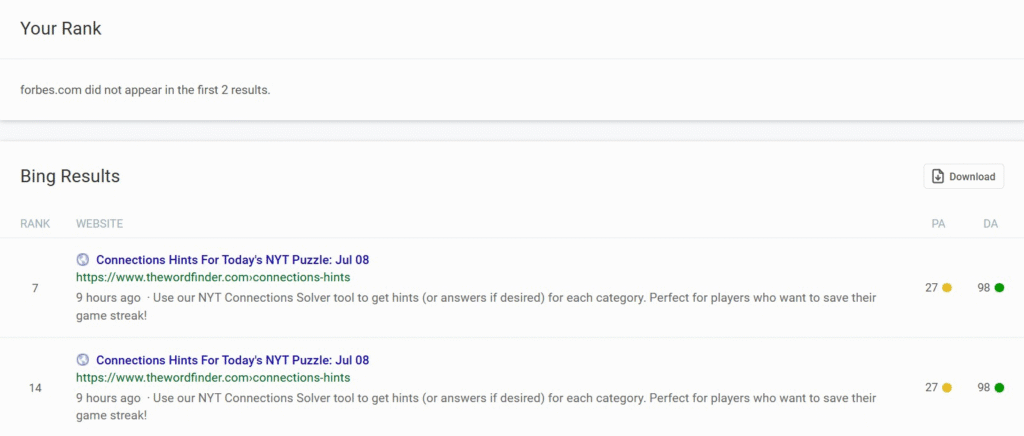
Step3: Download your Free Report
On the far right, you will see a Download button, and when you click it, our tool will download your results to your Downloads folder.
That’s it!
2. Bing Webmaster Tools (For Ongoing Monitoring)
For tracking rankings over time, Bing Webmaster Tools is the most accurate source because the data comes directly from Bing. You will need a free Microsoft account to access it.
Here’s how:
- Log in to Bing Webmaster Tools: (If you haven’t already, sign up and verify your site.)
- Navigate to “Search Performance”: On the left-hand sidebar, click on “Search Performance.”
- Filter by Query: You can then filter by specific keywords (queries) and see your average position, clicks, and impressions over a chosen time period.
New in 2026
Bing Webmaster Tools now includes an AI Performance report (currently in public preview). This shows how often your content is cited in AI-generated answers across Microsoft Copilot and Bing’s AI summaries, including which URLs are being referenced and how citation activity changes over time. This is a new layer of visibility that is worth setting up even if you don’t check it every week.
How often should you check?
For most sites, once a week is plenty. Bing rankings don’t shift as frequently as Google’s, so daily checking is overkill. If you’ve just published new content or made significant on-page changes, check after 5–7 days to see whether Bing has re-evaluated the page.
How to Optimise for Bing
Now for the actionable stuff! Let’s get down to how you can actively optimise your site for Bing.
What Actually Works
1. Prioritise High-Quality, Authoritative Content
Start with your content. Bing rewards depth and credibility more visibly than Google does. Cover your topic thoroughly, cite credible sources, and make sure the people behind your content are clearly identifiable. This aligns with E-E-A-T principles (Experience, Expertise, Authoritativeness, Trustworthiness), which matter on Bing just as much as Google.
2. Structure Content for AI Citability
In 2026, being cited in a Copilot answer is just as valuable as ranking in position one. Write in clear, self-contained blocks. Use specific headings. Answer questions directly. Avoid long, unbroken paragraphs that are hard to parse.
3. Optimise for Social Signals
Social sharing is worth the extra timefive minutes. When you publish something, push it on LinkedIn, Facebook, or X. It won’t transform your rankings on its own, but Bing factors in social signals in a way Google doesn’t, for free.
4. Leverage Bing Webmaster Tools
Submit your XML sitemap, monitor crawl errors, use the Site Scan feature to identify technical issues, and now. Check the new AI Performance report to track your Copilot citation visibility.
5. Optimise Your Images
Use descriptive, relevant filenames and alt text for every image. Bing Images is a meaningful traffic source that is often overlooked. If your images have generic filenames like IMG_4821.jpg and blank alt text, you’re leaving that traffic on the table.
6. Use IndexNow for Fast Indexing
IndexNow is a protocol co-developed by Microsoft that lets you instantly notify Bing when you publish or update a page, instead of waiting for Bingbot to find it on its own. Most WordPress plugins support it. New content can get indexed in minutes rather than days.
7. Focus on Local SEO
If you have a physical location, your Bing Places for Business listing matters more than most local businesses realise. Fill it out completely: address, hours, photos, categories. Bing’s local pack results are a consistent traffic source for local searches, and the competition for those spots is generally much lower than on Google Maps.
8. Use Microsoft Clarity
Clarity is Microsoft’s free analytics tool that provides heatmaps and session recordings. Since it is a Microsoft product, some SEOs believe it may indirectly influence Bing’s understanding of your site’s user experience. At minimum, it gives you the data you need to improve UX, which is a confirmed ranking factor.
How to Optimise Your Content for Bing’s Algorithm
On the content side:
- Use proper heading structure (H1, H2, H3),
- Ensure your target keyword appears in your title and naturally throughout the page
- Keep your writing readable
Bing still relies on direct keyword matching more than Google does, so a page that never uses the phrase you’re targeting will struggle. Check your keyword usage with Click Raven’s Keyword Density Checker.
How to Get Indexed Fast on Bing
Getting indexed quickly is crucial for visibility. Here’s how:
- IndexNow: This is the fastest method. Implement IndexNow on your site (many CMS platforms like WordPress have plugins for it) or use the API to automatically notify Bing of content changes. This can get your new content indexed in minutes.
- Submit Sitemaps: Always submit an updated XML sitemap through Bing Webmaster Tools.
- Use the URL Submission Tool: For critical new pages, use the manual URL submission tool in Bing Webmaster Tools.
- Build Internal Links from existing, well-indexed pages to new content so Bingbot can find them through crawling.
What to Do With Your Ranking Data Results
Once you have your ranking data from Click Raven’s free Bing rank checker or Webmaster Tools, here is how to act on it:
- Content Gap Analysis – Not ranking at all for a relevant keyword usually means one of two things: either you don’t have content targeting it, or Bing can’t properly access your page. Create the content to directly address those topics or run Click Raven’s Crawlability Checker to rule out access issues.
- Near-the-top opportunities – Ranking on page two for a keyword is actually a useful position to be in. You’re close enough to target on-page improvements. a stronger title tag, better heading structure, and more depth in the content. This can push you to page one without starting from scratch.
- Backlink gaps – If your rankings are low across many different keywords at once, that usually points to a technical problem rather than a content problem. This could be crawl errors, slow load times, or pages getting blocked from indexing. Check Bing Webmaster Tools’ Site Scan and run the Crawlability Checker to identify what’s stopping Bing from reading your site properly.
Frequently asked questions
Is this a Bing SERP checker or a rank tracker?
It is both. The tool performs a live Bing SERP check for a given keyword and URL, and you can export each result to build your own lightweight tracking log.
Do I need an account to check Bing ranking?
No. You can run a check without signup and export a CSV immediately.
How accurate are the positions compared to Bing Webmaster Tools?
Positions reflect a real time query for your chosen location, while Bing Webmaster Tools reports averages over time. Use both together, one for spot checks and one for validated trends.
Can I check rankings by location?
Yes. Select a target country or region before running the test to see location aligned results.
What keywords should I track on Bing?
Prioritise terms with commercial or high intent that match your audience. For discovery, use the Keyword Research Tool and map terms to Search Intent types.
How often should I check my Bing rankings?
Weekly is enough for most sites. Check again after publishing new content or making significant updates, typically 5 to 7 days later.
How do I get indexed on Bing faster?
Enable IndexNow, submit your sitemap in Bing Webmaster Tools, and build internal links from relevant pages.
Final Thought
Bing rewards the basics when done properly. These are authoritative content, clean technical setup, relevant backlinks, and pages people actually want to read.
The difference in 2026 is that Copilot adds another layer: structured, credible content now has a chance to appear in AI answers too, not just organic results.
The first step is knowing where you currently stand. Use Click Raven’s free Bing rank checker to check your position for any keyword, then work through the issues from there.
Happy optimising!