Category: AI Marketing

  • AI Content Creation Workflows That Actually Scale Quality

    AI Content Creation Workflows That Actually Scale Quality

    AI can materially speed up production and improve first-draft quality, as long as you use it inside a disciplined system.

    One controlled experiment found access to ChatGPT cut time to complete workplace writing tasks by roughly 40% while raising output quality by 18%.

    Those results show the promise and the prerequisite: velocity without structure creates chaos, not content.

    Search is shifting fast as Google rolls out AI Overviews to all U.S. users, reaching more than 1.5 billion people monthly by Q1 2025.

    These summaries increasingly set user expectations before anyone clicks through, so your pages must outperform the overview to win the visit.

    You can roll out AI content creation workflows in 30 to 60 days by combining disciplined prioritization, grounded generation, and structured review.

    An effective plan uses Search Console data, retrieval-augmented generation (RAG) grounded in your sources, human review gates, and a quality harness that enforces factuality and intent match before anything ships.

    Define the Job to Be Done for SEO and Content Ops Leaders

    Define the outcome your team owns so you can scale AI-assisted content without diluting quality or breaking compliance.

    Your core job is to produce more high-quality articles and updates per month, measured by clicks, click-through rate (CTR), engagement, and conversions, without triggering spam risks or eroding brand trust.

    That framing matters because it puts quality and compliance at the center, not volume alone.

    Common constraints include reviewer bottlenecks, opaque ownership, thin or redundant articles, and performance decay that erodes gains after initial wins.

    Success looks like cycle times from brief to publish down 25–40%, acceptance rates up 20 or more points, fewer rewrites, stable or rising rankings, and durable CTR improvements on targeted search engine results pages (SERPs).

    Pain Points You Can Solve with Process

    Volume versus quality tradeoffs shrink when quality is operationalized and enforced with checklists and gates.

    Reviewer bottlenecks shrink when risk-tier routing and acceptance tests decide which work needs subject-matter expert (SME) or legal review versus editor only.

    You do not need heroics; you need a system that routes the right work to the right reviewer at the right time.

    Define, Score, and Enforce Quality at Scale

    Make quality concrete and measurable so every draft is judged against the same bar before it reaches production.

    Operationalize quality across six dimensions scored zero to five: search engine results page (SERP) intent match, evidence density, depth versus top competitors, Experience, Expertise, Authoritativeness, and Trustworthiness (E-E-A-T) signals, readability and structure, and on-page SEO hygiene.

    Target a composite score of at least 24 out of 30 before release, and add a pass-fail accuracy gate owned by an SME when claims carry risk.

    Benchmark top-three competitors on depth and evidence, using the current SERP as your reference point for each target query.

    If your draft is thinner, add sections or examples until it is clearly better for the query, then require inline citations for every non-obvious claim and aim for at least one primary source per major section.

    Set Guardrails That Keep You in Google’s Good Graces

    Treat search guidelines as product requirements so automation scales value for users instead of triggering spam classifications.

    Google’s guidance frames E-E-A-T as a helpful evaluation concept, not a direct ranking factor, and recommends clarifying who created content, how it was created including automation disclosures when relevant, and why it exists.

    The March 2024 core update added spam policies for expired-domain abuse, scaled content abuse, and site-reputation abuse, and automation becomes spam when its primary purpose is to manipulate rankings.

    Operationalizing Who, How, and Why

    Add visible authorship with relevant experience, and include editor and SME credits for higher-risk pieces.

    Write a brief ‘how we created this’ note if AI assistance materially shaped the draft or visuals, and keep logs of sources and review decisions for every page.

    Avoiding Scaled Content Abuse

    Do not generate mass pages solely for search manipulation; every page must serve a real user task and pass intent and evidence checks.

    Consolidate thin near-duplicates, and use canonicals and 301 redirects to resolve duplication instead of spinning variants.

    Architect an Operating System to Prioritize, Create, Review, and Measure

    Treat your AI content program as an operating system so every piece of work moves through clear, predictable stages.

    The operating system has four layers: prioritization, creation, review, and measurement.

    Prioritization uses a Google Search Console (GSC) driven backlog, creation uses prompt templates plus RAG plus visuals, and review uses editor, SME, and legal gates.

    Measurement uses dashboards tracking leading and lagging indicators, and each layer has explicit inputs, outputs, and acceptance tests to reduce rework and speed approvals.

    Use Search Data to Prioritize High-Impact Work

    Let real user behavior choose your backlog so AI accelerates impact on revenue and rankings instead of generating random content.

    Use GSC to source four work types: content decay with steady year-over-year declines, low-CTR pages with stable rank but CTR below benchmark, cannibalization clusters with overlapping URLs, and topical fragmentation with missing or weak hubs.

    Define trigger thresholds such as CTR under peer median by 30% or more, impressions up but clicks flat, more than two URLs ranking for the same head term, or decay for three consecutive months.

    Each backlog item includes a target query set, dominant intent, hypothesized cause, and success metric, so editors and SMEs understand why the work matters.

    Build a RAG Research Layer That Connects Drafts to Your Sources

    Ground AI outputs in your own documentation so drafts stay factual, current, and aligned with how your organization actually works.

    Retrieval-augmented generation (RAG) pairs a large language model (LLM) with a non-parametric memory such as a dense index, and the original RAG paper on arXiv demonstrated this approach produces more specific and factual language on knowledge-intensive tasks.

    Build a document store of product docs, specs, policies, SME notes, and past winners, then chunk content to 400–1,000 tokens and tag by topic, freshness date, owner, and country.

    Require inline citations with provenance IDs, prefer primary documents, and route Your Money or Your Life (YMYL) topics to SME review so you never publish them without human sign-off.

    Purge stale docs, mark freshness dates, and attach owners to source folders so SMEs can keep high-risk materials current.

    Create Prompt Systems, Not Ad-Hoc Prompts

    Turn prompts into reusable systems so every writer can get consistent, on-brand drafts instead of reinventing instructions in each session.

    Create prompt templates per content type that include objective, audience, style guide, sources allowed, must-include facts, forbidden claims, output schema, and a self-check list.

    Parameterize templates with variables like brand, product, persona, competitors, and region, and store them in source control with semantic versioning.

    Test variants against acceptance criteria and keep the best-performing versions, then require change logs when prompts are updated so you can track which changes improve results.

    Design Human Gates Around the Jagged Frontier

    Use humans where AI is weakest so experts focus on judgment, nuance, and accountability instead of rewriting low-risk drafts.

    Harvard and BCG field experiments with 758 consultants showed GPT-4 users did 12.2% more tasks, 25.1% faster, with over 40% higher-quality results on tasks within AI’s competence.

    Those same users were 19 percentage points less likely to be correct outside that jagged frontier, where problems differ from the model’s training distribution.

    Use AI for ideation, outlines, stylistic rewrites, summarization, and table drafting, and require SME ownership for data interpretation, causal claims, and original frameworks.

    Gate by risk tier: tier one covering YMYL, legal, and medical content needs two-person review, tier two covering product and technical SEO needs SME plus editor, and tier three covering evergreen tips can be editor-only.

    Ship On-Brand Visuals Without Stock Bloat

    Make every visual earn its place so images clarify concepts, reflect your brand, and meet accessibility standards instead of adding noise.

    Every image must add information that supports the user task, and you should provide clear alt text.

    Meet Web Content Accessibility Guidelines (WCAG) contrast thresholds for text overlays at 4.5:1 for normal text and 3:1 for large text to satisfy AA compliance.

    Mark purely decorative images with empty alt text per W3C guidance so assistive technology ignores them.

    Tooling and Batch Production

    Create a styleboard for color, typography, and component patterns, then generate three to five options and select and compress the best versions.

    Add captions and alt text with verbs, entities, and outcomes so images reinforce the narrative instead of repeating surrounding copy.

    Maintain a naming and versioning convention so alt text and captions stay synchronized across variants.

    Design and content teams often juggle multiple campaigns, stakeholders, channels, and formats while trying to keep visuals on-brand, performant, and accessible across devices and regions. When design teams need brand-consistent hero graphics or explanatory diagrams fast, under tight deadlines and with limited specialist support on overlapping projects and launches across teams, an AI art generator can help you create unique visuals you can batch-produce, version, and annotate with alt text so images carry meaning, not bloat.

    Tools can work well for this category, especially when you apply your brand system, including colors, type, and iconography before export.

    Use a Quality-Evaluation Harness to Score Before You Ship

    Automate basic checks and standardize human review so only drafts that clear your quality bar ever reach a publishing queue.

    Run automated checks before human review for broken links, reading grade, heading structure, image alt coverage, link density, and schema validity.

    Apply the human rubric scoring SERP intent, evidence density, depth versus the top three competitors, clarity, accuracy, and page experience, and target at least 24 out of 30 plus SME pass when required.

    Conduct factuality sampling by randomly auditing roughly 10% of claims against sources, and target fewer than one factual error per 1,000 words.

    Record sample results to improve prompts and retrieval over time so the system learns where it tends to drift.

    Measure Performance and Run Experiments

    Instrument your workflow so you can prove AI’s impact with data and keep improving based on controlled experiments.

    Track leading indicators such as cycle time, acceptance rate, revisions per draft, and reviewer load by role.

    Track lagging indicators such as clicks, CTR, average position, conversions, and revenue by cohort including new, refreshed, and consolidated content.

    Run one change at a time in experiments, prioritizing title tests for CTR, intro rewrites for engagement, FAQ additions for long-tail coverage, and image swaps for comprehension.

    Unify GSC and analytics into one view that ranks opportunities by expected impact so your next sprint is obvious.

    Execute a 30-60-90 Rollout to Prove Value Fast

    Stage your rollout so you earn quick wins in the first month while building the assets and habits that make the system durable.

    Days zero to 30: build the backlog from GSC, stand up the RAG corpus, ship prompt templates for two formats, and pilot the rubric on 10 URLs.

    Days 31 to 60: expand to three or four formats, stand up the visual pipeline, start title and intro experiments, and publish change logs on updated pages.

    Days 61 to 90: run a full refresh cadence, consolidate cannibalized pages, automate dashboards, target a 25% cycle-time reduction, and raise acceptance rates by 20 or more points.

    By day 30 you should have a prioritized backlog and the first five refreshed URLs live, and by day 60 your visual pipeline should be in place.

    Build Once, Then Improve Every Sprint

    Treat the workflow as a product so each sprint removes friction, reduces risk, and compounds the value of every published page.

    Quality at scale is a system problem, not a talent problem, and prioritization, RAG grounding, prompt templates, human gates, and a quality harness make higher velocity safer.

    Manage to leading and lagging indicators such as cycle time, acceptance rate, reviewer load, clicks, CTR, rankings, and conversions, and refresh proactively on decay or cannibalization signals.

    Adopt the 30-60-90 plan, then run quarterly retros to prune steps and standardize what works.

    This week, stand up the backlog, draft two prompt templates, nominate an SME for tier-two reviews, and pilot the rubric on a single article.

    The workflow keeps getting faster without loosening standards when you treat it as a product you iterate on every sprint.

  • Is Lovable-Prompts.com A Great Prompt Library and Generator?

    Is Lovable-Prompts.com A Great Prompt Library and Generator?

    Building applications with AI tools has fundamentally changed how entrepreneurs and developers bring ideas to life. The quality of your initial prompt often determines whether you spend minutes or hours achieving your desired outcome.

    Lovable AI has emerged as a popular platform for creating web applications through natural language instructions. However, many users discover that getting consistently good results requires more than just describing what they want it requires understanding how to communicate effectively with AI systems.

    Here’s a truth every Lovable user learns eventually: a strong prompt is money, and prompt loops are expensive.

    Every iteration cycle consumes credits, time, and mental energy that could be spent on higher-value activities.

    What Lovable-Prompts.com Actually Offers

    Lovable-Prompts.com positions itself as a dedicated resource for users of Lovable AI, offering both a curated prompt library and an AI-powered prompt generator. The platform focuses specifically on the Lovable ecosystem rather than trying to serve multiple AI tools simultaneously.

    The core offering centers on helping users craft more effective lovable ai prompts that reduce the back-and-forth iterations common when working with AI app builders.

    The platform transforms rough ideas into structured, optimized prompts that follow Lovable AI best practices.

    The Prompt Generator: Core Functionality

    The standout feature at Lovable-Prompts.com is its prompt generator, which takes a different approach than generic template libraries. Rather than offering one-size-fits-all templates, the generator creates customized prompts based on specific inputs about your project.

    Users can specify details about their target audience, which the generator then incorporates into the prompt structure. This audience-aware approach addresses a common weakness in basic prompts: they often focus purely on features while ignoring who will actually use the application.

    Technical Configuration Options

    One aspect that distinguishes this tool from simpler prompt collections is its handling of technical specifications. The generator allows users to define UI preferences, database requirements, authentication methods, and integration needs before crafting the final prompt.

    This pre-configuration approach means generated prompts arrive with technical decisions already embedded. For users who lack deep technical knowledge, this removes the guesswork about what specifications to include.

    Product-Channel Fit Analysis

    The platform incorporates product-channel fit analysis into its prompt generation process. This feature accounts for where and how your application will reach users, not just what functionality it provides.

    This consideration matters because applications designed for different distribution channels require different structural approaches. A tool meant for viral social sharing needs a different architecture than one designed for enterprise sales processes.

    Specific Prompt Categories and Examples

    The platform organizes prompts into practical categories that address real use cases. Understanding these categories helps users find relevant starting points quickly.

    • SaaS Dashboard Applications include prompts for analytics platforms, admin panels, and subscription management tools. These templates handle complex data visualization and user permission structures.
    • E-commerce Solutions cover online stores, product catalogs, shopping carts, and checkout flows. The prompts address inventory management, payment integration, and order tracking features.
    • Landing Pages and Marketing Sites focus on conversion-optimized designs with lead capture forms and CTA placements. These prompts emphasize visual hierarchy and persuasive content structure.
    • CRM and Business Tools provide foundations for contact management, pipeline tracking, and customer communication features. The templates include relationship mapping and activity logging components.
    • Portfolio and Personal Branding Sites help creators showcase work with project galleries and testimonial sections. These prompts balance aesthetic presentation with professional credibility signals.
    • Internal Tools and Workflows address employee dashboards, approval systems, and operational tracking needs. The prompts handle role-based access and process automation requirements.

    Who Benefits Most from This Resource

    Beginners to Lovable AI likely stand to gain the most from Lovable-Prompts.com. New users frequently struggle with the gap between their mental vision and the words needed to communicate that vision to an AI system.

    The structured approach helps newcomers understand what information matters when crafting prompts. Even if users eventually outgrow the generator, the patterns it demonstrates teach valuable principles about effective AI communication.

    Value for Experienced Users

    Experienced Lovable users may find different value in the platform. For those who already understand prompt engineering principles, the generator serves more as a time-saver than an educational tool.

    The ability to quickly generate comprehensive prompts with technical specifications built in can accelerate workflows even for skilled users. Speed matters when you’re iterating through multiple concepts or working under deadline pressure.

    The Economics of Prompt Quality

    Remember: a strong prompt is money, and prompt loops are expensive. Every iteration cycle with Lovable consumes credits, and poorly constructed prompts often require multiple rounds of refinement.

    A well-engineered initial prompt that captures your requirements accurately can significantly reduce these iteration costs. The time savings compound when you consider the hours spent reviewing, providing feedback, and waiting for regeneration.

    Pricing Structure

    Lovable-Prompts.com offers a free plan for users wanting to explore the platform. The one-time Builder’s Pack costs $59 and includes over 100 prompts with lifetime access.

    For ongoing access, the Pro Plan runs $19.99/month and includes all 100+ prompts plus future updates and premium features. This tier suits users who build frequently and want continuous access to new templates.

    Limitations Worth Considering

    No tool solves every problem, and Lovable-Prompts.com has inherent limitations worth acknowledging. The platform focuses exclusively on Lovable AI, so users working across multiple AI development tools won’t find cross-platform utility here.

    Additionally, generated prompts still require human judgment to evaluate and refine. The generator cannot read your mind about unstated preferences or business context that affects design decisions.

    The Learning Curve Question

    Some users might wonder whether relying on a prompt generator prevents them from developing their own prompting skills. This concern has merit. There’s educational value in struggling through prompt construction yourself.

    However, the generator can also serve as a teaching tool when used thoughtfully. Examining the structure and content of generated prompts reveals patterns that users can internalize and apply independently over time.
    Comparing to Alternative Approaches

    Several alternatives exist for users seeking prompt assistance with Lovable AI. The official Lovable documentation provides prompting guidance, community Discord servers share user-generated prompts, and various tutorial creators publish prompt breakdowns.

    Lovable-Prompts.com differs from these options by offering active generation rather than passive reference. Instead of browsing examples and adapting them manually, users input their specifications and receive tailored output.

    The Prompt Library Component

    Beyond the generator, the platform maintains a library of prompt examples organized by category and use case. This collection provides inspiration and reference points for users who prefer learning from examples.

    Browsing curated prompts can spark ideas about features or approaches you hadn’t considered. The organizational structure makes finding relevant examples more efficient than searching through forum threads or Discord histories.

    Practical Workflow Integration

    For users building multiple applications or iterating frequently, Lovable-Prompts.com can integrate into existing workflows as a starting point rather than a complete solution. The generated prompts serve as foundations that users customize further based on specific requirements.

    This workflow approach acknowledges that no generator perfectly captures every nuance of a unique project. The value lies in providing a strong starting point that handles common elements effectively.

    Assessing Overall Value

    The value proposition of Lovable-Prompts.com depends heavily on your current skill level and usage patterns. Frequent Lovable users who struggle with prompt construction will likely find meaningful time savings and improved results.

    Occasional users or those already proficient at prompt engineering may find less incremental benefit. The decision ultimately comes down to whether the time savings justify adding another tool to your workflow.

    Areas for Potential Improvement

    Based on available information, a few areas could strengthen the platform’s offering. More transparency about the specific prompt patterns and principles underlying the generator would help users learn rather than just consume.

    Integration with version control or prompt history features would help users track what worked and refine their approach over time. These additions would transform the tool from a one-time generator into a more comprehensive prompt management system.

    The Broader Context of AI Prompting

    Lovable-Prompts.com exists within a larger trend of specialized prompting resources emerging for specific AI tools. As AI development platforms mature, the ecosystem of supporting tools and resources naturally expands.

    This specialization benefits users by providing targeted assistance rather than generic advice. Platform-specific resources can account for the particular behaviors and preferences of individual AI systems.

    Final Assessment

    Lovable-Prompts.com addresses a genuine need in the Lovable AI ecosystem, the gap between user intent and effective prompt construction.

    The combination of an intelligent generator and a curated library provides multiple entry points for different learning styles.

    The platform appears most valuable for beginners and intermediate users who want to accelerate their results without deep-diving into prompt engineering theory.

    Experienced users may find utility in the time savings, though they’ll likely customize the generated output significantly.

    For anyone spending substantial time with Lovable AI and finding themselves stuck in iteration loops, exploring Lovable-Prompts.com makes practical sense.

    The potential reduction in wasted cycles and improved initial outputs could justify the time invested in learning the tool.

    Whether this resource fits your specific needs depends on an honest assessment of where you currently struggle.

    If prompt construction represents a genuine bottleneck in your workflow, dedicated assistance tools deserve consideration as part of your toolkit.

  • Can ChatGPT Summarize a YouTube Video?

    Can ChatGPT Summarize a YouTube Video?

    Content consumption is at an all-time high with YouTube, a leading video platform, having approximately 2.7 billion monthly active users as of early 2025.

    From detailed video tutorials to hour-long podcasts, Youtube offers a wealth of information.

    The only challenge is that sometimes, it can be quite an endeavour navigating lengthy videos among the many looking for one specific answer to your particular question.  

    Enter ChatPT, its quick-fire text based outputs are tidily summarized and above all, direct answers to your questions.

    Hence the question, can ChatGPT summarize a YouTube video?

    Yes! ChatGPT can help decipher through a long video and give you a brief summary of its content but with some conditions in place.

    It is important to remember that ChatGPT is a text-based AI, therefore, it can’t “watch” a video in the traditional sense and tell you what it is about.

    However, with the right approach, it can be an incredibly powerful tool for extracting the essence of video content.

    In this article we will discuss:

    1. ChatGPT’s capabilities and limitations when working with YouTube video content
    2. Three practical methods for summarizing YouTube videos using ChatGPT:
    • Direct transcript copying and pasting
    • Browser extensions and third-party tools
    • Advanced API integration and custom scripts
    1. Step-by-step instructions for extracting YouTube transcripts with real examples of the process and prompt engineering techniques you can try on your own.
    2. Ideal use cases for different professionals, from students and marketers to content creators and researchers.

    By the end of this guide, you’ll have a complete toolkit for leveraging ChatGPT to efficiently digest and extract key insights from YouTube video content and save time without watching hours of footage.

    What ChatGPT Can and Can’t Do

    Before we get into how ChatGPT can help you summarise that long Youtube lecture on dentures, it’s vital to understand its inherent capabilities and limitations.

    What ChatGPT Can Do: Working with Text

    ChatGPT’s power lies in processing and understanding written language. To summarise your Youtube videos, ChatGPT can:

    Summarize YouTube transcripts if provided: This is its primary mode of operation for video content.

    If you give ChatGPT the full text of a video’s dialogue, it can analyze it then generate a concise summary.

    Interpret timestamps, captions, or scripts pasted into the chat: Beyond just raw transcripts, adding specific timestamps with brief descriptions or a pre-written script for a video in a ChatGPT prompt allows the AI to highlight key moments or summarize sections more effectively.

    Generate summaries based on user-provided descriptions or notes: Even without a full video transcript, you can feed ChatGPT your own notes about the video such as what topics were covered, key arguments, important names, etc.

    This helps it to structure and condense that information into a coherent summary.

    What ChatGPT Can’t Do: Direct Video Access

    Since ChatGPT is natively a text-based AI, it can’t perform the following:

    Directly access YouTube: You can’t paste a YouTube URL into ChatGPT and expect an automatic summary.

    This seemingly simple and direct approach does not work for ChatGPT.

    It cannot process visual or auditory information directly from a video file or stream, meaning that the video’s visuals, tone of voice or background music can not be used to enrich a summary.

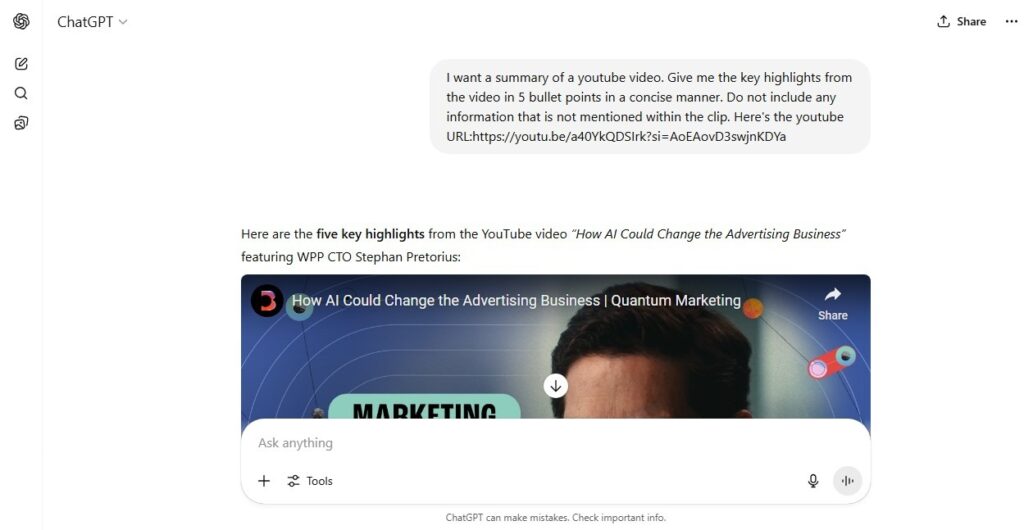
    Here’s an example of what happens when you try to use a direct URL:

    A screenshot of me directly using Youtube URL in ChatGPT

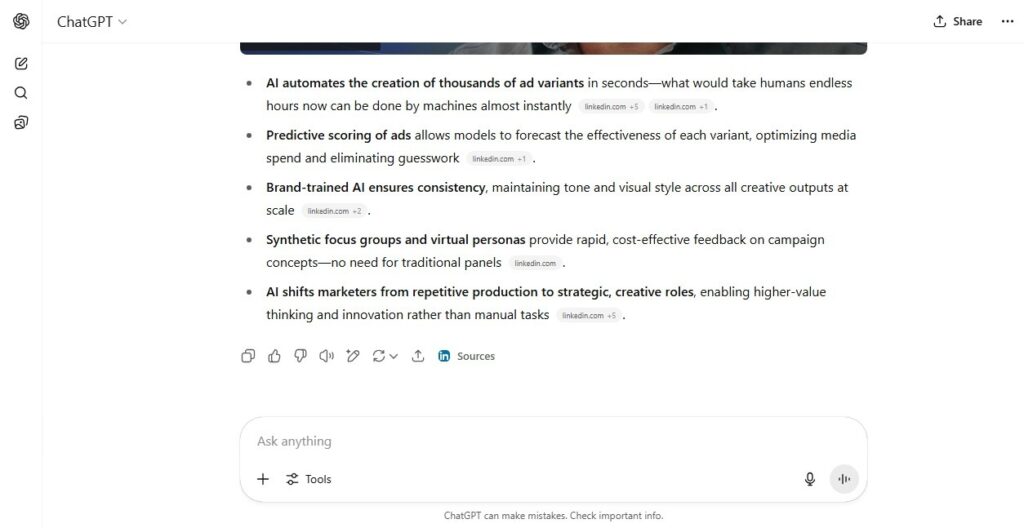
    As shown below, ChatGPT did give me a summary as I asked but from an entirely different source (LinkedIn) and did not reference the actual video even after I cautioned against that in my prompt.

    Screenshot of ChatGPT's Inconsistent Results

    So, while ChatGPT is incredibly smart, it still requires your input or the use of an external tool to effectively summarize your Youtube videos.

    How to Summarize a YouTube Video with ChatGPT: Your Playbook

    With the background knowledge of how ChatGPT operates, let’s explore the practical methods you can use to generate useful YouTube video summaries.

    Option 1: Copy and Paste the Transcript

    This is the most direct method. It is simple enough to try out and requires no additional tools beyond YouTube and ChatGPT.

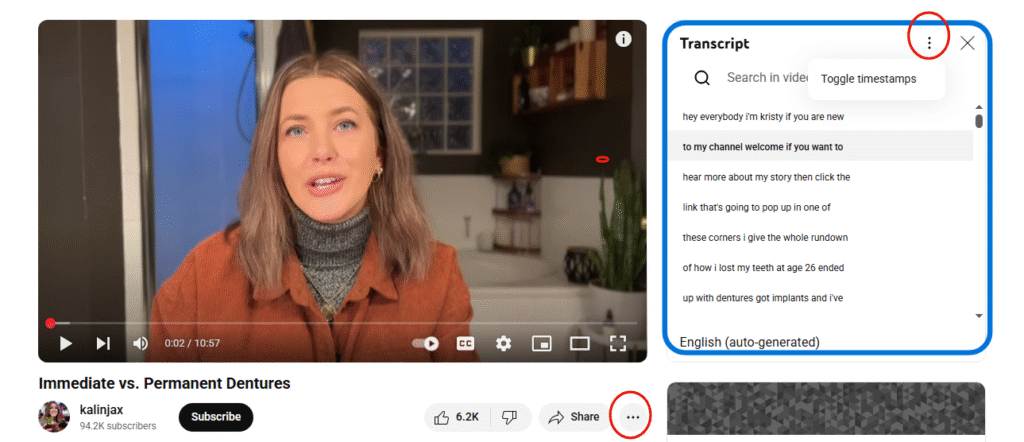
    How to get a transcript from YouTube:

    1. Open the YouTube video you want to summarize (in-app) .
    2. Look for the “…” (three dots) icon below the video title, often near the “Share” and “Save” buttons. Click it.
    3. From the dropdown menu, select “Show transcript”.
    4. A transcript pane will appear on the right side of the video (or sometimes below it).
    5. Click the “…” (three dots) within the transcript pane itself (usually at the top right of the pane) and select “Toggle timestamps” to remove the timestamps, which often clutter the text and can confuse ChatGPT.
    6. Highlight and copy the entire transcript. You might need to click the first line, scroll to the bottom, hold Shift, and click the last line to select it all.
    7. Paste the copied transcript into ChatGPT.
    A visual showing Youtube Transcript generation

    Once the transcript is in ChatGPT, you can then request your summary. 

    As with all AI prompts, keep it specific and well-detailed.

    For example: “Summarize the key points of this video transcript in 3-5 bullet points.” or “Provide a comprehensive summary of the following lecture, highlighting the main arguments and conclusions in 300 words.”

    Option 2: Use a Browser Extension or External Tool

    Many third-party tools and browser extensions that can automate the transcript extraction process have emerged to bridge the gap between YouTube and ChatGPT.

    How to work with these tools:

    There is an efficiency to using these third party tools and extensions. They automatically recognize when you’re on a YouTube video page and they do the work for you.

    Two ways they can get a video’s transcript is by automatically grabbing the transcript provided by YouTube’s API  or using their own transcription service for the video.

    Once the transcript is available, they send it to ChatGPT (often via the ChatGPT API which powers the extension) to generate the summary.

    The final summary is then presented neatly within your browser or it directs you to a dedicated summary page.

    Some of the popular tools include:

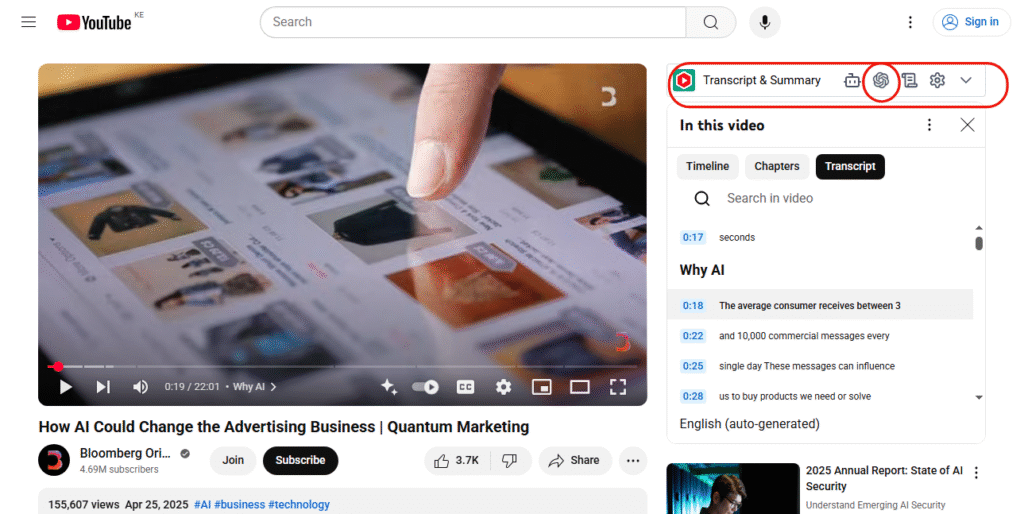
    • YouTube Summary with ChatGPT: This is a very direct and widely used Chrome extension by Glasp.

    It offers free access to YouTube transcripts and AI-generated summaries.

    How to use: Once installed, when you open a YouTube video, a button or sidebar will appear (as shown in the image below) and with one click you can instantly get a summary generated by ChatGPT, often with timestamps.

    Visual showing a browser extension (YouTube Summary with ChatGPT) in app
    • Meeting summarizers (e.g EightifyNoteGPTMonica, etc.): While these tools are primarily for meeting recordings, they offer YouTube integration.

    They can extract transcripts, often with higher accuracy than YouTube’s auto-generated captions, and then leverage AI to summarize the content.

    Option 3: Use the YouTube API or Third-Party Scripts

    A more advanced approach involves using the YouTube Data API to programmatically pull video metadata and captions/transcripts.

    This method gives you control over the data extraction and summarization process, allowing for custom filtering, cleaning and formatting of the transcript before it even reaches ChatGPT.

    It is especially useful for those with coding knowledge or specific project needs and is ideal for large-scale video analysis or integrating summarization into other applications.

    How it works: 

    • Developers can write scripts (e.g., in Python) to access YouTube’s API,
    • Download the available captions (which often serve as transcripts),
    • Then feed that text data into the OpenAI API (which powers ChatGPT) for summarization.

    Case Study Examples: From Long Lecture Videos to Quick Insights

    Take an instance where you are strapped for time but need to get quick industry insights about AI and marketing from a 30-minute video.  

    Without ChatGPT: You’d need to watch the entire video, pause, take notes and then manually synthesize the information. All of which sounds draining.

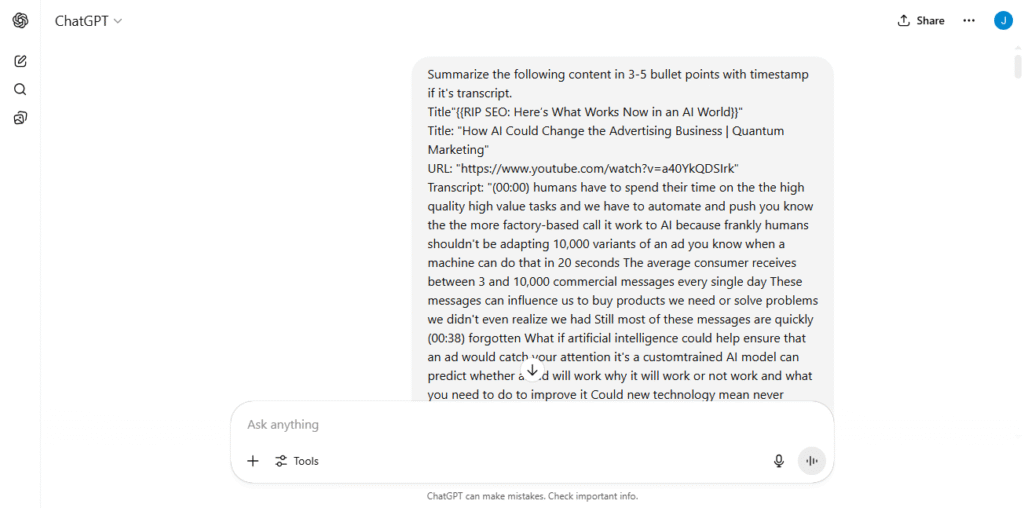
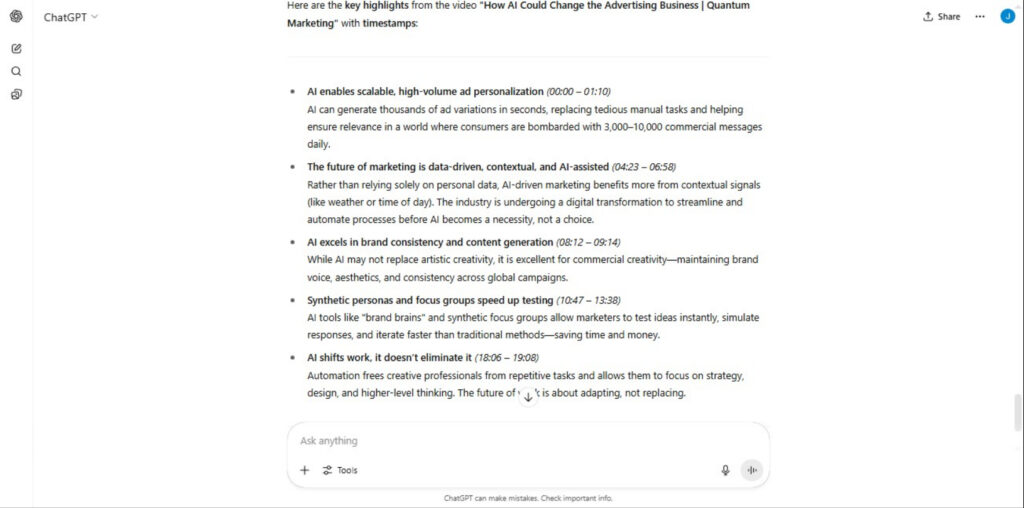
    With ChatGPT : All you would have to do is get the full transcript of the TED Talk from YouTube then paste it into ChatGPT with the prompt: “Summarize this into bullet points, including timestamps for main sections”

    Here is an example of the input and output version generated by ChatGPT:

    Before (Full Transcript Snippet):

    ChatGPT Summary Prompt request

    After (Bullet-point Summary with timestamps by ChatGPT):

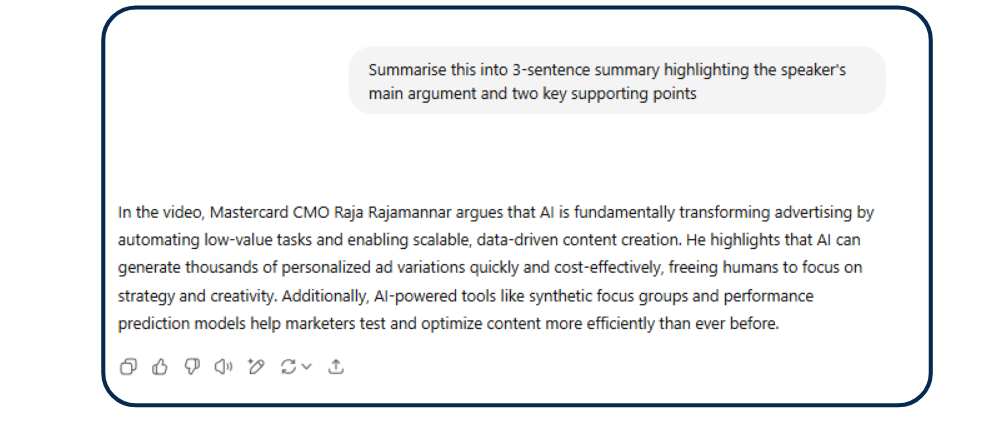
    You could also use prompts like: “Summarize this TED Talk transcript into a 3-sentence summary highlighting the speaker’s main argument and two key supporting points.”

    Simple chatGPT summary

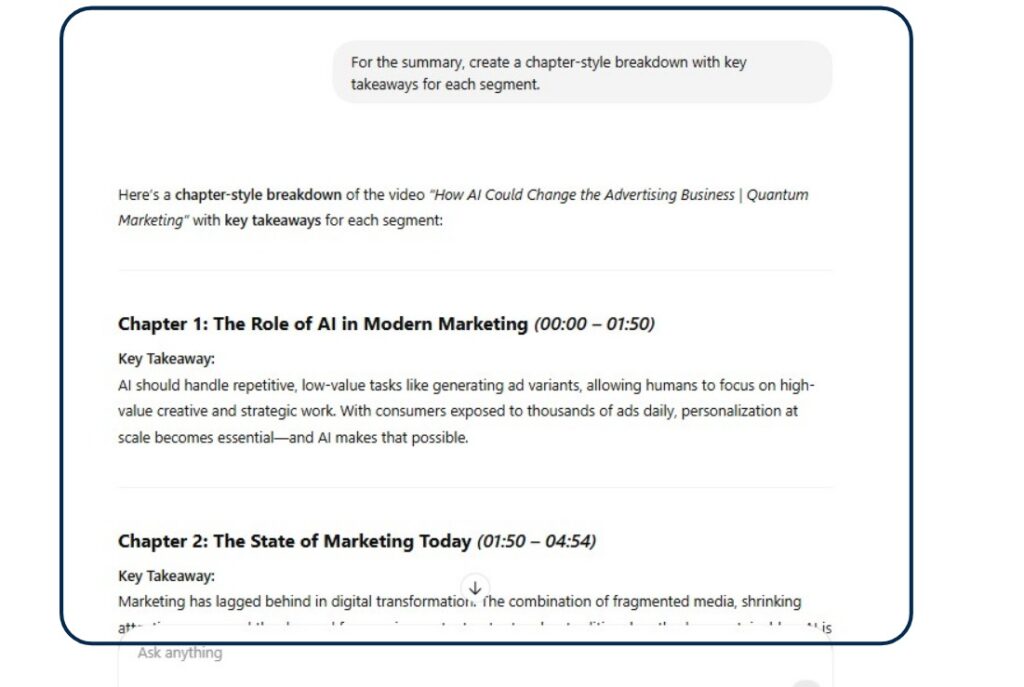
    or “Create a chapter-style breakdown with key takeaways for each segment.”

    Chapter-style summary of youtube video

    These specific prompts give you an output that is geared to the format you would like and control of how your answers look like in the final summary.

    ChatGPT’s Limitations and Accuracy Concerns

    While incredibly useful, ChatGPT summarization isn’t flawless:

    Misinterpretation from unclear transcripts: YouTube’s auto-captions are generally 60–70% accurate, meaning roughly 1 in 3 words is wrong. 

    These inaccuracies are often due to poor audio quality, speaker’s accent, background noise or technical jargon.

    This leads to ChatGPT summarizing transcripts with errors and giving you irrelevant content.

    Limits with poor auto-generated captions: Some videos have no manually created captions, relying solely on YouTube’s AI which is never 100% accurate.

    Context loss in long videos or fast-spoken content: Very long videos or those with rapid dialogue might exceed ChatGPT’s token limit for a single input.

    The typical option of breaking them down into smaller chunks can lead to some loss of overall contextual flow and a total miss on the complex visual cues that are not verbally explained.

    Oversimplification: To give a short summary, ChatGPT might sometimes oversimplify complex arguments.

    This can lead to the loss of crucial nuances or intermediate steps, especially in technical or philosophical videos.

    Ideal Use Cases

    Being able to quickly summarize a video’s content is impactful and can be leveraged by many people for different purposes.

    Who Benefits the Most?

    • Students: Summarizing lectures, educational videos, and documentaries for study notes and revision.
    • Professionals: Quickly grasping the essence of webinars, online courses, product tutorials, and industry talks without watching the full length.
    • Marketers: Analyzing competitor video strategies, extracting key messaging from brand videos, or summarizing market research presentations for reports.
    • Content Creators & Podcasters: Repurposing long video episodes into concise blog posts, social media updates, or show notes, significantly aiding in content distribution and SEO.
    • Journalists/Researchers: Rapidly sifting through long interviews or public address videos to extract sound bites or key policy points.

    Pro Tips To Master Prompts for Better AI Summaries

    To get the most out of ChatGPT for video summarization, remember that prompt engineering is key:

    Ask for summaries in different styles: Don’t just say “summarize.”

    Try: “Provide a bulleted list of the main points,” “Give me a paragraph summary for a non-expert,” “Generate a TL;DR (Too Long; Didn’t Read) version,” or “Extract the top 5 actionable insights.”

    Prompt ChatGPT to include specific elements: Ask for “main arguments,” “key statistics,” “actionable steps,” “speaker’s opinion,” or “next steps discussed,” and even “include timestamps” if the transcript you provide retains them.

    Combine transcript with title description for better context: Give ChatGPT the video title and description alongside the transcript.

    This provides additional context and helps the AI understand the video’s core theme, leading to more accurate summaries.

    Break down long transcripts: If a transcript is too long for one prompt (due to token limits), break it into logical sections.

    Summarize each section individually, then provide those summaries to ChatGPT and ask it to create an overarching summary from them.

    Final Thoughts

    By leveraging YouTube’s transcript feature or one of the many excellent browser extensions and third-party tools, you can effectively feed ChatGPT the information it needs to deliver quick insightful summaries.

    This capability is a massive time-saver and a productivity booster for anyone who consumes video content regularly.

    Whether you’re a student trying to ace an exam, a professional staying updated on industry trends, or a marketer looking for quick competitive intelligence, ChatGPT can help you stay ahead and transform how you interact with YouTube.

    Don’t just watch more videos; understand them better and faster.

    Start experimenting with ChatGPT’s Video summarizer and learn how to use intelligent prompts to upscale your output.