

Last Updated on July 22, 2026 by Click Raven
Video content has quietly become one of the highest-leverage assets in an SEO toolkit: it drives dwell time, it feeds YouTube as the second-largest search engine on earth, it earns video-rich snippets in Google’s SERPs, and it gives E-E-A-T signals a visual anchor that text alone can’t.
The problem for most SEO and content teams has never been “should we make video” — it’s been cost and speed. A single polished multi-scene video used to mean a shoot, a schedule, an editor, and days of turnaround per asset.
That cost structure is exactly what’s shifting. Dreamina’s Seedance 2.5 model generates connected, multi-scene video from a single prompt — which matters less for its novelty and more for what it does to your content production math.
Why this matters for content velocity, not just creative quality
If you’re running content ops across blog pages, landing pages, YouTube, and short-form social, the bottleneck is rarely ideas — it’s producing enough format variety fast enough to keep every channel fed. A page targeting a commercial keyword benefits from an embedded product-in-use video. A YouTube channel targeting informational search intent needs a steady cadence of watchable, coherent video, not just talking-head clips. A short-form distribution strategy needs the same core asset reformatted across aspect ratios without starting from scratch each time.
Historically, stitching separate AI-generated clips together to cover a full narrative arc — introduction, use, payoff — introduced visible seams: lighting drift, character inconsistency, pacing that felt assembled rather than shot. That’s a real problem for SEO use cases specifically, because inconsistent, obviously-synthetic video is a fast way to erode the trust signals video is supposed to be building in the first place.
What Seedance 2.5 changes for production workflows
Single-pass multi-scene generation.
The model accepts up to 50 pieces of multimodal input (text, image, video, audio) in one pass, meaning a full concept — including how it should move from opening shot to closing CTA — gets communicated once instead of assembled from disconnected generations. For a team producing video at scale, that’s fewer QA passes per asset.
Consistency across scene changes.
Cumulative visual drift across a sequence has been largely resolved, so lighting, tone, and style hold steady as the setting or action shifts. This is the detail that most directly affects whether a video reads as credible content versus obviously-stitched filler — a meaningful distinction if the asset is meant to support trust and engagement metrics on a page.
Longer runway per clip.
Single-clip length has doubled from 15 to 30 seconds, with an Ultra-long mode extending presets up to 180 seconds. Longer coherent sequences mean fewer separate assets to manage per concept — useful if you’re building out video for longer-form informational pages where a single embedded video needs to sustain attention.
Reference-driven control for repeatable output.
White-model blockout references let you map movement and blocking visually rather than through prompt text alone — helpful if you’re producing templated video formats repeatedly (e.g., a recurring product-demo format across a catalog page set). Green screen references support precise physical interaction sequences that need to stay consistent across a shoot.
Additional production controls:
- Timeline accuracy to roughly one second, so scripted beats (a CTA, a product reveal) land where intended
- Two rounds of extension support without a visible quality drop
- Region-level local editing, so one detail in a later scene can be corrected without regenerating the whole sequence — relevant if you’re doing compliance or brand edits post-generation at scale
A production workflow for content teams
Step 1: Anchor the brief.
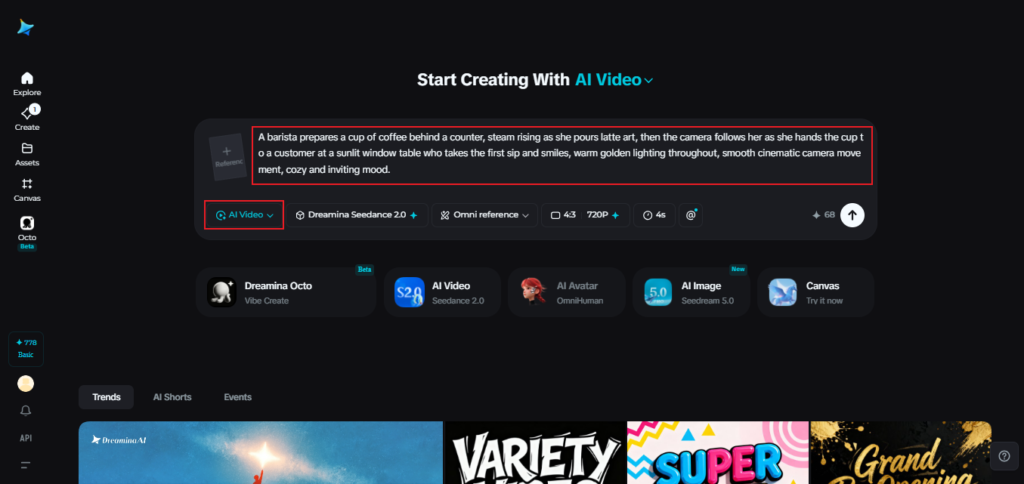
In Dreamina’s AI Video section, upload a reference image if the asset centers on a specific product or subject (useful for commercial-intent pages); skip it for a pure concept-driven piece.
A workable prompt for a 30-second sequence: A barista prepares a cup of coffee behind a counter, steam rising as she pours latte art, then the camera follows her as she hands the cup to a customer at a sunlit window table who takes the first sip and smiles, warm golden lighting throughout, smooth cinematic camera movement, cozy and inviting mood.
Step 2: Generate against your target channel.
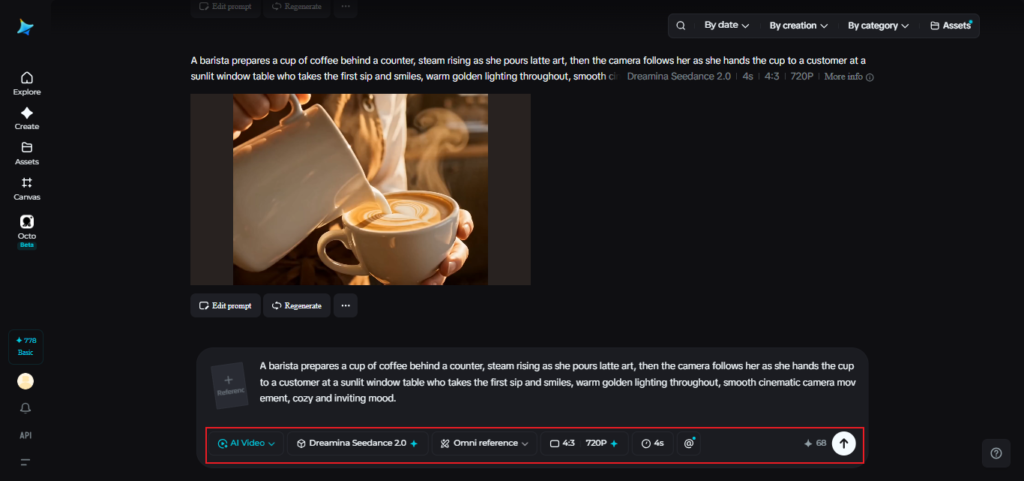
Select Seedance 2.5, set duration, and choose the aspect ratio for where the asset will actually live — 16:9 for YouTube and on-page embeds, 9:16 for TikTok/Reels/Shorts distribution. One concept, reformatted per channel, without re-shooting.
Step 3: Polish and repurpose.
Use Upscale for resolution, and Generate Soundtrack to tie the sequence together tonally before export. From there, the same asset can be embedded on a landing page, uploaded natively to YouTube with a keyword-optimized title and description, and cut down for short-form distribution.

Production notes that affect output quality
A few habits noticeably improve results for anyone treating this as a repeatable content pipeline rather than a one-off:
- Write the transition between scenes into the prompt explicitly, not just each scene in isolation
- Keep visual details — wardrobe, lighting tone, setting — consistent in the prompt across the full sequence
- Think in terms of a progression (setup → action → payoff) rather than a list of disconnected shots, since that structure is also what tends to hold viewer attention long enough to matter for engagement metrics
The takeaway for SEO and content teams
The strategic shift here isn’t “AI can make a nice-looking video.” It’s that a coherent, multi-scene video — the kind that used to require a production budget — can now be generated, reformatted per channel, and iterated on fast enough to treat video as a standard content asset rather than a special one. For teams already stretched across on-page content, YouTube, and short-form social, that’s the difference between video being a nice-to-have and being a channel you can actually sustain.