Technical ideas often feel like a wall for your online readers. When you explain a difficult process or a dense theory, plain words can fall short. Most people prefer to see how things work rather than study a long manual.
Visual storytelling bridges that gap by turning abstract thoughts into clear images. It helps your audience grasp the main points without extra effort. High-quality graphics turn a boring page into a clear and helpful guide.
Making Technical Details Accessible
Abstract concepts in fields like engineering or science can confuse the average reader. 3D models allow you to strip away the outer layers of a machine to show the moving parts inside. Readers appreciate seeing the internal logic of a product.
Static photos do not offer the same level of depth or clarity. You can rotate the view or zoom in on small parts that matter. Showing every angle helps build a full picture in the mind of the customer. People stay on your page longer when they can watch a process unfold.
Clear visuals reduce the time spent figuring how a system functions. Your content becomes a tool for education rather than a heavy block of text.
Improving Information Density on the Page
Large blocks of text often scare away potential leads who want quick answers. Using tools like legal graphics services is a smart way to present evidence or chronologies without overwhelming the viewer. These visual tools clarify timelines and physical evidence for any audience.
Simple charts are good, but 3D scenes create a much deeper impact. They allow you to place the viewer inside a specific scenario or event. This immersion makes the facts feel real and immediate, a visual win for the site.
Complex data sets become easy to digest through movement and color. You can highlight specific data points as the camera moves through a scene. 3d animations transform a list of numbers into a visual story.
Advancing Visual Depth with Modern Technology
A report on upcoming design trends shared that neural rendering and ray tracing now let creators build hyper-detailed digital humans. These technologies make characters look and act more like real people.
Realistic lighting and textures change how we perceive digital worlds. When a viewer sees a life-like simulation, they trust the accuracy of the information more. High detail levels remove the “cartoon” feel of older animations.
Adding these layers of realism helps your content stand out from low-budget competitors. Professionalism shines through when the shadows and reflections look natural. It creates a polished look that reflects well on your brand.
Building Authority with Realistic Assets
Technical accuracy is a priority when you represent a brand online. If your diagrams look cheap, readers might assume your services are cheap too. 3D assets give you the power to show precision in every frame.
Experts in your field will notice when the small details are correct. They want to see that you understand the mechanics of your industry. Correct scale and movement demonstrate your deep level of knowledge.
High-quality visuals serve as a badge of expertise for your website. They signal your investment in providing the best ways to communicate with your audience. Your readers will feel more confident choosing a team that values clarity.
Reusing Assets for Better Value
Creating a high-quality 3D model is a smart long-term investment for your business. Once a model exists, you can use it for many different types of content. Here are a few ways to get more value from your digital assets:
Turn a 3D model into a series of static images for blog posts.
Use the same character in multiple training videos for consistency.
Create short clipsfor Instagram or LinkedIn from longer videos.
Render the model in different colors to show a variety of product options.
Repurposing content saves you time and money on future marketing projects. You do not have to start from scratch every time you need a new visual. Consistency across platforms helps strengthen your brand identity.
Each new render provides a fresh look at the same core concept. Your audience gets to see your product from many different angles. It makes your marketing strategy feel cohesive and professional.
Strategic Use of Lists for Quick Scanning
Readers often skim through articles to find the most relevant parts. Bulleted lists provide a break from dense paragraphs and highlight key benefits. You can use these lists to complement 3D models in summarizing your points.
They serve as a quick reference for people who are in a rush. Keeping your points brief makes the information stick in their memory.
Well-placed lists provide a visual break that keeps the eyes moving down the page. They help maintain interest throughout an entire article. A logical flow keeps the bounce rate low and the engagement high.
Conclusion
Visual tools are no longer just a luxury for big corporations. Small businesses can also use these techniques to level the playing field. Clear animations make any topic easier to grasp for your target market. The benefits speak for themselves:
Simulations can show dangerous environments safely.
Animations explain internal mechanics without taking a machine apart.
Digital assets can be updated without reshooting live video.
3D content works across social media and websites.
Investing in quality graphics makes your content more useful, more memorable, and more trustworthy. When your audience finds clear answers on your site, they stay longer and come back. That is the power of visual storytelling done well.
Animations are becoming an essential part of social media marketing. Whether you’re promoting a product, sharing brand stories, or simply looking to boost engagement, using animations can dramatically elevate your social media content. With tools like Adobe Express, creating stunning animations has never been easier. If you’re looking to spice up your social media feeds and grab your audience’s attention, here are some best animation ideas that will keep your followers engaged and boost your social media presence.
Why Choose Animation for Social Media?
Animation is more than just a fun way to decorate your posts; it has real benefits for your brand. Research shows that animated content tends to capture more attention, increase engagement rates, and help messages stick. If you’ve ever struggled to engage your audience, animations are your secret weapon. They offer creativity, motion, and storytelling that static images or text alone simply can’t deliver.
Adobe Express provides a powerful yet easy-to-use platform to help you create professional animations without needing advanced design skills. Whether you’re promoting a new product, explaining a concept, or sharing customer testimonials, Adobe Express can help you create visually compelling content.
One of the best ways to showcase your product on social media is through animation. Instead of posting static product images, why not create an animation that highlights your product’s features? A short, looped animation of your product in use can grab your audience’s attention and make your post stand out in the feed.
For example, if you sell skincare products, you could create a quick animation showing how to apply your product and its effects on the skin. Or, if you sell tech gadgets, you can demonstrate the product’s features through animated visual cues.
Pro Tip: Keep your animations short (no more than 15 seconds) to maintain interest and encourage shares.
2. Animated Quotes and Testimonials
Customer testimonials and quotes are often more impactful when presented through animation. Instead of a simple text post, try animating the customer’s words with dynamic effects like text transitions, moving backgrounds, and visually appealing typography, a technique commonly used in video animation for business to build credibility and engagement.
For example, you can animate a positive customer review by having the text appear word-by-word with a stylish fade-in effect, and use bright, attention-grabbing colors for each word. Adding small illustrations or icons related to your industry can also give your animation an extra flair. Adobe Express offers pre-built templates for this, making it easy to get started.
3. Announcement Posts
Nothing grabs attention like an eye-catching animated announcement. Whether you’re launching a new product, announcing a sale, or hosting an event, animation can help your message stand out. Consider using bold, animated text with movement to reveal important details.
For instance, an animated post announcing a sale could feature words like “50% OFF!” sliding across the screen with vibrant colors and an eye-catching background. You could even include a countdown timer for added urgency, creating a sense of excitement and anticipation.
Pro Tip: Combine animation with strong calls to action (CTAs) to drive conversions.
4. Animated Infographics
Infographics are a great way to share statistics, explain concepts, or tell a story. But they can feel a little static. Transforming your infographics into animations adds life to the data, making it more engaging and memorable. Adobe Express allows you to animate infographics easily by adding movement to elements like pie charts, bar graphs, or bullet points.
For example, animate the segments of a pie chart to grow from zero to full size as you explain the data points. Or, animate text boxes to pop up sequentially as you walk the viewer through the infographic. This type of animated content works especially well on platforms like Instagram and Facebook.
5. Animated Social Media Stories
Social media stories are one of the most engaging ways to connect with your audience, and adding animation to them makes them even more compelling. You can create animated stories that include text, images, and animations that flow together seamlessly.
Consider using animations to highlight features of your products or services in a fun, visually appealing way. You could create an animated behind-the-scenes look at your company, showcasing the team at work or the creation process of your product. With Adobe Express, you can add movement to your images, use text transitions, and apply stylish filters to make your stories even more engaging.
6. Animated Backgrounds for Video
Adding animated backgrounds to your videos can instantly enhance the overall look of your content. Whether you’re creating a promotional video, tutorial, or behind-the-scenes vlog, incorporating a dynamic background keeps the viewer’s attention focused.
For instance, you can animate a background with subtle motion, like floating clouds or swirling colors, while your main content stays static. This creates a more immersive experience for the viewer and adds depth to your video content. Adobe Express allows you to easily create and apply these effects to videos.
7. User-Generated Content (UGC) Animation
User-generated content is a great way to build trust with your audience, and animating this content takes it a step further. If your customers are posting about your products or services on social media, ask them if you can use their content and turn it into an animated post.
You could animate their reviews, pictures, or videos with cool transitions and effects to share on your social media. This not only acknowledges your customers but also encourages others to create content about your brand.
Final Thoughts
Animations can do wonders for your social media presence by adding dynamic content that captures attention, increases engagement, and reinforces your brand message. With Adobe Express, creating these animations is easy, even if you have no design experience. From product demonstrations to animated stories and infographics, the possibilities are endless. So why wait? Start exploring animation ideas for your social media today and see how animation can take your content to the next level.
Pro Tip: Keep your animations consistent with your brand’s style and voice for a cohesive and professional look across all your social media platforms.
Knowing how to do a case study can help convince potential clients to buy your core product or service. When well done, case studies help you build trust with your audience. However, a case study is more than just good storytelling. To do it well, you need to understand which elements make it such an effective type of content marketing.
Before we understand how to do a case study effectively, let’s talk about what it is.
What Is a Case Study?
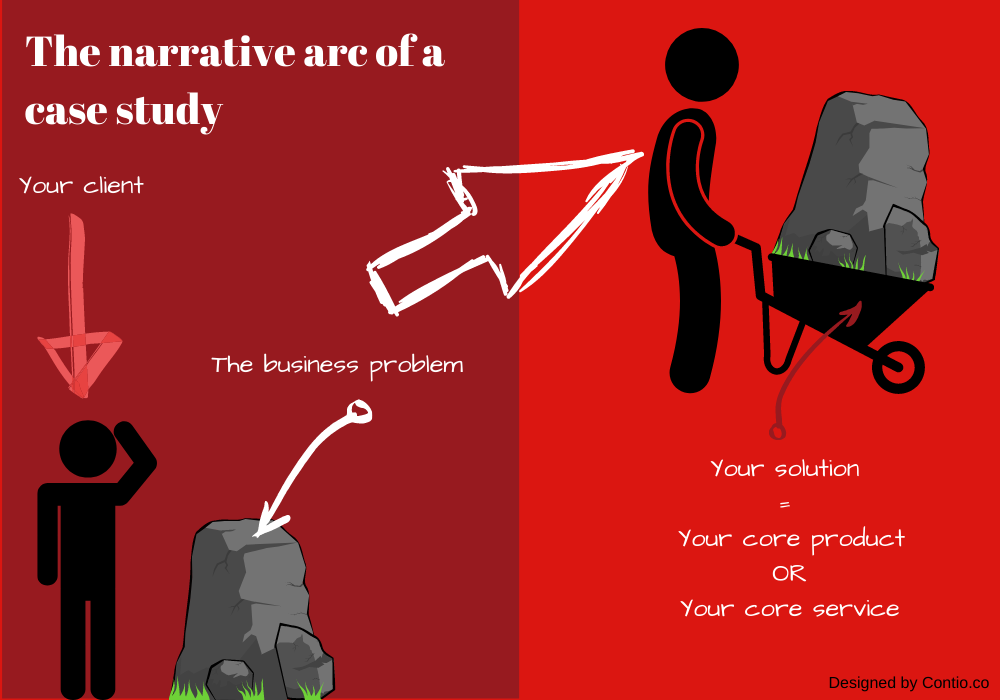
A case study is a relatable story about a client who solved a problem using your core product or service.
Imagine you’re shopping online for a new pair of shoes. You find a beautiful pair but are unsure if it’s worth the money. What do you do before you decide? You read reviews.
If you have friends who shop online, maybe you’ll ask them if they’ve ever shopped at this particular store. If the answer is yes, you will want to know their experience.
The point is that when buying shoes at a store you’ve never shopped, you will need evidence from other customers that these shoes are a good deal.
Imagine you’re a business looking for a solution to a specific business problem. As before, once you find a solution, you’ll need proof that it’s the best solution on the market.
This is where case studies come in. They’re essential pieces of content, especially in the B2B market. When a potential client is experiencing a problem, they usually spend a lot of time comparing different solutions before deciding. Ultimately, your case study could distinguish between a client signing up with you or joining your competition.
Why Do I Need to Use Case Studies?
At this point, you might ask, “Do I need to invest time and energy into developing case studies when I can just share reviews on my website?” The answer is yes. If you want to convert more leads into clients, case studies should be a priority in your content marketing strategy.
As a content creator, case studies can be a powerful piece of B2B content marketing. Case studies can help you in the following ways:
1. Creating a Relatable Narrative
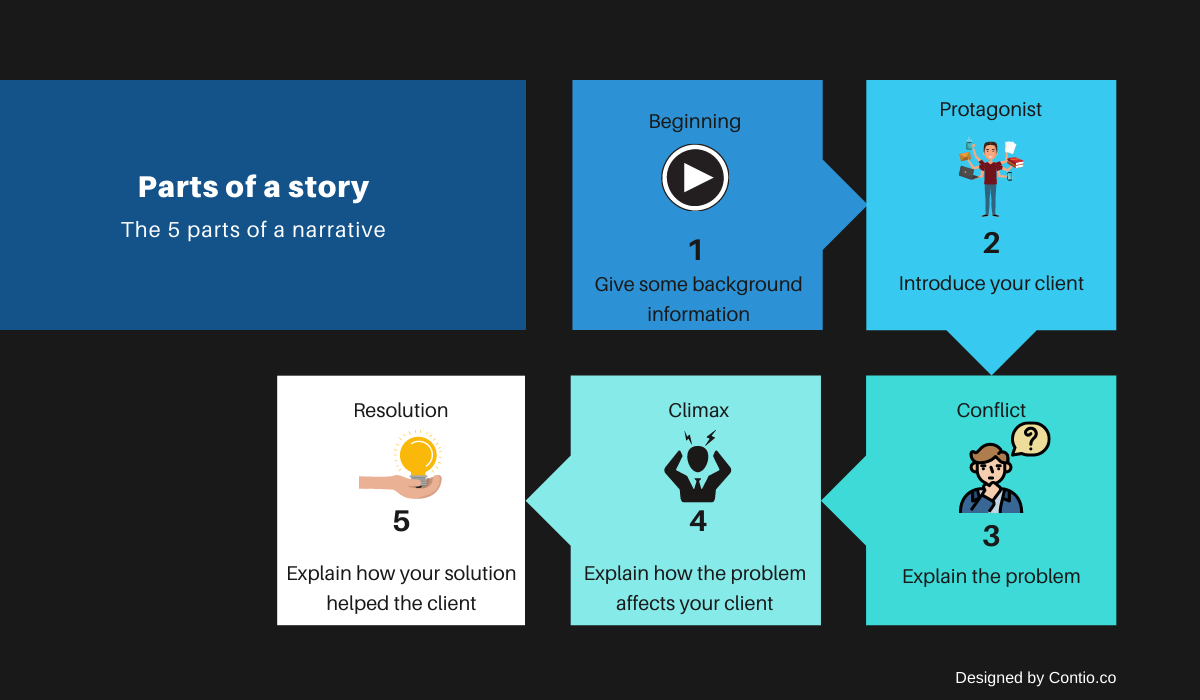
Since a case study is a narrative, it follows the standard arc of a story. And, as we know, every story has a beginning, protagonist, conflict, climax, and resolution.
Following this narrative arc, a case study triggers emotions and creates a connection with your reader. Everyone loves a good underdog story, and this is essentially what your case study is. It is the story of a protagonist who triumphed over incredible obstacles thanks to your core product or service.
When done well, a case study helps your audience imagine themselves in your client’s shoes. They can imagine your clients’ problems because they face similar issues.
Similarly, like your clients, your readers seek solutions to these problems. A compelling case study drives empathy and helps your audience become emotionally invested in the outcome. Therefore, they will be more open to hearing about your solution.
2. Creating a Sense of Hope
A good case study will go beyond just helping your readers to identify with your client and the problem they are facing. A compelling case study will convince readers that your solution worked for your client and can also work for them.
In other words, a well-done case study should inspire hope and promote your brand. When potential clients read your case study, they will be convinced of the benefits of signing up with you.
3. Helping You to Stand Out
There are many good blogs but not as many good-quality case studies. Although case studies do an excellent job of showcasing a brand’s expertise, not everyone builds them.
For this reason, if you start building case studies for your brand, you will stand out from the competition. A proper case study can make a strong case for your brand and improve your brand image.
How to Do a Case Study in 3 Steps
Developing a good case study isn’t hard. To make the process less daunting, we’ve broken it down into 3 straightforward steps:
1) Select Your Case
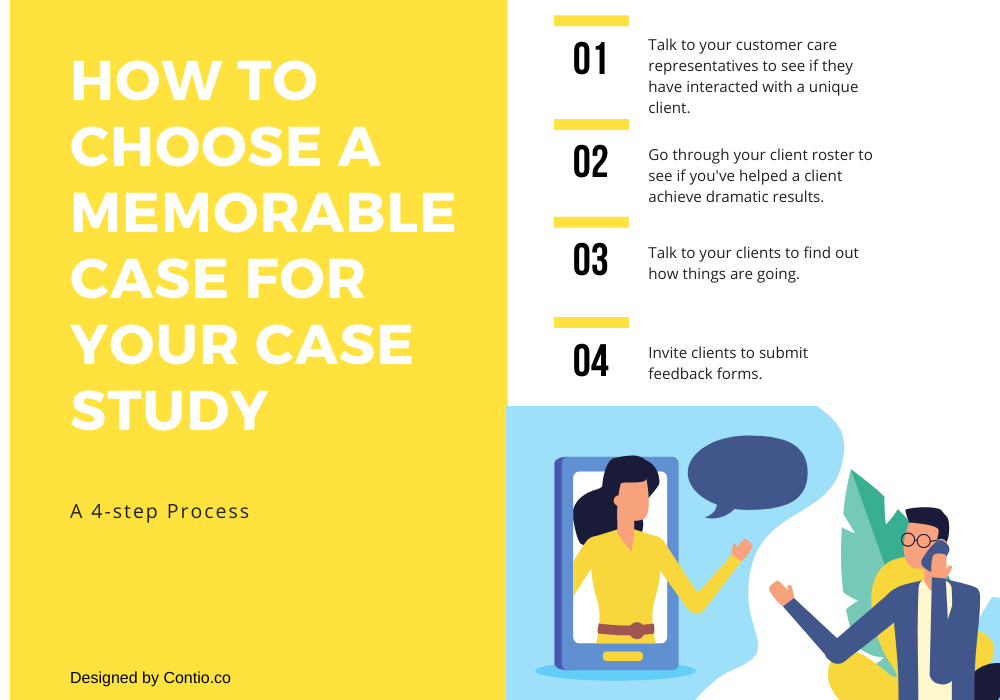
You may have many clients to choose from, but not all of them will qualify for a case study. You must seek unique and memorable clients to build a practical case study. These are clients who:
Are facing a unique problem.
Are uniquely using your business solutions.
They have switched from a competitor.
They have experienced dramatic results with your solution.
Choose an unusual case first if you want your case study to stand out. Provided that a client meets one of the above conditions, they are a good candidate for your case study.
2) Do Your Research
Once you’ve chosen the perfect case, you can start gathering evidence. To be effective, your evidence needs proof that what you’re saying happened.
Most people assume that complex numbers are needed to prove their point. Even so, you can go beyond data when doing your research. Quality evidence can be as simple as a before-and-after description.
While the type of evidence you use isn’t carved in stone, there are two essential steps in the research process.
a) Developing an Introductory Questionnaire
An introductory questionnaire explains the purpose of your case study to your client. More importantly, it is a place where you ask a few preliminary questions to help you begin your research.
b) Interviewing Your Case Study
The interview is the most essential part of the case study since this is when your research starts. An interview allows you to not only ask more questions but also get clarification on any vague answers in your questionnaire.
Preparing for the interview in advance is always a good idea, instead of just winging it. Thinking through the necessary information and writing questions will help you get more relevant information.
3) Write Your Story
Once you have all the relevant information, it’s time to sit down and write your story. As we stated before, every good story has 5 different parts:
Beginning: This is where you give background information on the case study.
Protagonist: Your chosen client. Introduce them and explain what they do.
Conflict: The problem they are facing
Climax: How the problem is affecting the client and what makes it unbearable
Resolution: How your solution helped the client to overcome their problem
Your case study must follow this structure closely so readers can follow along easily. However, you can break the standard narrative arc into 6 different parts so that you can add important details to your case study:
Summary: Develop an overview of your case study. 100-200 words is sufficient.
Subject: Introduce your client and explain what they do.
Problem: Explain the situation. Why does it exist? How does it affect your client?
Solution: Describe the solution. Offer supporting evidence for why it was the best solution.
Results: Explain how your solution helped your client to overcome the problem.
Case Study Format
Once you’ve written your case study, you can tell your story in various ways.
Downloadable PDF.
Webpage.
Slideshow.
Video.
How to Do a Case Study: Best Practices
A case study that follows the above structure can be a powerful piece of content marketing. Even so, we want to go beyond simply helping you to do a case study and show you how to write a case study that will stand out.
Here’s how to write a case study that people will remember:
i. Use Evidence to Back up Your Claims
People will get emotionally invested in a good story, but you still need evidence to back what you’re saying up. One way to do this is by using complex numbers from your client. Alternatively, you could create and compare a “before” picture with an “after” picture.
Using the “before vs. after” model, you can effectively present this information using an infographic or an image. To ease your work, you can use ready-made before & after slide templates by SlideModel. If you’re presenting figures, you can simplify the data using graphs.
iii. Choose a Fascinating Angle
Since you want people to remember your story, you must make it memorable. You can choose a client who does something differently or has a unique problem.
However, you must relate the problem to most readers even when writing a unique story.
iv. Follow the Standard Narrative Arc
Using the standard narrative arc will help you write an emotionally engaging story. If your story engages, your audience will follow along until the end. Moreover, an engaging case study equals a higher conversion rate.
v. Use Quotes From Your Client
Using quotes from your client will help in three ways. Firstly, it’ll make the story more unique and relatable. Secondly, it will highlight the protagonist of your story. Finally, it will help you back up the claims you are making in your case study.
vi. Repurpose Your Case Study
A good case study doesn’t start and end as a formal one. Once you have developed one, you and your team should feel free to mention it whenever you talk to a prospective client.
Quote your case study to a client who has called to inquire about the effectiveness of your product or service. This will help you convince the client that your solution works since it has worked for a different client.
A good case study can convince a potential client that your business solution is worth investing in. Now that you know how to do a good case study, you can showcase your brand to potential clients.
Exploring content marketing stats can give you insights into trends that could boost your brand. It’s like peeking into the playbook of successful brands to shape your winning content strategy.
Now, it’s crucial to remember that what worked wonders for others might not be a guaranteed success for you. Think of these stats as friendly advice for your brand. You’ll need to tweak and test them to see what clicks for you.
Imagine the scene: your competitors are riding the wave of influential content marketing trends, and you don’t want to be left in their dust. Keeping an eye on what brands in your circle are up to can give you a fighting chance in the race for attention.
But here’s the exciting part – by smartly embracing these content marketing trends, you won’t just keep up; you might even carve out your spotlight in the crowd. It’s about finding the right groove for your brand and making it shine.
Benefits of Understanding Content Marketing Statistics:
Aside from growing your brand and keeping up with the competition, content marketing statistics can help in the following ways:
1. Establishing Your Brand as a Thought Leader
You retain your place in the market by keeping up with content marketing statistics. Beyond that, keeping up with these trends helps you establish a reputation for your brand as a trusted authority. Moreover, once potential customers think of your brand as a trusted authority, they are more likely to become paying customers.
2. Helping You Perfect Your Craft
If you can analyze content marketing statistics successfully, you will become a better marketer. Improving your skills will make you a more marketable asset to brands needing content marketing help.
3. Winning More Customers
Content marketing aims to share valuable information with your target audience to build genuine, long-term connections with them. In other words, if you keep doing your right, you’ll win more customers for your brand.
These content marketing statistics indicate what content creators believe and are doing in 2026.
1) Content marketing costs 62% less than other outbound marketing tactics but generates 3x as many leads.
What you can do: Traditional advertisements are great but intrusive. If you want to build a genuine connection with your target audience, give them valuable information in a format they’ll enjoy. You can do this by investing in different forms of content marketing.
In summary, content marketing will help you reduce your marketing budget and win more clients for your brand.
2) 78% of CMOs say that custom content is the future of successful content marketing.
What you can do: While content marketing is designed to speak to both potential and existing customers, custom content is designed to retain your existing customers. This content can include blog posts, social media posts, email newsletters, white papers, industry reports, videos, webinars, and more.
In summary, Use custom content to share valuable, informative content with existing customers. This will keep them engaged with your brand and boost brand loyalty.
You can use Instagram stories to share valuable information and stay competitive. For example, you could use this platform to share tips and tricks related to your products. Alternatively, you could give your followers a sneak peek into what goes on behind the scenes. Showing your team in action could humanize your brand and generate a connection with your target audience.
In summary: Use Instagram stories to share informational content or show the faces behind your brand.
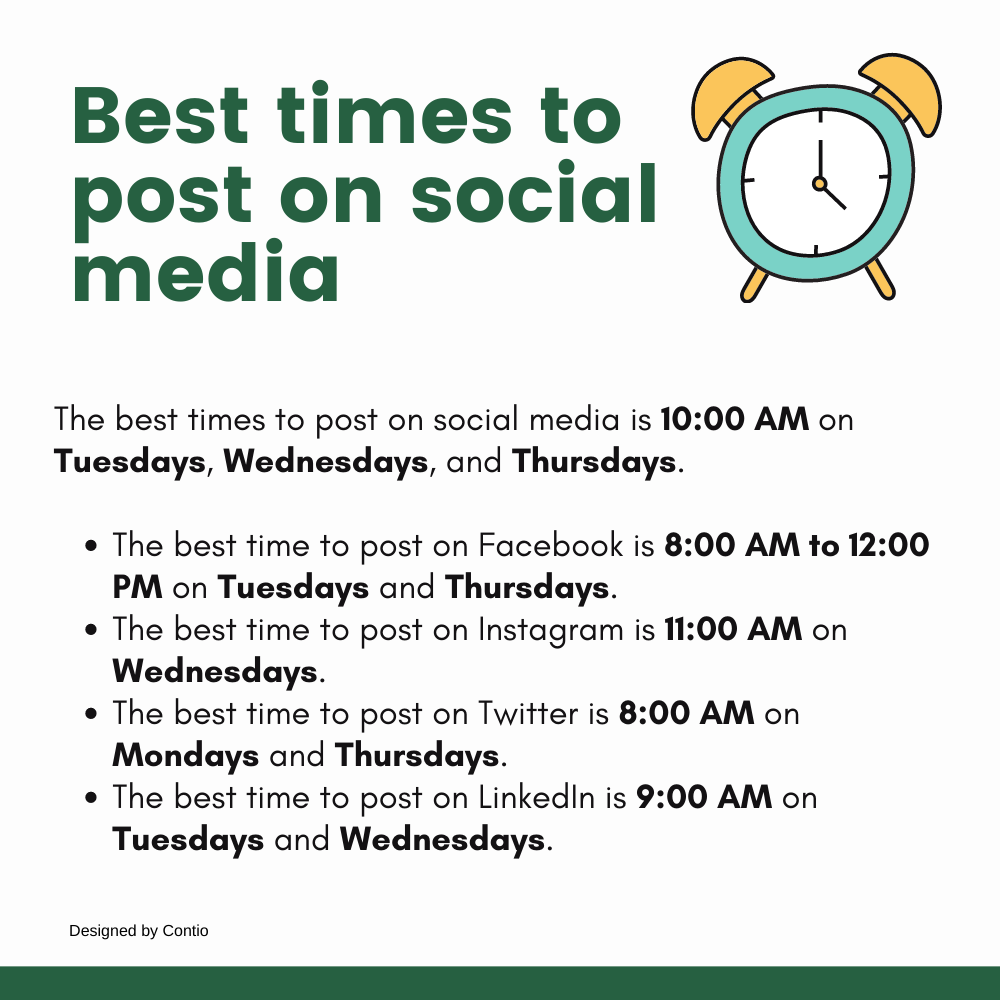
4) Content is shared on weekdays and most often on Tuesdays.
What you can do: Content is shared chiefly on weekdays because this is when people spend the most time online. If you want your content to perform well online, you must share it when people look. According to Hootsuite, here are the best times to share your content on social media platforms.
In summary: Post your social media content when it matters most.
5) 72% of marketers believe content marketing increases engagement (CMI).
What you can do: To boost engagement with your target audience, you must amp up your content marketing efforts. However, it’s not enough to keep churning content out nonstop. For your content marketing efforts to bear any fruit, you need to keep checking in with your audience to see what kind of content they enjoy from you.
In summary, Ask your audience for feedback on the kind of content they enjoy so that you can produce more of this content.
6) Social media content is the #1 type of content used by B2C and B2B marketers.
What you can do: If you want to go beyond keeping up with your competitors to stay ahead of the pack, social media content is something you should focus on. Even so, when developing a social media outreach strategy, you should determine what content works for each platform.
In summary, determine which platforms your audience spends the most time on and what content works best for them.
7) 60% of marketers produce at least one piece of content daily.
What you can do: To stay competitive, you should keep up with these marketers by producing daily content. There is an endless variety—from blog posts to infographics, eBooks, white papers, social media posts, and more—so this shouldn’t be too difficult.
In summary: Produce at least one piece of content daily to break through the noise and stay on the mind.
8) 77% of brands have a content marketing strategy (SEMrush).
What you can do: To stay competitive, you should also have a content marketing strategy that works for your brand. Track your performance to determine what works and what needs tweaking.
9) 96% of the best content marketers say content marketing has helped them build trust and credibility with their audience (Content Marketing Institute).
What you can do: As a content marketer, you always want to build trust and credibility with your audience. For this reason, you should always aspire to produce valuable content that your audience will appreciate.
In summary: Establish a track record of producing valuable content people appreciate.
10) 90% of these content marketers have succeeded by focusing on the audience’s need for information (Content Marketing Institute).
What you can do: To determine what information your audience needs, you can run a survey or ask them to share feedback. Once you know what they need, you should produce more.
In summary: Ask your audience what they need and produce more.
What you can do: These content marketers changed their strategy in response to evolving needs. To stay relevant during this uncertain time, you should connect with your target audience and learn how their needs have changed. Only then will you be able to satisfy these needs?
In summary: Connect with your target audience, find out how their needs have changed, and produce content that satisfies these needs.
What you cando: You need to not only take time to understand the sales cycle but also develop the right kind of content for each stage of the cycle. By doing this, you’ll connect with each member of their audience where they are and guide them through the buyer journey.
In summary: Guide your leads through the sales cycle with the right content to convert them into paying customers.
What you can do: Be open and honest in your content. Failure to do so will violate your audience’s trust. Don’t give your audience any reason to distrust you unless you want your audience to run to your competition.
What you can do: As other brands seek to boost client loyalty, so should you. After all, the last thing you want is to lose clients who are unsure about your brand to the competition. Find out what your clients value and give it to them.
In summary: Take steps to boost brand loyalty so you don’t lose clients to your competition.
What you can do: Use your web traffic and sales figures to determine how well your content marketing is going. While measuring sales is straightforward, a few tools are designed to help content creators measure web traffic. In addition to web traffic, you can also keep track of other metrics such as page load time, conversion rate, bounce rate, and more.
In summary, track your sales and web traffic to see how well your content marketing is going.
16) Marketers create content for multiple audience segments at once – usually 3 segments.
You can Segment your audience according to stages in the buyer journey or interests. Create content designed to fulfill the needs of each segment and share this content consistently to create a connection with your target audience.
In summary: Segment your audience and design content to fulfill the needs of each segment.
17) 47% of people surveyed in 2026 spent more than $10k on annual content marketing.
What you can do: This is an increase of 9% from 2019. To remain competitive, consider boosting your annual content marketing budget. While your budget doesn’t necessarily have to match the $10k, it should align with your content marketing goals.
In summary: Establish a budget to meet your content marketing goals.
Online Behavior
These content marketing statistics highlight how your target audience spends their time online and what they believe about brands that use content marketing. This information will help you better understand how to reach these people.
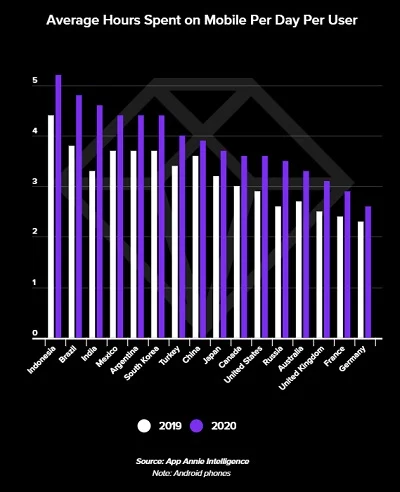
What you can do: Since the start of the pandemic, your target audience has been spending more time on their mobile devices. For this reason, it’s crucial to ensure your content is compatible across different devices. Moreover, you need to optimize your content for various social media apps.
According to App Annie, here are the most popular apps from 2020.
TikTok
Facebook
WhatsApp Messenger
Instagram
Facebook Messenger
Ensure your content works across devices and other apps to reach your target audience.
What you can do: Do you want to put your brand in front of your target audience? For this reason, take time to find out which specific platforms your target audience hangs out on. Once you know that, you have a higher chance of connecting with them.
In summary: Adapt your content to the different platforms where your target audience hangs out so that you can initiate a conversation with them.
What you can do: This is undoubtedly good news for your brand. However, the last thing you want to do is take it for granted. Always be open and honest in the brand story you craft with your content. Remember that while people trust businesses as valuable sources of information, it’s easy to lose this trust. All it takes is one mistake or lie; you could lose the confidence you’ve worked so hard to build.
In summary: Be open and honest with your target audience to retain their trust.
What you can do: We know your customers feel they benefit from your content marketing, but do we know why? To answer that question, you can create a survey to determine what content your target audience enjoys. With this information, you can produce more high-performing content. Utilizing online form builders simplifies the process of tailoring questions to specific reader segments for more actionable insights.
In summary, Customers are more likely to buy from brands with content. Find out the kind of content your audience enjoys most so that you can produce more of it. This way, you can win more customers.
Blogging
These content marketing statistics refer to what bloggers do and how their target audiences relate to their content. This information will help your blog stand out if you run a blog.
22) Articles with images get shared more.
What you can do: Add one or more images to your blog posts to create content that your readers will enjoy. Once you’ve provided them with informational and engaging content, they’ll happily share it with family and friends.
In summary:Use appealing and engaging images to appeal to your readers and encourage them to share.
What you can do: Given that so many people are reading blogs faithfully, you should invest in quality, informative content for your blog. Learn the best practices for running a successful blog, including when is the best time to post a new blog article.
In summary, if you can set up and maintain a quality blog, you can attract some of these loyal readers.
24) Blog titles with 6-13 words get the most clicks.
What you can do: If you run a blog, keep your titles within this word count. You can also review old articles and adjust the titles accordingly.
In summary: Maintain a word count of 6-13 words for your blog titles.
25) Longer content gets shared more (SEMrush).
What you can do: If you write blog posts, keep your content longer to be more shareable. What is the recommended length for your blog posts?
In summary: Find out the recommended length for your blog posts to be shareable.
26) The recommended blog post length is at least 1269 words.
What you can do: Since this is the recommended length for a blog post, keep your posts to this minimum length.
In summary: Stick to 1269 words at least.
27) Longform content of 3,000+ words gets 3x more traffic, 4x more shares, and 3.5x more backlinks than other blog content.
What you can do: If you want your content to generate a lot of engagement and a high number of backlinks, then you should aim for at least 3,000 words per article. Given that this is much easier said than done, you can choose a few cornerstone articles and make them longer than the average.
In summary, 1 out of every 3 articles should be at least 3,000 words long.
28) Listicles are shared 2x more than other blog article formats.
What you can do: To develop shareable content, include some listicles in your blog. For example, a title such as “50 ways to create engaging content” is much more attractive than “How to create engaging content.”
In summary: Develop some educational listicles as part of your blog content.
29) 51% of companies update old blog articles to boost traffic (SEMrush).
What you can do: Do you want to produce new content without the energy or time to write a new blog post from scratch? You can revisit old blog posts that have performed well in the past, update them, and share them again.
In summary, Updating well-performing blog posts will help you reach a wider audience and renew interest in your blog.
30) 71% of B2B consumers visit an organization’s blog at some point in the buyer’s journey.
What you can do: While you’re not supposed to market your product directly through your blog, inserting a few mentions about your product can be helpful. Keep your blog articles informative and engaging, but dedicate 1-3 paragraphs to discussing your product.
In summary, Run an informative blog, but use 1-3 paragraphs of each article to discuss your product briefly.
31) 86% of companies produce more blog content than other content (SEMrush).
What you can do: To stay competitive, you might want to invest time and energy in growing your blog. Moreover, you should find out what to do to make it competitive.
In summary: Invest in your blog and make it competitive.
SEO
These content marketing statistics highlight what content creators like you are doing to boost their content’s online visibility.
32) 95% of people only pay attention to the first page of search results.
What you can do: Optimize your content to stand out in Google search results pages (SERPs). Pay attention to SEO-boosting factors, such as using high-ranking keywords and linking to sites with high domain authority scores. If you write marketing blog posts, using an editor that gives you both a readability and SEO score as you write is essential.
33) Search is the number one source of blog traffic across industries (SEMrush).
What you can do: Optimize your blog posts for SEO when you write them. Create your content in an editor that rates readability and SEO; you can use a blog editorial calendar. If you can do that, your blog will rank relatively high in relevant search results across different search engines.
In summary, Consider your SEO score as you write your blog content.
34) Half SERP clicks to reach the top 3 results (Ignite Visibility).
What you can do: When optimizing your content for SEO, you should target these top 3 results. Adopting some proven blog SEO strategies can give your blog a much-needed boost.
In summary: Focus on SEO when you’re writing blog articles.
Visual Content Marketing
If you want to use visual content to get an edge over your competitors, then this is what you need to know.
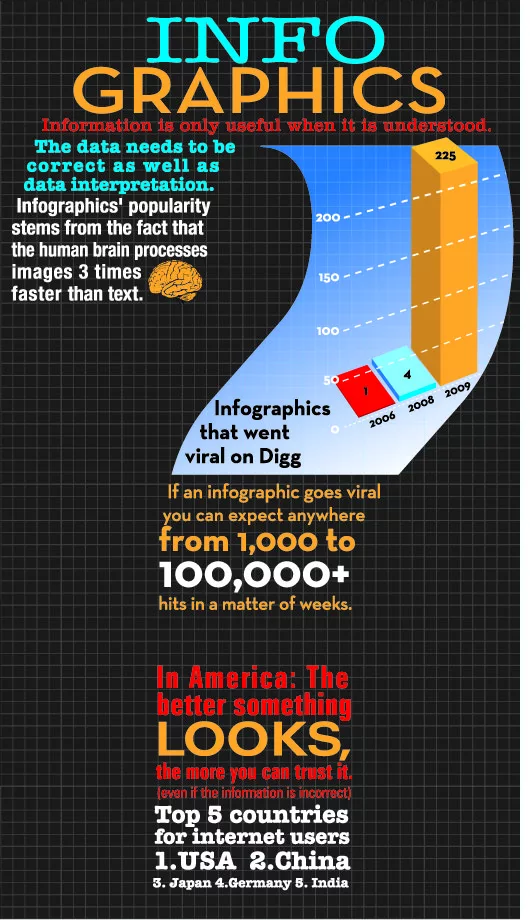
35) Infographics are the #1 type of content to get shared.
What you can do: Summarizing your blog posts is an easy way to generate infographics. Once you’ve developed a summary, you can turn it into an infographic by adding images to your written summary. Repurposing your blog content in this way will ensure you always have information to build another infographic.
In summary: Repurpose your blog content by turning it into infographics, and then share these on social media.
Video Marketing
Are you curious about how to use video to promote your brand? With these content marketing statistics, you’ll be well on your way to producing outstanding videos.
What you can do: To boost your web traffic, you can design engaging and educational videos and post these on your social media. Include calls to action for people to visit your website for more advice, tips and tricks, or insight.
In summary, You can turn your blog posts into short videos. However, remember the recommended length of time for your social media videos.
37) 54% of consumers would like to see more video content.
What you can do: This is easy—you can produce more videos related to your brand and products! However, learning how to create engaging videos that your audience will remember would be best. An AI video generator from Higgsfield makes it significantly easier to produce more videos at scale, without sacrificing quality or consistency especially when creating interactive and personalized content like AI face swap video, which enhances user engagement, boosts watch time, and improves overall content performance.
In summary, create more memorable videos related to your brand and the products you sell to remain at the top of your target audience’s mind.
What to do: You can help your clients by developing instructional videos that show them how to use your product. To create a compelling video, review the most common questions you receive from your current clients. Create videos that address a client’s needs when contemplating buying your product and then share the rest when they pay.
In summary: Create instructional videos and share them with clients during the buyer journey.
39) 17% of marketers plan to add videos to their marketing strategy.
What to do: Once you’ve started producing videos for your brand, perfect them to stay ahead of your competition. You can improve your video content by asking your audience for feedback.
In summary: Ask your audience for feedback and use this feedback to improve your videos.
What you can do: Since more and more brands are producing videos, you need to pay attention to what your competitors are doing. It’s essential to note what they do well and what they’re struggling with. With this information, you can create videos that stand out from the competition.
In summary: Look at what your competitors are doing and aim to do it better.
41) 96% of people will watch an explainer video to learn more about your product.
You can create a few product explainer videosto explain how your product works. Sharing this content with your leads will help convert them into paying clients more efficiently. Moreover, if clients know they can rely on you to teach them how to use a complex product, they’re less likely to check out your competition.
In summary: Produce explainer videos so potential clients feel more confident about using your product.
What you can do: To stand out from the crowd, you need to figure out how to go beyond creating good videos to create exceptional videos. Ask your audience for feedback on the kind of videos they enjoy and track their engagement with videos you’ve produced in the past.
In summary: Create exceptional videos to stand out from the crowd.
What you can do: Design promotional videos, invest in brand storytelling, and find out how to give your content that extra kick. Once you discover what kind of unique content you can create, you’ll be easier to stand out from your competition.
In summary: Invest in promotional videos and brand storytelling, but find elements to make your content stand out.
Podcasts
Podcasts are a great way to promote your brand while educating your audience. If you’re considering launching a podcast, these content marketing statistics will help.
What you can do: Repurposing some of your blog content as podcast episodes could help you grow your audience. Once you’ve set up your podcast, you should promote it widely on the platforms where your audience spends most of their time.
In summary: Repurpose your content as quality and informative podcast episodes, and promote these episodes where your audience hangs out.
What you can do: If your target audience is in the 25-34 age range, a podcast is an excellent way to reach them. Since podcasts promote your brand while educating your audience, they can be an effective marketing tool.
Studying successful learning Podcasts can provide valuable insights into content formats, episode structures, and engagement strategies that resonate with audiences seeking educational value alongside entertainment.
Even so, you might want to survey the content people enjoy in their podcasts. This information will guide you as you develop a content calendar.
In summary: Launch an engaging podcast to connect with people in this age range.
46) In the US, 39% of men and 36% of women listen to podcasts monthly (Edison Research, 2020).
What you can do: If you want to reach these demographics, one way to do it is to launch a podcast. Find out the popular podcasts among these segments and offer them similar content.
In summary, Find out what kind of podcast content is popular among this demographic and offer them something similar.
Email Marketing
A great email marketing campaign can help you stay connected to your target audience throughout the buyer journey. These content marketing statistics can help you create an effective email marketing strategy.
47) Email marketing is the top content marketing strategy for nurturing audiences.
What you can do: Use a good email marketing strategy to connect with your leads and guide them through the sales funnel. If you keep in touch with potential customers throughout the buyer journey, they might eventually become paying customers.
In summary: Use email marketing to keep in touch with potential customers and maintain contact even after they become paying customers.
What you can do: Segment your audience so that you send everyone on your mailing list content that is relevant to them. With a segmented email campaign, you can meet each of these people where they are and connect with them memorably and effectively.
In summary: Segment your audience and send different content to each segment according to their needs.
Webinars
Webinars (some of which you can make using AI presentations in today’s world) can help you establish your brand as a thought leader while promoting your products. Here are some helpful content marketing statistics to help with your webinars.
What you can do: Emailing potential attendees might boost your registrations if you run a webinar. To do this effectively, you can list previous webinar attendees and update it regularly. Alternatively, you can collect these email addresses via a landing page on your website.
In summary: Email previous webinar attendees and website visitors to promote your current webinar.
50) 59% of webinar attendees register the week before the webinar, and 17% register on the webinar day.
What you can do: Given that potential webinar attendees will pay more attention the week before your webinar, you can boost your advertising efforts for this week’s webinar. Additionally, it would be best to keep advertising until the actual day of the webinar to get some last-minute registrations.
In summary: Boost advertising for your webinar in the week before your webinar and consider hosting a webinar regularly to establish your brand as a thought leader while generating qualified leads.
Over to You Now:
Content marketing statistics are usually an accurate indication of what your competitors are doing. Therefore, by studying these statistics, you can get a good idea of what works, what doesn’t, and what’ll give you an edge over your competitors.
On the surface, content can look productive. Blogs are going live, keywords are being added, pages are getting indexed. Yet something feels off. Traffic plateaus. Rankings move, just not enough. And no matter how much effort goes in, the outcomes don’t seem to follow.
That disconnect often comes down to structure, not volume. Publishing more content doesn’t automatically create authority. Without a clear system behind it, even well-written pieces end up scattered.
That’s where topic clusters quietly make a difference. Not as a tactic you add later, but as a framework that shapes how content connects, builds, and grows over time.
If something in your strategy feels fragmented, these are theusual indicators.
Your Content Feels Disconnected, Even When It’s Relevant
One post covers a broad subject. Another dives into a subtopic. A third overlaps slightly. But they don’t link together in a way that builds depth or direction. That’s often a sign that the structure behind the content is missing.
Instead of forming a network, everything sits in isolation. This makes it harder for search engines to understand what your site actually specializes in. When you begin exploring frameworks like SEO topic clusters, it isn’t just about organizing content. It’s about creating meaningful connections between pages, so they support each other over time. This kind of structured approach is where teams start to see clarity.
For instance, an agency such as Aspire Digital Solutions tends to focus on identifying a core pillar topic tied to your main services, then mapping out supporting content around it with a clear internal linking plan. The idea isn’t to overcomplicate things, but to create a system that’s practical to execute and easier to build on as your content grows.
You Keep Creating New Content, But Rankings Stay Flat
You may have no shortage of new posts. In fact, the output may look consistent. But rankings don’t reflect that effort. Some pages might rank briefly, then drop. Others never gain traction at all. It feels like starting from scratch every time.
This usually happens when each piece is competing on its own, without support from related content. Search engines don’t just evaluate individual pages. They look at how well a site covers a topic overall.
Without clusters, your content lacks that depth. With clusters, each new piece strengthens the ones around it. That compounding effect is what often leads to more stable rankings.
Internal Linking Feels Random or Forced
You are adding internal links, which is not an issue. But they don’t feel intentional. Some links are added because they seem related, others are placed just to have links. There’s no clear hierarchy or flow guiding them.
This kind of linking doesn’t build structure. It just connects pages loosely. In a cluster model, internal linking becomes purposeful. A central page anchors the topic, while supporting content branches out and links back. The connections aren’t random. They follow a clear path that helps both users and search engines navigate the topic more effectively.
If your linking feels scattered, it’s usually reflecting a deeper structural gap.
You’re Targeting Keywords Instead of Building Topics
It’s easy to fall into keyword-first thinking. One keyword, one article, repeat. At first, it works. Then it starts to stall. The problem is that keywords alone don’t create authority. Topics do. When content is built around isolated keywords, it misses the broader context that search engines now prioritize.
Clusters shift the focus. Instead of asking, “What keyword should we target next?” the question becomes, “What part of this topic haven’t we covered yet?”
That change in perspective often leads to more cohesive, comprehensive content. And over time, stronger visibility.
Your High-Value Pages Aren’t Gaining Traction
Every strategy has a few key pages. The ones meant to rank, convert, or anchor your expertise. But sometimes, those pages don’t perform the way they should. They’re well-written, optimized and still underperforming.
Often, it’s because they’re standing alone. Without supporting content linking to them, these pages lack context. Search engines don’t just evaluate the page itself. They look at how it’s supported across the site.
When a content strategy feels like it’s not delivering, the instinct is often to create more. More blogs, more keywords, more updates.
But sometimes, the issue isn’t volume. Its structure. Topic clusters don’t require starting over. They require rethinking how content builds and how each piece supports the next.
Once that structure is in place, the same content effort starts to work differently. Not harder, just more cohesively. And that’s usually where momentum begins.
Whether you’re a solo blogger or part of a team, staying organized and focused is crucial to success as a content creator. A clear plan can make multiple tasks, deadlines, and creative ideas manageable. That’s where a blog editorial calendar comes in handy. It’s not just a tool; it’s your trusty sidekick in the ever-evolving world of content creation. Let’s dive into why a blog editorial calendar is essential and how you can tailor it to suit your needs.
Why Is a Blog Editorial Calendar Important?
Picture this: You wake up on a Monday morning, ready to tackle the week ahead. But as you sit at your desk, you realize you have no idea what to write about for your next blog post. Panic sets in, and before you know it, you’re spiraling down the rabbit hole of writer’s block.
Does this scenario sound familiar? If so, you’re not alone. Many content creators need help with consistency and staying on track with their content schedules. That’s where a blog editorial calendar swoops in to save the day. How?
1. Consistency Breeds Success
Consistency is the backbone of any successful content strategy. Whether you aim to attract new readers, engage with your existing audience, or boost your SEO efforts, publishing regular, high-quality content is vital. A blog editorial calendar keeps you accountable and ensures you’re consistently delivering valuable content to your audience.
2. The SEO Advantage
Ah, SEO – the holy grail of digital marketing. It’s no secret that ranking high on search engine results pages (SERPs) can improve your website traffic. But here’s the catch: Google loves fresh, relevant, dated content. By planning your blog posts, you can strategically incorporate keywords, optimize your content, and increase your chances of ranking higher in search results.
If you’re part of a content team, you know how challenging it can be to keep everyone on the same page. With multiple projects in the works, communication can quickly become chaotic. A blog editorial calendar provides a centralized hub where team members can cooperate, share ideas, and track improvement, fostering a sense of unity and purpose.
So, What Should I Include in My Editorial Calendar?
It’s easy to think of your editorial calendar as a regular calendar. However, if you do this, you will be disappointed with the results.
Certain non-negotiable elements exist for this calendar to work well for you and your team. Here are the sections you absolutely must include in your calendar for it to work:
1) Blog Title
Your blog title should be laid out to help focus your writing. In addition to highlighting the title for each post, it helps to have a brainstorming section where you and your team can add title ideas as they come to you.
For example, let’s assume you own a flower shop and run a blog that teaches people how to care for their plants. The keyword “gardening tools” can branch out into many blog titles.
As shown in the Google Trends search below, other related keywords also famous for this search include “gardening tools for kids” and “gardening tools names.”
So, if you start with “gardening tools” as a keyword, you can generate at least two other blog titles. However, your creativity should continue where Google Trends suggestions continue. You can also write a blog post about “gardening tools for the winter,” for instance. Or “easy-to-use gardening tools.”
If the original keyword “gardening tools” is included in your blog title, your posts about gardening tools will likely be recommended by Google to people searching for “gardening tools.”
As you can see, once you start with a focused and popular keyword, the possibilities for blog titles are endless. This is just one way having an editorial blog calendar should streamline your teamwork.
With this brainstorming process, you can wave goodbye to the days when you used to wrack your brain for something to write about. As long as you have a permanent section of your calendar dedicated to brainstorming blog titles, you won’t run out of things to write about anymore.
2) Keywords
Speaking of keywords, each blog post in progress should have a corresponding keyword assigned to it. This helps the author refine their writing according to expectations.
As with the blog titles, it’s also a good idea to have a running list of keywords to add to as you go. Seeing all the keywords you can use in one place helps you avoid writing one article after another with the same keyword, which can get very tiring—both for you and your audience.
If you can see all your keywords in one place, you can offer your audience some variety by switching from one keyword to another as you write subsequent blog posts. You can also increase your domain authority over time by writing about various topics.
3) Blog Post Status
Your editorial calendar should also have a section for each blog title that indicates the status of that content piece. Is it pending approval, or has it already been approved? Is it under editing? Has it already been published?
Highlighting this information will save time and help everyone on your team to be on the same page. If you can see the status of each piece of content, you no longer have to keep pinging your content creators to find out how far along they are in the process.
4) Deadlines
To optimize teamwork, you must include multiple deadlines for each piece of assigned work in your editorial calendar.
You should have approval, editing, and publishing deadlines. Highlight the stages of your blog post before it’s live on your site.
While assigning these deadlines, you should remember that some tasks—like editing—require 2-3 days’ lead time. It would be unfair to write the first draft of your blog article and then expect your editor to have it done within an hour, especially if they’re multitasking.
Be fair with your deadlines so that everyone on your team can do their best work.
5) Links to Assets
Once you’ve written and submitted the first draft of a blog article, it’s helpful to the rest of the team to share any links to media you used within the article. Dedicating a section of your calendar to this will help save time when the final article is being pulled together or repurposed later.
6) Repurposing Opportunities
Summarizing your blog post in a different format, such as an image or video, can help drive traffic to the original post.
After you’ve published each blog post, it can be helpful for the other content creators on your team to brainstorm creative ways to reuse this content for your social media channels.
So, your blog post has passed through the approval, writing, and editing stages and is ready for publishing.
Where do you plan to publish it?
Once you decide where each content will be published, indicating this on your calendar is essential.
Getting the placement of your content right is crucial to ensuring your target audience sees it after you’ve worked so hard. For this reason, you don’t want any confusion about where to publish your blog post when it’s done and where it will be shared.
Highlighting the platforms in your calendar will help the person in charge of publishing and sharing each piece of content put it in the right place at the right time.
What Types of Blog Editorial Calendars Can I Use?
A few options are available, from DIY content calendars to comprehensive project management solutions. Let’s review the types of calendars you can use with your team.
a) Excel or Google Sheets
Excel or Google Sheets are an excellent option for people who would like to be involved in creating and developing their calendars. Both allow you to get hands-on and create your calendar from scratch or download a pre-designed calendar and adapt it to fit your team’s needs.
A Kanban board is a style of editorial calendar that offers users interactive cards that can be dragged to different sections as required. This is an ideal solution for a team of highly visual people. Trello and Asana are good examples of this.
Sometimes, you should skip designing your calendar and use a comprehensive project management tool to manage your team’s workflow. Editorial calendars help everyone see what stage each content piece is at, the assigned teams, and a priority list of upcoming content.
Once you’ve updated the calendar, it is easy to transition to the writing process using the powerful content editor built in. A project management solution can help you manage all the content for your blogs under one roof.
Putting It All Together
A blog editorial calendar is more than just a tool – it’s a roadmap to success. By incorporating the human element into your content planning process, you can stay organized, inspired, and focused on creating content that resonates with your audience. So grab your calendar, gather your team, and start crafting your next masterpiece. Your readers are waiting.
Remember, it’s not about quantity; it’s about quality. So take your time, unleash your creativity, and let your voice shine in every blog post you create. Happy blogging!
Running for governor requires a strategy to reach voters across the entire state. A candidate needs a clear message and a strong ground game.
Success depends on how well the campaign connects with different groups. Every interaction should build trust and encourage participation in the democratic process.
Establish Measurable Marketing Goals
A campaign needs to know what it wants to achieve before spending any money. Setting specific targets helps the team stay focused on the most effective tasks.
One academic study suggests that candidates should define clear objectives, like increasing website traffic by 20%. Having these metrics allows staff to track progress throughout the election cycle.
These goals provide a roadmap for every social media post and television ad. If a tactic does not help reach the target, the campaign can shift its budget to other areas.
Growing Support Through Personal Networks
Asking supporters to reach out to their own networks is a powerful way to grow the campaign. This method turns every donor into a vocal advocate for the candidate’s platform.
It helps campaigns expand their message through trusted personal connections. Campaigns often track their peer-to-peer fundraising results, since this data shows which networks are most active. This information shows which volunteers are best at recruiting new donors and spreading the word.
Many individuals react better to personalized ads that they receive in their mail, so planning physical outreach alongside digital efforts can create a more balanced strategy. Companies are encouraged to make an EDDM marketing performance prediction to figure out what specific geographic areas will yield the highest response rates for their current campaign goals. Analyzing these projected outcomes allows organizations to allocate their resources more effectively by targeting neighborhoods that align with their ideal audience profiles.
Utilizing data-driven insights ensures that every piece of mail sent has a better chance of engaging a potential supporter or customer.
A strong network of personal connections can raise more money than a traditional direct mail flyer. It builds a sense of community that lasts through the entire election.
Identify Your Target Voter Base
Understanding who will vote for the candidate is the foundation of a winning campaign. Campaign managers look at data to find where their supporters live.
Messaging should speak directly to the concerns of these specific neighborhoods and communities. This focus prevents wasting resources on groups that are unlikely to change their minds.
Volunteers can use this information to prioritize their door-knocking efforts and phone calls. Speaking to the right people at the right time makes a huge difference.
Leverage Digital Communication Channels
Modern campaigns live on the internet, where most voters get their news. A professional website serves as the central hub for all official information and volunteer sign-ups.
Email lists and social media profiles help the candidate share their vision instantly with thousands of followers. Frequent updates keep the base energized and ready to act on short notice.
The digital space offers ways to test different messages to see what resonates. Constant feedback helps the team refine the candidate’s public image and policy positions.
Track Fundraising Revenue Trends
Monitoring the flow of donations is necessary for maintaining a healthy campaign budget. Recent industry reports show that the top 30 fundraising programs saw a 3.4% increase in revenue during 2025.
This growth indicates that supporters are still willing to contribute to causes they believe in. Staying aware of these national trends helps a gubernatorial team set realistic financial expectations.
Tracking every dollar makes sure that the candidate has enough funds for the final weeks of the race. Proper accounting builds confidence with the public and oversight boards.
Build Donor Loyalty Through Recurring Programs
Securing a single donation is good, but building a base of regular supporters is better. Many political organizations are moving toward models that encourage small monthly contributions.
A report on nonprofit giving found that 57% of donors now participate in recurring gift programs. This steady stream of income allows a campaign to plan for future expenses without constant stress, especially when paired with the best donor management software to manage recurring contributions efficiently.
Communicating the impact of these gifts keeps donors feeling connected to the campaign’s mission. Regular updates on how the funds are used help maintain high retention rates.
Utilize Data for Campaign Decisions
Numbers tell a story that helps a campaign manager make the right choices. Analysis of past voting patterns can reveal which districts are likely to flip.
Strategic data points include:
Voter turnout rates from previous midterm elections.
Average donation amounts per zip code.
Engagement levels on different video platforms.
Using these figures allows the team to allocate resources where they will have the most impact. Decisions based on facts rather than feelings lead to more efficient operations.
Traditional media still plays a role in reaching older voters. Television ads and radio spots remain effective ways to build broad name recognition.
Local newspapers provide an opportunity for the candidate to explain complex policies in detail. Opinion pieces and letters to the editor can influence the local conversation significantly.
Combining these old-school methods with modern digital tactics creates a comprehensive marketing approach. A visible presence across all media helps the candidate stay top of mind.
Winning a race for governor is a complex task that requires constant attention to detail. Every marketing choice contributes to the perception of the candidate.
By staying focused on clear goals and voter connection, a campaign can navigate the challenges of the trail. The right strategy will lead to a successful outcome on election day.
Have you noticed your LinkedIn feed changing? It’s no longer just for job hunting; it’s becoming a hub where industry experts share real advice. This shift has opened a massive door for B2B influencer marketing. Unlike traditional ads, this strategy uses trusted voices to get your brand in front of the right decision-makers.
However, before you spend your budget, you need to understand that B2B influence works differently from Instagram or TikTok, and recent TikTok statistics shows that platform’s massive user base makes it a very different beast from the professional audiences LinkedIn commands.
To help you navigate this, we’ve put together a guide on what really matters. Here is what every B2B marketer should know to ensure their LinkedIn influencer campaign actually delivers results.
Defining Clear Campaign Goals
Before starting any influencer marketing initiative, B2B marketers should clearly define their objectives. Without a clear goal, it becomes difficult to measure whether the campaign is delivering real value.
Some campaigns focus on building brand awareness, while others aim to generate leads, promote product launches, or drive event registrations. Each objective requires a different strategy.
For example, an awareness campaign may prioritize educational content and industry commentary. But a lead-generation campaign may encourage influencers to direct their audiences toward webinars, reports, or product demos.
Aligning influencer content with the broader marketing funnel ensures that campaigns contribute to measurable business outcomes rather than simply generating social media engagement.
Identifying the Right Influencers
Choosing the right influencer is one of the most important factors in a successful campaign. In B2B marketing, relevance is often more important than reach. An influencer with a smaller but highly targeted audience may generate better results than someone with a much larger but less relevant following.
For example, a creator with 15,000 engaged followers in a specific industry can often deliver more impact than a broad influencer with hundreds of thousands of followers outside the target market. Many companies explore working with a LinkedIn influencer agency when developing their strategy. Why? Because these agencies specialize in identifying creators whose audiences match a brand’s ideal customer profile.
Organizations such as Cherry Lane Media focus on building influencer partnerships with credible industry voices who already have the attention of professional audiences. Their campaigns typically include strategic planning, influencer vetting, and end-to-end campaign management designed to generate measurable pipeline growth.
Creating Valuable and Authentic Content
Content is the foundation of successful LinkedIn influencer marketing. Business audiences expect thoughtful insights, practical advice, and educational content that helps them solve real problems.
Unlike consumer influencer campaigns, overly promotional posts often perform poorly in B2B environments. Professional audiences tend to respond better to authentic perspectives, case studies, and industry commentary.
For example, influencers might share their experiences with certain tools, discuss industry trends, or provide lessons learned from real projects. This type of content builds credibility while naturally introducing a brand’s solution. When influencers are allowed to share genuine perspectives rather than scripted promotions, their audiences are more likely to trust the message.
Building Long-Term Influencer Partnerships
Many marketers make the mistake of treating influencer collaborations as one-time campaigns. In reality, long-term partnerships often deliver stronger results in B2B marketing.
Consistent exposure to the same trusted voices helps build familiarity and credibility with target audiences. Over time, repeated discussions about industry challenges and solutions reinforce a brand’s presence within professional conversations.
These ongoing collaborations can also create what some marketers describe as an “influence flywheel,” where repeated exposure builds awareness, strengthens credibility, and eventually leads to conversions.
Measuring Campaign Performance
To understand whether an influencer campaign is successful, marketers must track meaningful metrics rather than focusing only on surface-level engagement.
Key performance indicators may include qualified leads, website visits from target audiences, event registrations, or demo requests. Tracking these metrics helps marketers evaluate how influencer content contributes to the sales pipeline.
Many campaigns also use tracking links, audience surveys, or CRM data to better understand how influencer content influences purchasing decisions. Focusing on measurable business outcomes ensures that influencer marketing supports broader marketing and revenue goals.
Conclusion
LinkedIn influencer marketing has become an important strategy for B2B brands looking to build credibility and reach professional audiences. However, successful campaigns require careful planning, thoughtful content, and partnerships with credible industry voices. By understanding how influence works in professional environments and focusing on long-term relationships rather than short-term promotion, B2B marketers can create campaigns that support both brand awareness and meaningful business growth.
Building a brand online requires a deep commitment to the people you serve. For years, businesses treated search engine optimization as a mechanical game of math and code. This approach no longer delivers sustainable results.
The organizations achieving consistent growth today are those that design their online experience around actual human needs. By focusing on the challenges your audience faces, you naturally create content that search engines want to reward.
Shifting Focus From Keywords To Human Intent
Search platforms have grown incredibly smart at identifying what a user truly needs when they type a query. A strategy built entirely on repeating phrases throughout a page simply fails.
Modern systems prioritize text that provides real utility and answers complex questions. When your primary motivation is solving consumer problems, your organic traffic becomes far more qualified.
Adapting Content For No Click Realities
Recent statistics reveal that nearly 65% of Google searches now finish without a single click, largely due to instant answers on the results page. Another industry study noted that by the end of last year, over 60% of desktop queries and 77% of mobile queries resulted in zero clicks.
This means individuals are gathering information directly from search pages. You cannot rely solely on basic informational terms to attract visitors. To capture meaningful attention, your articles must offer deeper insight than that of a summary box. Your writing must establish a connection so compelling that readers intentionally click through to explore your unique perspective.
This is where client advocacy becomes a real competitive edge. Businesses that invest in dedicated specialists, people whose job is to guide users, answer questions, and build genuine relationships, consistently outperform those relying purely on content automation. Those looking to build that capability can start by exploring client advocacy careers to find talent that turns one-time visitors into loyal, long-term customers. This personal touch ensures that users feel valued and not lost in automation cycles.
Building Lasting Assets Through Authenticity, Not Corporate Scale
Smaller enterprises frequently worry that they lack the budget to compete with industry giants. However, a major marketing publication suggested that smaller bloggers with solid social proof are starting to outrank massive corporations that lost their personal touch.
Paid campaigns offer quick results, but the traffic vanishes the moment your funding stops. A marketing strategy guide explained that organic optimization builds long-term visibility and trust in ways that paid advertisements cannot match.
Audiences naturally gravitate toward genuine voices. When you communicate like a person instead of a boardroom committee, your metrics show higher engagement. Investing in helpful resources creates an online asset that draws visitors for years. This sustainable approach helps keep your overall customer acquisition costs low.
Meeting Consumers At Critical Moments
Understanding the consumer path requires analyzing the actual questions your target audience asks. Google’s growing focus on user intent has forced a major strategic shift from keyword-centric planning to user-centric planning. This means studying the mindset of the person behind the screen. You must discover if they want to learn, buy, or simply find a quick answer.
Analyze support tickets to uncover recurring frustrations.
Interview frontline representatives about common objections.
Review community forums to see the exact language consumers use.
Matching the Rise of Conversational Inquiries
The way people type their queries has transformed because technology allows for more natural communication. An industry insight paper highlighted that the shift from traditional keyword searches to intuitive, dialogue-driven queries marks a fundamental change in user behavior.
People write out full sentences or ask questions as if they are talking to a colleague. Your text should mirror this relaxed tone to match modern search habits.
Optimizing Content For Voice Technology
Smart speakers and mobile assistants have completely changed daily searching habits. A recent blog post stated that because voice-activated devices keep growing in popularity, optimizing for voice search is turning into a major priority. Voice queries are usually longer and far more conversational than typed words. If your copy sounds natural when spoken aloud, it stands a much better chance of ranking for these verbal requests.
When writing for voice devices, aim for direct answers. Focus on answering the key questions your customers ask: who, what, when, where, and why. Keeping your initial answer under 30 words can help smart speakers read your content as a featured snippet.
Measuring Success Through Real Engagement
Track how long users stay on your pages instead of just looking at pageviews.
Monitor scroll depth to see if readers finish your articles.
Watch your referral traffic to see if people share your links naturally.
True marketing growth comes from putting your audience first every single day. When you design an online experience that values human connection over technical tricks, search engines naturally notice your authority. This user-first philosophy builds a loyal community that protects your brand from changing algorithms. By committing to real people, you secure sustainable visibility and long-term success.
2010 has often been called “the year of the infographic” due to the exploding popularity of infographics on the web. However, it seems very few people are actually quantifying this popularity, or sharing stats on infographics themselves. There is a plethora of information out there on how to design them, and thousands upon thousands of infographics on every subject from Facebook to cats. But after hours of research, we found that very few people are putting numbers or charts against this infographic growth.
As marketers, we’ve always recognized the value of portraying content in a visual manner and, as a result, we thought we’d take our first step into the infographic world. Below we have a few of the stats on the growth of this phenomenon, and some reasoning behind why they are so popular. Check it out and feel free to share any infographic stats you may have in the comments.
I love Facebook. I mean really, it is my lifeline. And now, thanks to the extreme popularity of Facebook fan pages, I have a great way to help clients get involved on Facebook too.
The fan page, like everything in social media, can be built and done in a matter of minutes. That is, if you are not planning on having anyone look at it, connect to it, or like it. If you are, in fact, trying to give personality to your brand and connect with your customers, your Facebook fan page will take you substantially longer to create and will need to be maintained regularly.
* UPDATE – Before you build your page, you’ll want to know about the new changes to Facebook fan pages that will launch in January of 2010. They will have a direct impact on any company with a fan page.
Here’s how to get started.
1. Facebook appears to have hidden the “create a fan page” link on your home page. (If anyone knows where that is, feel free to let me know). So instead, you can go to an existing fan page, any fan page, and scroll down. On the left hand column at the bottom, it says “create a page for my business”. That’s the one you want.
2. You then have to select what kind of business you are, sign that you are authorized to be representing that business, and then create the page.
3. First things first, you’ll want to get your basic info on there. Click “edit the page” and scroll down to the information section. Click on the pencil and hit “edit”. They don’t give you a whole lot of room to be creative with this basic info. You’ll just enter info such as: website, address, and hours you are open. Nothing exciting.
4. Now you need a profile image. Yes, you can use your logo, but if your logo is a little boring and/or corporate, I’d recommend against it. Instead, I’d choose an image that represents your company, product or service. It’ll make the page a little more user friendly.
5. Add apps. Apps are the best way you can show your company’s personality. I’d start with the extended info app, as this allows you to create categories ie : favorite food, favorite TV shows, interests, travel, etc and then fill out your answers. What’s neat about this is that you can customize your categories to fit your business and your goals. If you are a tech company perhaps you’d use: favorite tech inventions of all time. If you are an apartment complex, maybe you make the category, best local places to eat. It’s up to you, but feel free to get creative and/or funny. People like funny.
There are many many other apps you can use, although depending on the type of business you are, there are some that may not be available. A couple that I really like are: the “You Tube Box” where you can showcase your favorite You Tube videos, the “Favorite Pages” where you can show other Facebook fan pages that you like, and “Networked Blogs“, where you can feed in your latest blog posts into your fan page.
6. Check your publishing settings. Some people may disagree with me on this, but I don’t think you should send an update to all of your fans every time you do anything on Facebook. True, that’s a good way to get your name repeatedly in front of them, but it’s also a good way to annoy them and, possibly, have them un-fan you. Again, look at your goals for the page and choose the updates that you think are most relevant to your fans. Do your fans care if you made an update to your extended info app. Probably not. What about a new event? Yes, maybe.
7. Add photos. I wouldn’t recommend doing a whole bunch of product shots, or building shots, or logos. If you want to have one “about us album” go for it. But since this is Facebook and it’s all about people and interacting, I’d recommend your pictures be people too. Whip out the camera at an event, take pictures of your employees, or pictures with your clients. Best of all, if you are able to have an event that your fans would come to, take pictures of your fans and then tag them. It will give your fan page added value.
8. Once you’ve gotten all this set up, go ahead and hit “publish” (it’ll be at the very top). Keep in mind that for the page to be effective, publishing it doesn’t mean your done. You are going to want to make status updates, upkeep event info, add new images when they become available, start discussion threads, respond to people who comment on your wall, suggest your fan page to your friends, and plenty more. It’s all fun though. I promise. Let me know if you think I’m missing anything and check back in next week. I’ll be sharing with you some pages that I think are doing it right.
User-generated content marketing is like having your customers become enthusiastic ambassadors for your brand. It not only enhances brand loyalty but also significantly boosts brand awareness. When you share content created by your customers, it’s akin to receiving a free advertisement for your brand. It’s a powerful strategy that seamlessly complements your traditional content marketing efforts.
What Is User-Generated Content?
User-generated content is essentially from individuals who have engaged with your brand. These folks typically become familiar with your brand by purchasing your main product or service, or they might belong to your target audience.
Regarding user-generated content marketing, the idea is to share this content across your platforms. By doing so, you’re aiming to create a buzz around your brand and garner positive attention.
Why Do You Need User-Generated Content Marketing?
Why do content marketers need to add user-generated content marketing to our overflowing to-do lists? People don’t like or trust traditional advertisements. 7 in 10 people use advertising avoidance strategies such as ad blockers.
It’s true. Humanity has become very suspicious of advertisements that seem to promise heaven on earth. The Fyre Festival is only one of many reasons for this distrust.
In April 2017, Fyre Media co-founder Billy McFarland started selling people tickets to a once-in-a-lifetime experience – a luxury music festival set against the backdrop of a tropical island in the Bahamas.
An average of 5,000 people spent thousands of dollars on these tickets, which should include luxury accommodation for the festival’s duration.
These people arrived on the island excited to mingle and party with celebrities like Ja Rule and Kendall Jenner. They were astounded to find that all the A-list musical acts had dropped out of the festival. To make things worse, their five-star accommodation had transformed into dilapidated tents soaking wet from the rain.
Advertisements for the Fyre Festival had promised “a place where the tropical sun shines all day, and our celebrations ignite the night.”
Our burgers always look juicier on a billboard than on our plates. Our resorts look better in the photos on the website than in person. Red Bull promises to give us wings.
Unsurprisingly, people will trust what one of your customers says about your brand more than an advertisement from your brand. User-generated content marketing is seen as more authentic than traditional marketing. This is why your brand needs it.
User-generated content is a form of social proof for your brand. It helps you strengthen your relationship with current customers and reach a wider audience. A strong UGC Product Pitch can also help brands present real customer experiences in a more relatable and conversion-focused way
Here’s how sharing user-generated content can boost your brand:
1. It Is Authentic
User-generated content is created by people who don’t work for your brand. This content presents an authentic perspective on your for a potential customer because it is produced by someone just like them who has had first-hand experience with the brand. For this reason, people will trust your user-generated content marketing more than they will trust your traditional advertisements.
2. It Creates a Content Community
When you share content from one client, you encourage others to create similar content, making it easier for brands to find TikTok affiliates and other creators who genuinely enjoy advocating for your brand.
This results in a community of people , i.e. UGC creators who love and enjoy advocating for your brand. A content community is a source of valuable publicity for your brand.
3. It Generates Brand Loyalty
Speaking of content communities, user-generated content marketing also inspires brand loyalty. If you encourage people to share what they love about your brand, you will remain at the top of these clients’ minds. This increases the chances that they will return to you the next time they look for a similar product or service.
4. It Drives Sales
Sharing content created by people loyal to your brand boosts brand awareness. Ultimately, more brand awareness generates more sales.
User-generated content is an excellent place to find out what people love about your brand and what they don’t particularly enjoy. The feedback won’t always be positive, and that’s not bad. Instead, negative feedback is an opportunity to tweak what isn’t working for your clients, allowing you to build a product that they truly love.
Taking this feedback seriously will help your clients feel seen and heard. If your customers believe you value what they say, they will stay with you long.
Examples of User-Generated Content Marketing
1) Coca-Cola’s “Share a Coke” Campaign
In 2011, Coca-Cola launched its “Share a Coke” campaign in Australia by printing people’s names on the sides of their bottles. Coca-Cola encouraged people to buy a friend a bottle with their name on it and share the Coke.
While the original campaign was launched in Australia, it became a multi-national campaign. Images of the Coke bottles were widely shared on social media, and the company tailored the campaign to each new culture. This approach allowed them to create a personalized campaign in each new country.
For example, in Israel, the company greeted people personally by name on giant billboards. Similarly, in China, nicknames were included among the original names.
With this campaign, Coca-Cola built a personal connection with consumers and spread some joy.
2) Aerie’s #Aeriereal Campaign
In 2014, American Eagle’s loungewear and lingerie line – Aerie – launched the #AerieREAL campaign to encourage women to appreciate their natural beauty. Since our adverts are filled with retouched photos of flawless women imposing unrealistic expectations on real women, this campaign is still relevant today.
With #AerieREAL, Aerie hopes to promote body positivity and confidence in women. This is a noble goal, especially in an industry with ridiculous beauty standards.
When Aerie launched this campaign, it also committed to stopping the editing of photos of its models. In addition, it encouraged its customers to post unedited images on social media with the accompanying hashtag “#AerieREAL.” Aerie donates 1 to the National Eating Disorders Association for each photo shared on social media.
In 2020, Aerie launched #AerieREAL Changemakers, a program that recognizes women who are helping their communities and changing the world. #AerieREAL Changemakers awards these fierce and inspiring entrepreneurs, advocates, and humanitarians $20,000 each to support their selfless projects. These women are now brand advocates for Aerie. Moreover, Aerie has gained publicity as a brand that cares about humanity.
3) Starbucks White Cup Contest
2014, Starbucks launched its white cup contest to build a deeper connection with its customers. They wanted to develop a new design for their cups and invited their customers to submit designs using the hashtag #whitecupcontest. These customers, who enjoyed drawing on their cups, were eager to participate.
The #whitecupcontest united Starbucks customers and encouraged them to achieve a common goal. This contest resulted in thousands of cup designs being shared on social media. In addition, Starbucks enjoyed more publicity and brand loyalty.
With the pandemic confining many people to their homes more than usual, brands are reaching out to reassure their clients. By keeping clients’ companies online, brands can create a sense of community during a trying time. Here are two brands that are doing this well:
4) Recreate a Piece of Art at the j.paul Getty Museum
When COVID hit back, the fact that the J.Paul Getty Museum had to close its doors didn’t stop them from engaging with the public. The museum called for people to recreate works of art while quarantined at home.
“We challenge you to recreate a work of art with objects (and people) in your home,” the museum tweeted. Contestants had to:
Choose their favorite work of art
Find objects and people in their homes
Recreate the piece of art
Share their creation on social media
Twitter users joined the fun and encouraged their families and friends to participate. The result was a series of exciting and amusing submissions and increased publicity for the museum.
To celebrate National Travel & Tourism Week 2020, Stevens Point Area invited the public to vote for the perfect way to spend a #StePoWknd. The campaign was designed to engage locals and former guests.
People submitted different must-haves for the perfect weekend. Stevens Point Area then used these submissions to curate the ideal weekend. The final perfect #StePoWknd was divided into drinks, food, and adventures.
With this campaign, Stevens Point excited their community about having a new adventure over the weekend. The public appreciated this excitement, especially given how isolated many people were at home.
If you ask your audience to submit user-generated content, you must be clear about what content you’d like them to offer. For example, the Starbucks white cup contest had a list of rules.
Even so, sometimes, your audience will post unexpected and unscripted content. This is good because the content someone posts spontaneously reflects your brand more authentically. So when this happens, enjoy the moment and share this content with the rest of your network.
2. Ask for Permission
Before you share user-generated content, it’s essential to ask the content creator for permission. By asking for permission, you show this person you respect them. Ultimately, clients who feel appreciated will speak highly about your brand.
3. Offer Something in Return
It’s not enough to ask for permission to use someone’s content. If you share someone’s content, offering them something in return is only fair. This person will appreciate feeling valued as a brand advocate. You can provide your content creators with branded gifts, event invitations, or discount vouchers for your core product or service.
User-generated content marketing can sound very technical and unfathomable at first. However, as you have seen, it’s pretty easy in practice. With the above tips, you can boost engagement with your current clients and increase brand awareness among potential clients.
As you keep your skills sharp and stay competitive with the right content marketing books, sometimes, picking the right book from hundreds of books can be challenging. Which books will give you the right skills to boost your brand? Which books will cater to your industry?
Given the number of books, we’ve curated a list of the top 50 content marketing books for you to read in 2025. We know you’re always busy creating content, so you might not have time to read all 50. To simplify your life, we’ve separated these into 10 books and 40 that you can read to supplement the first 10.
Choosing the best books for your specific role will be challenging even with this list. For this reason, we’ve included a summary of each book, so you know what each has to offer.
Once you’ve brushed up on your skills with these content marketing books, give your content creation process a boost as well by signing up for Kontely. With Kontely, you and your team can create content faster and publish it to several channels simultaneously – all from one place. Join Kontely today and streamline your content workflow to collaborate while producing and publishing content faster for your clients.
10 Content Marketing Books That You Absolutely Must Read
The following 10 content marketing books have been chosen specifically because they are the most highly acclaimed books of the lot. The best content marketers write them and include revolutionary advice to boost your content marketing efforts.
1) Epic Content Marketing: How to Tell a Different Story, Break Through the Clutter, and Win More Customers by Marketing Less
Author: Joe Pulizzi
In this book, Joe Pulizzi discusses creating content that will stand out in a digital space ruled by information overload and clutter. As one of the world’s leading content marketers, Pulizzi has developed a collection of tricks for capturing the attention of your target audience and inspiring action.
Why You Should Read It:
Why is this book #1 on our list of content marketing books? Today, people are wary of advertisements that promise the sun and the moon. They also don’t like being told what to do.
Because of this, it’s essential to connect with your target audience meaningfully. You need to be able to drive these people to a particular action in a way that inspires them rather than manipulates them into taking it.
If you want to build genuine connections with your customers, Epic Content Marketing is your book. In this book, Pulizzi guides you through what it takes to create content that entertains your audiences. Moreover, he includes case studies of how John Deere, LEGO, Coca-Cola, and other well-known brands have built outstanding content marketing campaigns.
2) They Ask, You Answer: A Revolutionary Approach to Inbound Sales, Content Marketing, and Today’s Digital Customer
Author: Marcus Sheridan
In They Ask You Answer, Marcus Sheridan offers an ingenious approach to content marketing. Rather than focusing on selling to people, Sheridan believes we should answer their questions. As someone who transformed himself from a struggling entrepreneur to an inbound marketing guru, he knows about building client trust.
Why You Should Read It:
This book features in our top 10 content marketing books for good reason. Gone are the days when traditional ads, keyword stuffing, and link building were all you needed to reach your target audience. If these are the only tactics you rely on, your strategy will likely fall flat. Since so many people distrust traditional marketing these days, Sheridan’s book focuses on showing you how to create quality content that your target audience wants so that you can build trust with potential clients.
3) Everybody Writes: Your Go-To Guide to Creating Ridiculously Good Content
Author: Ann Handley
Ann Handley uses Everybody Writes with wit and insight to teach her readers how to create quality content that people will want to read. According to Handley, your words matter whether you build your brand website, interact with clients on social media, or draft marketing copy.
Why You Should Read It:
Out of all our content marketing books, this is the best one to help you write better. Since we’re all writers, there’s a lot we can learn from Handley. Words have immense power – they can differentiate between retaining customers and sending them running in the opposite direction.
Handley’s book is an enjoyable six-part course on creating content that will leave your readers wanting more. It’s divided into 1) How to Write Better, 2) Writing Rules, 3) Story Rules, 4) Publishing Rules, and 5) Things Marketers Write, and includes a list of content tools to help you produce outstanding content.
4) What to Post: How to Create Engaging Social Media Content that Builds Your Brand and Gets Results
Author: Chelsea Peitz
If you’re used to abandoning marketing guides halfway through, Chelsea Peitz’s book will surprise you with advice you can refer to repeatedly. Peitz covers everything you need to market your real estate business, from building a memorable brand to creating relatable content and boosting your reach.
Why You Should Read It:
What to Post is on our list of content marketing books because it will help you boost your social media presence. This book is for you if you don’t know what to post on social media to increase engagement and make genuine connections with your audience.
Filled with many relatable examples and actionable tips, What to Post will transform you from a social media novice to a social media guru. Peitz even includes some blank pages where she guides you through brainstorming sessions. While it’s written for real estate marketers, the tips in this book can be applied to any industry.
The Practice is the key to discovering the most creative version of yourself. In this book, Seth Godin busts several myths about creativity and productivity and consistently shows how to create quality content.
Why You Should Read It:
Seth Godin’s books will appear a few times on this list of content marketing books, and with good reason. As a content creator himself, Godin can teach us a lot about producing content that turns heads and leaves a lasting impression. If you often battle writer’s block or perfectionism, then this is just what you need to help you push through those moments when you feel uninspired.
6) Become a Content Brand: Build a Team, Own your Audience, and Create Video your Customers will Love
Author: Chris Carter
Chris Carter has spent years helping 180 brands with content creation and building a network of over 150,000 creators, filmmakers, editors, and marketers worldwide. This experience has made him realize the growing demand for video and that no single brand can keep up with it. He wrote this book to help brands produce quality videos that can make a splash.
Why You Should Read It:
Out of all our content marketing books, this is the only one focusing specifically on videos. These days, we’re drowning in new content from brands every day. Instead of struggling with this constant flood of content, Carter shows you how to create quality content that will stand out from your competition. Do you want to learn how to create genuinely memorable videos? Then this is the book for you.
7) Content that Converts: How to Create a Profitable and Predictable B2B Content Marketing Strategy
Author: Laura Hanly
Laura Hanly taps into her experience to show people how to use content marketing to generate a predictable stream of qualified leads. Her methods have yielded positive results and are easily replicable by any brand.
Why You Should Read It:
Do you need help attracting more leads to your brand and converting these leads into paying customers? Then it’s good that Content that Converts is on our list of content marketing books because this is the book for you.
Hanly covers everything from establishing the right target audience to creating quality content to establish you as a thought leader in your industry. Rather than recycling tips from other content marketing gurus, Hanly fills her book with strategies that have worked for her campaigns.
Inspired by years of qualitative research and interviews with leading brands, Rebecca Lieb’s book is written to help you produce engaging social media content. Written by an industry thought leader, the content covered in this book should help anyone build a comprehensive content marketing strategy.
Why You Should Read It:
Lieb’s book is just what you need to create an integrated marketing strategy. This comprehensive book is why it’s in our top 10 content marketing books. By backing her ideas up with examples, graphs, and case studies, Lieb has created a foolproof guide to building a content-centric brand. To create a memorable brand that thrives on quality content, you must get a copy of this book ASAP.
Where You Can Find It:
Buy your copy of Content: The Atomic Particle of Marketing here.
9) The Lead Machine: The Small Business Guide to Digital Marketing
Author: Rich Brooks
In this book, Rich Brooks shares his digital marketing secrets. Brooks has tips for digital marketers of every level, from teaching brands how to rank higher on Google to showing content creators how to generate higher engagement on social media.
Why You Should Read It:
If you own a small to medium-sized business and are keen on it and generating leads, this book will help you meet those challenges head-on. With a combination of humor and insightful advice, Brooks enables you to build a website, attract the right people, and convert these leads into sales.
10) Superfans: The Easy Way to Stand Out, Grow Your Tribe, and Build a Successful Business
Author: Pat Flynn
In a world where people constantly chase likes and followers, Pat Flynn uses this book to remind us that a small, engaged audience is better than a sizeable, apathetic audience. His book is a series of tips and tricks to help you engage with your audience and turn them into superfans.
Why You Should Read It:
This book scored a place in our top 10 content marketing books because it will help you dramatically transform your social media strategy. Your regular audience members will like your social media pages and maybe even buy a product or two here and there.
Even so, the audience members who feel seen and heard will genuinely become your brand ambassadors. These people will tell their friends and family about you and share positive reviews online. They will also send you encouraging messages during a low-peak season and share your social media posts with their online network. We know you want to turn your target audience into superfans (who wouldn’t?), so this one is definitely for you.
As we’ve already said, our 10 most highly recommended content marketing books are above. If you don’t have time to read all 50 books on our list, you should at least read these 10.
More Content Marketing Books for Your Bookshelf:
In addition to the 10 content marketing books you must read, here are more to supplement your reading.
11) Clout: The Art and Science of Influential Web Content
Author: Coleen Jones
In this book, Coleen Jones demonstrates how to create content that converts using 8 principles of influence. According to Jones, using fancy technology and designing pretty content is insufficient to convert your leads into sales.
Why You Should Read It:
As a content creator, it is easy to focus on producing aesthetically pleasing content and using the newest technology to wow your audience.
However, Jones forces us to pause and understand why content is crucial to consumers and how to create content that meets their needs. This book will help you make the content your audience craves, thus creating a genuine connection with them.
12) F*ck Content Marketing: Focus on Content Experience to Drive Demand, Revenue & Relationships
Author: Randy Frisch
Randy Frisch believes the most successful brands worldwide don’t simply do content marketing. Instead, they focus on creating content experiences—imagine the immersive scrolling experience created by Netflix, Spotify, and Instagram.
Why You Should Read It:
Do you want your consumers to feel like you’re speaking directly to them in all your content marketing? Do you want them to forget where reality ends and your marketing begins?
If so, this is the book for you. Frisch designed it to teach content marketers how to use the Content Experience Framework to create personalized content that drives product demand and builds client relationships.
13) Master Content Strategy: How to Maximize your Reach & Boost your Bottom Line Every Time you Hit Publish
Author: Pamela Wilson
Instead of producing endless low-quality content, Pamela Wilson teaches us how to create the best content for each growth stage. As a business owner, marketing consultant, and thought leader, Wilson has practical tips that can be applied in both a B2B and a B2C setting.
Why You Should Read It:
This book, by Pamela Wilson, will guide you through the different stages of creating precious content for your audience. What makes this book stand out from the rest is that it will teach you how the needs of your newly launched blog will change as it ages. Instead of offering cookie-cutter advice, this book will grow with you and your business.
14) Brand Identity Breakthrough: How to Craft Your Company’s Unique Story to Make Your Products Irresistible
Author: Gregory V. Diehl
Gregory V. Diehl believes that every brand has a unique story to tell. Moreover, you carve out a more specialized niche in your industry with every new product. Diehl is passionate about helping content marketers combine these elements to build a standout brand identity.
Why You Should Read It:
The lessons in this book will help you build a brand that your clients can trust and tell your brand story to the world in a memorable way.
Diehl will show you how to be personable enough on your website, social media, and content to create a genuine relationship with your leads. Your brand could benefit from this book since sales follow only once this relationship happens.
15) Faster, Smarter, Louder: Master Attention in a Noisy Digital Market
Authors: Aaron Agius & Gián Clancey
In this book, Aaron Agius and Gián Clancey share secrets that helped them transform their two-person agency into a global leader in digital marketing. It is filled with tips to help you cut through the noise and information overload and build a more visible, long-lasting, and louder brand.
Why You Should Read It:
This book doesn’t simply present a list of successful marketing strategies. Agius and Clancey go beyond that to explain why these strategies were successful.
This approach makes it easy for content marketers to adapt the recommended methods to their brand. With actionable how-tos and step-by-step instructions, this book is an excellent blueprint for anyone committed to excelling with their digital marketing.
Daniel Anderson believes well-crafted stories build trust among your target audience and inspire action. His book contains tips and tricks for telling stories that will excite them about your brand.
Why You Should Read It:
Telling good stories can help you connect emotionally with your audience. If you want emotionally invested customers in your brand, you must pick up a copy of this book. Once you start using your content to tell powerful stories, your content marketing strategy will be more effective.
17) The Context Marketing Revolution: How to Motivate Buyers in the Age of Infinite Media
Author: Mathew Sweezey
In this book, Mathew Sweezey describes our unique digital landscape where – for the first time – our customers have the power to create content themselves. He goes one step further to talk about going beyond traditional marketing strategies to break through the noise and reach these customers.
Why You Should Read It:
Traditional marketing won’t cut it in a world where everyone with a smartphone is a content creator. Your traditional ads are more likely to be a bore or an annoyance to the people you’re trying to reach.
This book will arm you with strategies to break through information overload and reach your target audience. Context is important—helping your customers meet a need in the moment. Once you realize that, you’ll produce the content your audience has always wanted.
Where You Can Find It:
Buy your copy of Context Marketing Revolution here.
18) Effective SEO and Content Marketing: The Ultimate Guide for Maximizing Free Web Traffic
Author: Nicholas Papagiannis
Since people assume content marketing is simply about producing quality content, SEO is an underrated part of content marketing. Papagiannis shows how optimizing your content can increase brand awareness and drive more people to your website.
Why You Should Read It:
This will be a good read if you need help understanding SEO—from the basics to how to implement an effective SEO strategy. Many people assume that SEO only applies to their website or blog.
On the contrary, SEO is just as important on your social media channels, and Nicholas Papagiannis can show you exactly how to optimize these platforms.
Where You Can Find It:
Buy your copy of Effective SEO and Content Marketing here.
19) The One-Page Content Marketing Blueprint: Launch a Content Marketing Strategy in 90 Days and Double your Inbound Traffic, Leads and Sales
Author: Prafull Sharma
This book will offer an eagle-eye view of how content marketing works, including what to expect at each step of the journey. This is a comprehensive guide on how all the elements of content marketing come together to build a strategy that works.
Why You Should Read It:
A Google search on “content marketing” will leave you overwhelmed and drowning in tips, strategies, and advice from different people. These results are often conflicting, and very rarely will one result give you an idea of how all the various parts of content marketing fit together. If you know the feeling, you will appreciate Prafull Sharma’s guide on building a content marketing strategy, piece by piece.
Where You Can Find It:
Buy your copy of The One-Page Content Marketing Blueprinthere.
20) Marketing Rebellion: The Most Human Company Wins
Author: Mark Schaefer
Today, technology makes it easy for our customers to share recommendations with friends and family. As a result, most marketing happens without brands even getting involved.
The consumer is the new marketer. Schaefer uses this book to show us how to be part of these conversations by appealing to the people initiating them.
Why You Should Read It:
This book will challenge your understanding of being an marketer and show you how to build genuine connections with your consumers.
Today, the most prominent brands succeed because they can create human impressions that help customers believe, belong, and find meaning.
Don’t be left behind. With the right strategy, you can join your consumers’ conversations and arm them with the information and passion they need to be your brand ambassadors. If you’d like to do this for your brand, you must get your hands on this book and join the marketing rebellion.
21) The Content Fuel Framework: How to Generate Unlimited Story Ideas
Author: Melanie Deziel
In this book, professional journalist and award-winning marketer Melanie Deziel shows you how to consistently produce engaging content. Her framework will give your brainstorming sessions the boost they need, helping you generate new ideas effortlessly.
Why You Should Read It:
Even the best content creators suffer from writer’s block or brain fog occasionally. With this book, you can forget about wondering what to post on your social media or waiting for that “big idea” to boost your content.
The Content Fuel Framework is designed to help storytellers in any industry develop fresh, unique ideas anytime and anywhere.
22) Pre-suasion: A Revolutionary Way to Influence and Persuade
Author: Robert Cialdini
According to this New York Times and Wall Street Journal bestseller, your message does not influence people and change their minds. Instead, the moment before you deliver your message has the most power to drive action.
Why You Should Read It:
Cialdini believes that optimal persuasion can only happen after sufficient pre-suasion. For this reason, his book focuses on preparing your audience to be receptive to your message before you even deliver it. If you want to understand how to use diversion to prepare your audience to say “yes” to your brand, this book will be your new best friend.
23) Content Inc: How Entrepreneurs Use Content to Build Massive Audiences and Create Radically Successful Businesses
Author: Joe Pulizzi
Our list of recommended content marketing books features a second book by Joe Pulizzi. As founder of the Content Marketing Institute, Joe Pulizzi has the credentials to teach us how to be better content marketers.
In this book, Pulizzi recommends reversing the traditional model where brands create a product first and then look for an audience. Instead, he suggests that brands create content, build an audience around that content, and then develop a product for that audience.
Why You Should Read It:
Building a product and trusting that you will find an audience for it is much easier said than done. Brands that do this gamble with their money and investors’ funds. You can never guarantee that there will be an audience for your product once you’ve developed it.
However, if you build an audience first and create content that encourages them to engage with you, you are more likely to make the product they want. Pulizzi shows you how to create content that excites your audience and sparks meaningful conversations.
24) The Content Code: Six Essential Strategies for Igniting Your Content, Your Marketing, and Your Business
Author: Mark W. Schaefer
Mark Schaefer shares six digital secrets in The Content Code to help marketers master content promotion and distribution. He also teaches readers how to optimize their content for the web.
Why You Should Read It:
In a world where too many brands fight over a limited attention span, Mark Schaefer teaches these brands how to create content that encourages engagement.
Beyond simply generating engagement, Schaefer’s formula helps brands create content that will turn their audiences into fans who take over, driving their content to new places. This is a must-read if you want to make content your audience will be excited about.
25) Talk Triggers: The Complete Guide to Creating Customers with Word of Mouth
Authors: Jae Baer & Daniel Lemin
According to marketing experts Baer and Lemin, word-of-mouth advertising is directly or indirectly responsible for 90% of all purchases. Their book is designed to teach brands how to reach people who love to talk and turn them into brand ambassadors – at no extra cost to the brand.
Why You Should Read It:
We all rely on word of mouth from friends and family to make buying decisions. Ironically enough, fewer than 1% of companies have built a strategy for inspiring customers to do word-of-mouth advertising for them.
Talk Triggers provides that strategy in a compelling, relevant, and timely book. This relatable strategy can be implemented immediately by any business.
Where You Can Find It:
26) Storynomics: Story-Driven Marketing in a Post-Advertising World
In this book, Robert McKee partners with Skyword CEO Tom Gerace to create a formula for story-driven marketing. This solution is the perfect alternative to interruptive advertising, which our customers are fed up with.
Why You Should Read It:
People rarely click on pop-up ads anymore, so it’s time we found an alternative that works. Are you tired of annoying your target audience by jumping out at them and interrupting their browsing?
If so, this is the perfect read for you. Pick up a copy of this book and learn how to craft a brand story your target audience will naturally be drawn to.
27) Alchemy: The Dark Art and Curious Science of Creating Magic in Brands, Business, and Life
Author: Rory Sutherland
In this book, Ogilvy advertising legend Rory Sutherland decodes human behavior and tells us how to create that magical formula to draw customers to our products. It is a treasure chest of the secrets to human decision-making.
Why You Should Read It:
Most human interactions involve marketing, even if it’s not apparent. Sutherland analyses human interactions – from the everyday to the weird – to explain why humans behave the way they do.
By examining human behavior on such a fundamental level, brands everywhere can learn to create content that appeals to the human mind.
28) Stories that Stick: How storytelling can Captivate Customers, Influence Audiences, and Transform your Business
Author: Kindra Hall
You already know storytelling’s power to help you connect with your audience and convert leads. But do you know the correct stories to tell? In Stories that Stick, Kindra Hall helps us decide which stories are worth telling and to whom.
Why You Should Read It:
Storytelling seems simple in theory, but crafting a story that your audience will genuinely connect with can be challenging. If you struggle to communicate with customers, build trust with investors, and inspire your audiences, then this is the solution you never knew you needed.
29) The Copyeditors Handbook: A Guide for Book Publishing and Corporate Communications
Authors: Amy Einsohn & Marilyn Schwartz
Schwartz and Einsohn have developed this guide for new and seasoned copyeditors looking to sharpen their skills. This workbook includes the latest advice from language authorities and recognizes shifts in 21st-century copyediting.
Why You Should Read It:
If you write for a living, then you need this book. Schwartz and Einsohn have thought of everything you could need, from help writing for a global audience to working with authors who write in English as a second language.
The writers have added a dash of humor and interesting anecdotes for language lovers, including a history of punctuation marks that weren’t cut.
30) The End of Marketing: Humanizing Your Brand in the Age of Social Media and AI
Author: Carlos Gil
This book helps brands navigate the murky waters of social media marketing, where a single influencer can quickly get more views a day than Apple. Carlos Gil explains how brands can stay relevant in a world where traditional marketing is dead.
Why You Should Read It:
Today’s consumers don’t want to be sold to. Instead, they want to be engaged by the brands clamoring for their attention. Building engagement should be a priority for every brand in this digital landscape. By buying this book, you’re putting the formula for generating positive engagement with your audience in your own hands.
31) Words that Change Minds: The 14 Patterns for Mastering the Language of Influence
Author: Shelle Rose Charvet
This book digs into the science of influence to teach readers how to use their words to persuade people without manipulating them. It’s perfect for sales, marketing, recruiting, negotiation, teaching, training, communication at work, and conflict resolution.
Why You Should Read It:
As a content marketer, everyone you talk to has a “communication wall” built around them. This wall is designed to keep out the big lousy marketer notorious for promising the sun and the moon but delivering a rock instead. If you want to get through to even the most stubborn of people, then you need to buy this book.
32) Building a Story Brand: Clarify Your Message So Customers Will Listen
Author: Donald Miller
Building a Story Brand is an excellent solution for entrepreneurs who struggle to talk about their brand to audiences. Donald Miller shares lessons on crafting the perfect message for your website, brochures, and social media.
Why You Should Read It:
Building a brand story that excites your audience is crucial to content marketing. Donald Miller’s book teaches you how to do this. By sharing the seven universal story points humans respond to and the real reason customers make purchases, Miller will transform how you talk about your brand.
In this book, Halvorson explains why content is integral to your marketing strategy and how to make it work for your brand. This book offers a refreshing break from content marketing books, which focus on design by putting the focus on quality content.
Why You Should Read It:
A beautiful website is great but means nothing without creative and engaging content. This book will teach you how to combine the aesthetics of your content with valuable information in a beautiful harmony that will appeal to your audience.
Don’t get stuck on beautiful designs while neglecting your content. Offer your target audience the best of both worlds, and they will stick with you.
Where You Can Find It:
Buy your copy of “Content Strategy for the Web” here.
34) Binge Marketing: The Best Scenario for Building Your Brand
Author: Carljin Postma
In this book, Carljin Postma takes us to the people who have turned capturing and retaining an audience’s attention into an art: Hollywood. Since Hollywood has been getting people hooked on engaging content for decades, this is an excellent place for content marketing advice.
Why You Should Read It:
As content marketers, we often make the mistake of looking at each piece of content as a separate piece. In Binge Marketing Postma, we are encouraged to think of each new piece of content as a new episode in a TV show.
Creating this kind of serial content fosters trust and builds genuine long-term relationships with your audience.
35) Killing Marketing: How Innovative Businesses are Turning Marketing Cost into Profit
Authors: Joe Pulizzi & Robert Rose
Pulizzi and Rose take us behind the scenes to innovative marketing departments worldwide, showing us how they are ending marketing as we know it. Their new marketing model is so successful because it focuses on consumer needs.
Why You Should Read It:
If you can create value for your consumers through your owned media and savvy content marketing, you will boost brand loyalty and reach wider audiences. This book will show you how to do that, helping you transform your from a cost center to a profit machine.
36) Integrated Marketing Communications: Putting it Together & Making It Work
Authors: Don E. Schultz, Stanley Tannenbaum & Robert E. Lauterborn
According to this book, your business formula can be replicated—except for your content marketing. Don E. Schultz and his colleagues are committed to helping brands produce outstanding content that meets the needs of their consumers.
Why You Should Read It:
You might have a fantastic product, but your content helps you build a unique brand image and stay top of mind among your target audience. If you want to create content that stands out, this book is just what you need.
Where You Can Find It:
Buy your copy of Integrated Marketing Communicationshere.
37) The Social Organism: A Radical Understanding of Social Media to Transform Your Business and Life
Authors: Oliver Luckett & Michael Casey
In this book, Luckett and Casey make a fascinating comparison between social media and the biology of an organism. They explain how we can use our social media content to take part in the evolution of information on these platforms.
Why You Should Read It:
Do you know how to create shareable content that can go viral? It might seem easy to see other brands doing it, but developing viral content takes time and understanding your audience.
This book shows you how to tap into your consumers’ social DNA and create content they will replicate and share with you repeatedly.
38) The Best Damn Web Marketing Checklist, Period!
Author: Stoney deGeyter
The title of this book speaks for itself—it’s the ultimate guide to boosting your digital marketing. Packed with website strategies, it will help you increase your web traffic and improve your web presence.
Why You Should Read It:
Designing an effective website isn’t simply about slapping pretty colors and leaving it at that. It’s essential to focus on elements that search engines and your target audience will love.
Stoney deGeyter’s checklist covers web marketing strategies for design considerations, site architecture, conversion optimization, website optimization (SEO), website advertising (pay-per-click or PPC), content writing, and social media strategy.
Where You Can Find It:
Buy your copy of The Best Damn Marketing Checklist, Period! Here.
39) Top of Mind: Use Content to Unleash Your Influence and Engage Those Who Matter to You
Author: John Hall
John Hall uses his experience to teach readers how to build content-driven relationships that keep your brand in mind among consumers. With the tips in this book, you can make a lasting influence on your target audience.
Why You Should Read It:
The most loyal customers see you as a trusted friend, and Hall teaches you how to build this relationship with your consumers.
Successful businesses do so well because they are the first brands that come to mind when customers think of a particular product. If you want to rise in the ranks and join these brands, then give Top of Mind a read.
40) Giftology: The Art and Science of Using Gifts to Cut Through the Noise, Increase Referrals, and Strengthen Retention
Author: John Ruhlin
If you’ve never considered using gift-giving to boost your brand and connect with potential clients and influencers, then the concepts in this book will surprise you. Ruhlin believes something as simple as a handwritten note could brighten someone’s day and seal a deal.
Why You Should Read It:
You might not have realized this before, but branded gifts can boost your content marketing efforts. The trick is to give your prospect a gift they need precisely when needed.
John Ruhlin teaches his readers how to master the art of gift-giving. You can boost brand awareness and build brand loyalty by learning to give thoughtful gifts.
41) Powering Content: Building a Nonstop Content Marketing Machine
Author: Laura Busche
When your new product is ready to launch, you want to shout about it from the treetops. But how do you create content that will shout loud enough to be heard above the noise and clutter? Well, you can start by reading this book.
Why You Should Read It:
You might have developed the best product in the world, but your marketing efforts will fail if your audience isn’t excited about your brand.
With Busche’s guide, you can learn to create content your audience can relate to, speaking directly to your customers and inspiring them to take action.
42) Brand Now: How to Stand Out in a Crowded, Distracted World
Author: Nick Westergaard
With the rise of technology, sharing the good news about your product will be more accessible than ever. On the contrary, since smartphones have transformed everyone into a content creator, you must find creative ways to break through the clutter. You can start by creating a memorable brand.
Why You Should Read It:
In this book, Westergaard explains how to build a brand that resonates online and offline. Written with wit and insight, brand Now will teach you how to give your brand an unforgettable personality with which your target audience can connect.
43) Permission Marketing: Turning Strangers into Friends, and Friends into Customers
Author: Seth Godin
Seth Godin states, “Permission marketing is the privilege (not the right) of delivering anticipated, personal, and relevant messages to people who want to get them.” His book teaches brands how to create content that people will miss.
Why You Should Read It:
Imagine how good it would feel to be missed by a customer who picks up the phone or emails you are complaining that they didn’t get their newsletter this week.
Any brand would dream of creating content that is missed by its audience. Don’t let this opportunity pass you by. Pick up a copy of Permission Marketing and learn how to create content your clients cherish.
44) The Age of Influence: The Power of Influencers to Elevate Your Brand
Author: Neal Schaffer
In The Age of Influence, Neal Schaffer explains the elements needed to create an effective influencer marketing strategy for your brand. Schaffer, a social media expert, offers many tips and tricks to help you navigate today’s constantly evolving digital landscape.
Why You Should Read It:
Influencer marketing is an essential part of content marketing. Partnering with influencers helps you create content that your audience can relate to.
A good influencer marketing strategy will help you turn your audience into fans, subsequently turning these fans into influencers. If this sounds good, you must buy a copy of this book.
Jeremy Miller believes your brand name forms the foundation of your branding and content marketing efforts. With this book, you can create an unforgettable brand name that travels far and wide.
Why You Should Read It:
Your brand name is everything. It gives your brand a personality and helps your audience remember your core product or service.
Although many content marketing books focus on branding, this book will help you build a truly exceptional brand that people enjoy connecting with.
46) The Definitive Guide to Strategic Content Marketing: Perspectives, Issues, Challenges and Solutions
Authors: Justin Kirby & Lazar Džamić
This book collects advice from content marketing experts worldwide. A treasure chest of theories, tips, and tricks, The Definitive Guide to Strategic Content Marketing is designed to educate content marketers of all levels and abilities.
Why You Should Read It:
Are you curious about the theories that have made content marketing work so well for brands today? This book is just that, with examples from brands worldwide. Understanding how content marketing theories have shaped today’s marketing world will help you adapt these theories to your brand.
Where You Can Find It:
Buy your copy of The Definitive Guide to Strategic Content Marketing here.
47) One Million Followers: How I Built a Massive Social Following in 30 Days
Author: Brendan Kane
In One Million Followers, digital strategist and growth hacker Brendan Kane teaches readers how to go beyond building an engaged social media following to gain dedicated fans.
Why You Should Read It:
Do you want to create content that inspires your followers to do more than mindlessly click the ‘like’ button and scroll to the next thing? Would you like to publish content that stops people in their tracks and drives them to check your website and purchase your products?
If this is you, you should let Kane show you how in this book. Having built online platforms for A-listers, including Taylor Swift and Rihanna, he has what it takes to transform your social media presence.
48) Content Marketing for PR: How to Build Brand Visibility, Influence, and Trust in Today’s Social Age
Author: Trevor Young
Standing out from the competition and producing content that matters has become almost impossible today. Even so, with this guide, you can boost brand visibility and gain your audience’s trust.
Why You Should Read It:
As content marketers, we yearn to produce content that helps us break through the sea of voices crying out for attention. This is the only one of our 50 books that examines content marketing from a PR perspective.
This book combines influential content marketing and public relations theories to help you do just that. The right content marketing strategy is a series of good decisions you make for your brand. The first good decision you can make is to read this book.
Content marketing isn’t simply about producing brilliant content for your brand. You must also make sure this content is easy to find. Ward and French’s book shows us how to optimize our content for the web.
Why You Should Read It:
Your job as a content marketer doesn’t end when you’ve created unique content. To truly outshine your competitors, you must also ensure this content is visible on search engines. In The Ultimate Guide to Link Building, Eric Ward and Garrett French will show you how to make your audience happy while making Google happy.
Where You Can Find It:
Buy your copy of The Ultimate Guide to Link Buildinghere.
50) This is Marketing: You Can’t Be Seen Until you Learn to See
Author: Seth Godin
No, you’re not imagining things. Out of our list of 50 content marketing books, this is the third Seth Godin book we’ve recommended because he’s just that good. In another insightful book, Godin explains the importance of your audience in your content marketing efforts.
Why You Should Read It:
Many marketers make the mistake of using consumers to fulfill the brand’s needs instead of vice versa, which is how it should be. Seth Godin tells us, “You can’t be seen until you learn to see,” effectively saying that you must see your audience to produce valuable content.
Understanding your audience’s pain points is vital to this. With Godin’s content marketing tips, you can finally learn what it takes to produce content your audience values.
As you can see, there are many good content marketing books. If you want to brush up on your content marketing skills, the 50 books above are an excellent place to start. Alternatively, a good content marketing course could be just what you need.
Finding the right clients within a particular geographic boundary requires a unique approach. Standard nationwide marketing campaigns fail to address neighborhood needs which require tailored methods to capture local attention. Strategic adjustments help small businesses connect with community members effectively.
Reaching nearby consumers means understanding community preferences. Local business owners face steep competition from major corporations. Embracing specialized online approaches level the playing field and keep local businesses relevant.
Target Hyperlocal Paid Advertising
Running geo-targeted ads prevents wasting money on audiences living too far away. Working with an agency like Savage Global Marketing allows local companies to set precise geographic perimeters around their storefronts. An advertising radius of 5 to 10 miles captures shoppers during peak buying moments.
Niche enterprises must track their ad spend metrics diligently to avoid waste. Monitoring cost-per-click statistics helps managers understand which platforms generate the best returns on every $1 spent.
Adjusting campaigns weekly keeps the advertising budget efficient and focused.
Reviewing analytics regularly helps to uncover new opportunities for local growth.
Optimize Your Google Business Profile
Buyers frequently check operational hours and location details before driving to a shop. Accurate listings prevent consumer frustration and build immediate corporate reliability. Regular updates guarantee that prospects receive correct information during their search.
Feedback from previous buyers heavily influences new consumer choices. 83% of buyers browse online reviews before choosing a neighborhood establishment. That same investigation showed 89% of those shoppers expect owners to reply to every single comment. Attentive business practices show public commitment to client satisfaction.
Answering critical remarks politely demonstrates excellent customer care to prospective buyers. Grateful responses to positive feedback show that a company appreciates its customer base. Consistent interaction keeps a listing fresh and prominent in search results.
Improve Conversion Rate Optimization
Driving traffic to a website means very little if visitors leave without making a purchase. Local sites must provide clear pathways for scheduling appointments or buying goods. Complicated checkout steps discourage users who want quick service. Direct navigation elements help users find exactly what they need.
Half of modern marketing professionals prioritize conversion rate optimization above other website modifications. Tweaking simple form fields keeps local buyers moving through the sales funnel.
Fast loading speeds prevent mobile users from hitting the back button. Most neighborhood searches occur on mobile devices when people travel. Clean designs satisfy hurried users looking for immediate contact details.
Integrate Generative Artificial Intelligence
Automating routine operations preserves valuable capital for companies in small markets. Emerging software programs assist with scheduling appointments and answering initial client inquiries. Small teams can manage larger client volumes using modern technical tools. Smart automation frees up hours for personalized customer care.
Software adoption rates continue to climb among independent operators. 58% of small companies employ generative software tools to streamline corporate tasks. Progressive businesses utilize these tools to handle repetitive messaging.
Implementing smart tools lets staff focus on high-value client interactions. Automated email sorting systems answer basic questions without human intervention. Modern applications make sophisticated data analysis accessible to small teams.
Leverage Targeted Social Proof
Showcasing actual outcomes builds immediate trust within a small community. Neighbors feel comfortable purchasing from an organization with a proven history of success nearby. Localized proof removes hesitation from the buying process.
Displaying distinct types of proof on a website makes a memorable impression. Different formats appeal to varied client preferences during the decision-making process.
Display several styles of evidence on landing pages:
Video clips of neighborhood clients sharing positive experiences
Photographic evidence of completed local construction projects
Written statements from recognizable community figures
Verifiable results eliminate doubts that quiet shoppers might harbor before a purchase. Local validation outweighs general corporate messaging.
Updating these success stories regularly shows continuous involvement in the region. Consistent documentation of satisfied clients reinforces market leadership.
Host Hyperlocal Community Events
Face-to-face interactions build rapport that standard online advertisements cannot replicate easily. Assembling community members creates strong brand awareness. Sponsoring a neighborhood gathering establishes an enterprise as a supportive fixture in the area. Real connections form the foundation of long-term commercial loyalty.
Educational workshops offer immense value to potential buyers in niche sectors. A local plumbing company might host a free home maintenance seminar. Teaching useful skills positions the business as a helpful authority before a crisis occurs. Participants remember generous experts when they require professional assistance later.
Distributing branded items during gatherings keeps a business top of mind. People remember companies that contribute positively to regional charity efforts. Active participation in neighborhood affairs provides a steady stream of word-of-mouth referrals. Supporting local causes generates genuine goodwill across the entire township.
Succeeding in restricted geographical markets requires a dedication to local relationship building. Combining personalized web tools with authentic regional outreach yields excellent long-term results. Businesses that serve their immediate neighborhoods thoughtfully achieve sustainable growth. Dedication to community needs guarantees a lasting position in the local marketplace.
Content marketing return on investment (ROI) accurately indicates whether your content marketing efforts are helping you meet your goals. For this reason, understanding how to measure content marketing ROI is crucial to your strategy. To evaluate your content marketing strategy, you need to understand what metrics go into the ROI.
What Is Content Marketing Return on Investment (ROI)?
Content marketing ROI is a percentage that shows the revenue you gain from marketing your content compared to what you spend. You’re doing something right if you earn more income than you spend. However, you must identify and fix the problem if you pay more than you earn.
Why Do You Need to Measure Content Marketing ROI?
Content marketing ROI helps you decide and improve your content marketing strategy. Once you learn how to measure your ROI, it can help you in the following ways:
Your content marketing ROI helps you gauge the effectiveness of your content marketing strategy. Measuring your ROI gives you a good idea of what you need to do to increase your leads, retention, SEO, and authority in the future.
You can also compare your content marketing ROI from one duration to the content marketing ROI from another. This gives you a good idea of whether one content marketing strategy is more effective than another one. These insights can also guide the development of stronger customer retention strategies to improve long-term engagement and loyalty.
How to Measure Content Marketing ROI
Content marketing aims to help you connect better with your audience. However, you cannot simply measure the outcome of your content marketing qualitatively. You also need to do quantitative measurements.
You can measure your content marketing return on investment in many ways. However, a standard formula can help you quickly calculate your content marketing ROI.
To arrive at a figure for your return on investment, do the following:
Calculate how much you spent on distributing the same piece of content.
Calculate the total sales that particular piece of content generated.
Once you have the above information, all you need to do is plug the figures into this equation:
((Return – Investment)/ Investment) x 100 = Content marketing ROI
You know you’re doing something right if your spending is less than your earnings. However, if you’re losing money, you must return to the drawing board and fix your strategy.
7 Metrics for Measuring Content Marketing ROI
If you want a quantitative measure of your content marketing return on investment, focus on 7 key metrics. We’ve divided these metrics into categories depending on what aspect of your content marketing outcomes you want to analyze. We’ve also provided instructions on how to do some of these calculations in Google Analytics.
Does Your Content Marketing Have High Earnings Potential?
Measuring the earnings potential of your content can help you determine whether your content is good enough to bring in money from your leads. Is your content appealing enough to convince a lead to become a paying customer? To gauge the earnings potential of your content marketing, here’s what you need to measure:
1) Lead Quality
Are you getting a high enough number of leads to your website? More importantly, are they visiting the critical pages?
It’s essential to go beyond ensuring you have leads—you’re getting high-quality leads. A high-quality lead has a high potential for converting into a paying customer.
A Promising lead will find themselves on your landing page from wherever your content has brought them. Once they land, they will check your prices or consult a customer care representative for more information about your product.
You can set up a goal in Google Analytics to measure the quality of your leads.
How to find this in Google Analytics:
Conversions >>> Goals >>> Funnel visualization
2) Sales Figures
How many of your initial leads turn into actual sales? Comparing your sales with your leads will give you a good idea of how effective your sales funnel is.
How to find this in Google Analytics:
If you’ve enabled the eCommerce feature on Google Analytics, here’s how to find your sales:
Behavior >>> Site content >>> All pages
Many of your leads won’t convert into paying customers immediately. On the contrary, they will probably look around and wander off, only to return to buy your product another day. Sometimes, you remain at the top of your mind even after someone leaves, and they find they can’t resist your offer.
Alternatively, they might see another piece of content from your brand that reminds them of the products they left behind on your website. Either way, paying attention to how these leads eventually convert to sales is essential. Additionally, exploring Clickfunnels alternatives can help you identify more effective ways to capture and nurture these leads throughout their journey.
You can find this information efficiently if you’ve set up Google Analytics.
You can also compare this data between different periods. This comparison will help you gauge your most compelling content pieces.
Is Your Content Marketing Generating Engagement?
Producing quality content is not enough. You need to know that your content matters to people. If people interact with your content and navigate from one piece to another, you know they find it useful.
On the other hand, if people leave as soon as they view one piece of content, you can conclude they’re bored. If so, you must revamp your content to address your audience’s needs.
3) Web Traffic
Measuring web traffic is an essential part of evaluating the success of your content marketing strategy. However, some brands celebrate high web traffic without realizing that web traffic can tell you very little about their content marketing.
Since web traffic can become a distracting vanity metric, combining it with other metrics is essential. For example, you could combine web traffic with lead quality and sales. After all, just because someone visits your website doesn’t guarantee they will become customers.
When measuring web traffic, looking at how it grows over time is essential. It’s equally important to focus on referral traffic. This will give you a good idea of which channels most of your leads come from. This information lets you see what part of your content marketing strategy drives the most traffic. You will also know what areas of your plan waste your time.
You can measure your web traffic easily with a Google Analytics profile.
How to find this in Google Analytics:
Behavior >>> Site content >>> Landing pages
This will show you where your web visitors land when visiting your website. Google Analytics lists these pages, ranging from the ones with the highest traffic to the ones with the lowest.
If you want to study your referral traffic, you can also do this in Google Analytics.
You should pair web traffic with onsite engagement to see how people engage with your content once they land on your website. After all, if people immediately bounce away, then you can’t count that as meaningful web traffic.
Google Analytics tracks specific engagement metrics, such as the number of pages viewed per session, average session duration, and bounce rate.
How to find this in Google Analytics:
Audience >>> Overview
You can also study the engagement on each page of your website. This can give you an idea of which pages are more valuable to your web visitors.
How to find this in Google Analytics:
Behavior >>> Site content >>> All pages
5) Social Media Leads
Paying attention to your social media leads will give you a good idea of which channels attract more people. This can help you refine your social media outreach strategy to appeal to more people across all your channels.
How to find this in Google Analytics:
Acquisition >>> Social >>> Network Referrals
Beyond studying your social media leads, you can get an overview of how much revenue is coming from your social media.
How to find this in Google Analytics:
Acquisition >>> Social >>> Overview
In addition, you should monitor engagement metrics directly on your social media channels. For example, track shares, retweets, and likes. More importantly, pay attention to the comments you receive on your posts.
Engage with commenters and use social media analytics tools to build positive relationships with your audience while gaining deeper performance insights.
If you get disappointing engagement metrics, you and your team must figure out what part of your content marketing strategy isn’t working.
Does Your Content Rank High in SERPS?
If your content ranks high in search engine results pages (SERPs), you’ve optimized it well. A high ranking also means that search engines and people find your content valuable. After all, Google ranks the results with high SEO, and those people often click on higher after a while.
6) SEO Ranking
You can do several things to measure your SEO ranking.
Check whether you’re in the top 3 results in Google for your keywords. After all, most people only click on the top 3 results.
7) Online and Offline Authority
Most of the metrics we’ve already covered are directly related to the performance of your website. However, people’s perception of you as a thought leader can also give you an idea of how well your content is doing.
Ultimately, you can’t assign a figure to your authority online and offline. Authority is more about the sentiment surrounding your brand. You have high authority if people rely on you for advice and quality products and services.
To measure online authority, you need to engage in social listening. That way, you can answer the following questions.
Do you get positive media coverage from respected online media outlets?
Are people sharing your products and services with their online networks?
Are you getting positive reviews online?
Is your brand being mentioned in positive contexts?
Similarly, to understand your offline authority, pay attention to how people interact with you offline.
Are thought leaders inviting you to industry events?
Do journalists, bloggers, and influencers contact you for quotes and insights?
Have you received invitations to collaborate with other brands?
Do you get positive media coverage from respected offline media outlets such as newspapers, magazines, and radio?
Over to you:
While all these metrics are essential, you don’t have to use them simultaneously. To get meaningful results, you shouldn’t use them all simultaneously.
Instead, you should set a content marketing goal and pick the metric that will help you assess that goal. For example, for a particular month, you might aim to increase the engagement your content generates.
In this case, evaluating your website engagement and social media leads for that month would make sense. Once you have these figures, you can compare them with the previous month’s results and see what needs to be changed.
Measuring your content marketing ROI is essential to your content marketing strategy. After all, once you’ve implemented any plan, you must measure the results. With these 7 metrics, you will be well on your way to identifying which elements of your strategy are working and which need tweaking.
In a world where millions of conversations happen online every minute, understanding your audience is no longer optional,it’s a competitive advantage.
Social listening helps brands track, analyze, and act on what people are saying online. Done right, it fuels better content, stronger SEO, and smarter business decisions.
If you want to create content that actually resonates (and ranks), you need the right tools.
Let’s dive into the top social listening tools in 2026, starting with one of the most powerful all-in-one platforms.
Understanding crafting a captivating headline is crucial for creating compelling content that resonates with your audience. Your headline serves as the initial engagement point for readers, drawing them into your writing. It’s pivotal to grasp the essence of composing a headline that grabs attention and piques curiosity, compelling readers to delve deeper into your article.
Whether you’re penning a blog post, an eBook, or a white paper, a well-crafted headline can increase your content’s traffic. Conversely, a lackluster headline may prompt visitors to swiftly navigate away from your page in search of more enticing material.
As evident, the headline stands as a cornerstone of any written piece you produce. The encouraging news is that, with practice, you can master crafting engaging headlines that enhance clicks and draw in more interested readers.
Examples of Winning Headlines
In our quest for the perfect headline, we came across 5 categories of headlines that tend to perform well:
Making a promise
For example: “Do your Business Accounts Faster with this Simple Formula.”
For example: “This is the Best Diet for your Dog, According to Veterinarians.”
Asking a question
For example: “Have you Heard what Carrots can Do for your Skin?”
Disputing common knowledge
For example: “Here’s why Drinking Milk is Bad for You.”
Before we move on, all the above headlines are purely hypothetical. We don’t believe milk is terrible for you, so don’t quote us.
How to Write a Headline That Will Capture Attention
1) Do Your Research
You must first know what you’re writing about to write an engaging headline. Your topic should appeal to readers, so knowing what they want is essential.
Before crafting your headline, consider doing some preliminary research to understand your target audience’s pain points. Understanding their needs better will guide you in writing a headline that resonates with them.
Kick off your research by exploring what prompts people to turn to Google. What specific queries do they type when seeking assistance in your niche? By analyzing prevalent keywords, you can uncover the topics your audience is eager to explore.
Feeling lost? Start typing your chosen keyword into Google’s search bar and observe the suggestions before hitting “search.”
For example, here’s what appears when I use “DIY Decor” as a search term. As you can see, this search term is not as popular as in November. You can also see that Google Trends has suggested some related search terms, which I can compare with my original search term.
“DIY Ghost Decor” is an even less popular search term than “DIY Decor” right now. This is valid since this search term would’ve been popular around Halloween, not in the middle of March. Let’s try one more.
As expected, “Easter Decor” far outperforms “DIY Decor” as a search term at this point in the year. So, writing about Easter decor would be a great idea if you were a company that sells home decor accessories and runs a blog. As before, Google Trends has listed related search queries and their popularity. These queries can help you refine your headline to make it more focused.
For this reason, keeping your headline to 6 words long makes it easy to digest. If you need to write more than 6 words, you shouldn’t exceed 10 words. If you write those 10 words, you must make the first and last 3 words good because they will have the most impact.
Likewise, your headline should be 50-60 characters long. Packing too many characters into your headline will make it chopped in SERPs. Few people will click on your search result if your headline is incomplete.
3) Brainstorm a Selection of Headlines
Crafting the perfect headline isn’t an instant task; it requires patience and time. Rather than hastily settling on the first headline that comes to mind, it’s crucial to give yourself room to explore. Take a moment to brainstorm at least three different headlines, allowing yourself to uncover the one that truly captivates.
Some well-known blogs, such as Upworthy, go even further by generating a whopping 25 headlines. While it might seem excessive, this method increases the chances of discovering a gem. Once you’ve compiled your list, begin the process of elimination, discarding those that don’t quite hit the mark. With this approach, selecting the winning headline becomes straightforward, setting the stage for success.
4) Get to the Point
A good headline gets straight to the point rather than beating about the bush. Many brands make the mistake of crafting vague headlines because they believe the mystery will draw readers in. On the contrary, readers who can’t make heads or tails of what your article is about are unlikely to stick around and find out.
Be direct so that people can see the value in your article immediately. Including keywords in your headline is one way to immediately communicate value to your reader.
5) Size Your Headline to Stand Out
When you want your headline to grab attention, make sure it’s in a larger font than the rest of your text. It sounds like a no-brainer, but it’s easy to overlook details like font size when rushing to meet a deadline.
Luckily, many content editors come with pre-set heading sizes that you can apply. If yours doesn’t have this feature, adjust the size manually to ensure your headline gets the attention it deserves.
6) Use Visually Impactful Alignment
The way you align your headline also determines how prominent it is to the reader’s eye. Centering your headline will have the most impact, while a left-aligned headline seems more formal. Whatever you do, don’t justify your headline, as this leads to imbalanced spacing.
7) Write for SEO
When writing your headline, it would be best to appeal to human readers and search engines. Search engines also “read” your article to categorize it properly. For this reason, you need to optimize your headline to help the search engines understand your content.
As you’re writing for SEO, including the keyword in the title is essential. Moreover, you should include it as close to the beginning as possible. Ensure your headline makes logical sense, as you’re also trying to attract human readers.
Including your keyword in the headline will help search engines understand and include your article in the correct SERPs.
8) Use “You”
Addressing your reader directly is a good strategy if you want your headline to grab their attention. Instead of speaking abstractly, say “you.” For example, in the titles we listed previously, we said “Do your Business Accounts Faster,” when we could just as quickly have said “Do Business Accounts Faster.”
Adding the extra word – “you” – is worth it because it helps you develop a more personal headline that will stand out in SERPs.
9) Highlight the Value
Regardless of the headline style you choose, it’s essential to highlight the value you’re offering the reader. This is an excellent way to convince them that your article is worth reading.
You can do this by discussing a problem that your article solves. For example, you could mention “The Best Way to ABCD.” You can also present your headline as advice or mention interesting research data within your article. Finally, you can promise to teach the reader something useful.
10) Use Statistics
Including statistics in your headline will pique your reader’s curiosity, especially if it’s a surprising statistic. Include the figures as close to the beginning of your headline as possible so that it grabs a reader’s attention right away.
11) Use Numbers
Our brains are attracted to numbers, so adding numbers to the beginning of your headline is a surefire way to stop someone in their tracks. Numbers are especially effective if you are writing a “how-to” article. Remember to use digits instead of words to help your numbers stand out more.
12) Avoid Clickbait
As a content creator, the last thing you want is to earn a reputation for being pretentious or making exaggerated claims. This is precisely what clickbait will do to you, so steer clear.
All a reader needs to do is click on your grandiose headline, only to discover that you’ve misled them with clickbait. This kind of dishonesty will cost you a reader’s trust. This person is unlikely to click on any of your headlines in the future, no matter how interesting they seem.
13) Use Interesting Words
Headlines containing “X Tips for ABCD” are a dime a dozen. Instead of promising your reader some tips, use a less common word. For example, you can offer “X Secrets for ABCD” or “X Reasons to ABCD.”
Less commonly used words will help you stand out from the crowd.
14) Check Your Competitors Out
You shouldn’t settle on a headline before you’ve checked your competitors out and seen what kind of headlines they’re using for your chosen topic. Having an idea of what your competitors are doing will give you a good idea of how to write a headline that stands out.
15) Do A/B Testing
There is no single magical solution to writing headlines that stand out. Ultimately, it would be best to experiment with several strategies until you find one that works for your audience.
You can test your headlines in two ways:
a) Twitter
Once you’ve published your article, you can choose your two most potent headlines. Use them separately to promote your article and see which headline gets more clicks.
b) Email Marketing
Again, once your article is published, please send it to your mailing list using both headlines. Divide the people on your mailing list by half, and send the article to those people using one headline. Send the other half of your mailing list the other headline. Whichever headline gets more engagement should give you an idea of how to craft your headlines in the future. That’s email marketing made easy.
As you can see, learning how to write a headline that will stop people in their tracks is an essential part of content marketing for your brand. Follow the tips above and quickly write outstanding headlines.
Knowing the best time to publish a blog post can help you reach more people and boost your engagement whenever you publish a new post.
What is the best time for your new blog post?
Many bloggers prefer to publish their posts at a time when everyone is online. Similarly, some bloggers publish affiliate marketing content when their audience has time to engage with their content and share it with friends. How do you determine what these times are?
The good news is that many brands have already researched this. The bad news is that the results are very conflicting.
For example, consider the recommended time to publish a new blog post to earn social shares.
1. The Best Time to Publish for Social Shares
When they researched the best day to publish posts to enjoy high social shares, TrackMaven found that Sunday works best. In contrast, Backlinko and BuzzSumo found no difference in the number of social shares across the week’s days.
If you’re already confused, prepare to get even more confused. The answer to the best time to publish a blog post for social shares is even more complex.
TrackMaven recommends publishing at 3 p.m., but Shareaholic recommends 9–10 a.m. Furthermore, Shareaholic outlines 9 a.m. to 5 p.m. as the peak time for social shares.
Researchers have also recommended publishing your blog post at other times, depending on your end goal. Consider these times when determining the best time to publish a blog post.
In particular, Shareaholic, BuzzSumo, and Kissmetrics have recommended the best time to publish if you want to attract high traffic, a high volume of comments, and high authority backlinks.
2. The Best Time to Publish for Traffic
According to Kissmetrics and Neil Patel, the best time to publish if you want many page views is Monday at 11 a.m. Similarly, Shareaholic has recommended Monday at 9 a.m.
3. The Best Time to Publish for Comments
According to research by Kissmetrics, the best time to publish your blog post is Saturday at 9 a.m. EST if you want high engagement.
4. The Best Time to Publish for Backlinks
Kissmetrics also recommends publishing your blog post early on Monday or Thursday morning if you want to attract backlinks. According to their study, you can earn these backlinks as early as 7 a.m. EST.
What Is Truly the Best Time to Publish a Blog Post?
As you can see, if you pay attention to all the research, your head will spin before determining the best time to publish a blog post.
Here at Kontely, we like to present confusing data in infographics or graphs to make it easier to understand. However, these recommendations are too contradictory for us to simplify, even with the magic of an infographic.
We aren’t going to put all this contradictory information in one place. However, the least we can do is find some common elements in these research results. From what we can see, it seems that:
Monday morning between 9 a.m. and 11 a.m. is an excellent time to publish if you want to attract traffic
9 a.m. to 5 p.m. is the peak time for generating social shares
Off-peak times like weekends are the best time to publish if you wish to high engagement
80% of blog readers read blog posts in the morning
Conversely, 60% of men will read a blog post in the evening compared to 50% of women
In other words, Zarrella believes that if your target audience is men, you will have more page views in the evening.
This might seem like a simple solution to our problem. However, you can’t just slot these times into your blog editorial calendar without trial and error to determine if they work for your brand.
The Best Time to Publish a Blog Post for Your Brand
The optimal time prescribed by one researcher may not work for your brand, industry, or target audience.
So, instead of trying to arrive at one magical answer to this question, we’d like to help you figure out the best time to publish a blog post specifically for your brand. To do this, we’d like to shift your focus.
We won’t consider the answer to this question as a single optimal time. Instead, let’s admit that there are many ways to optimize the timing of your blog posts. How do you optimize this timing?
1. Publish Consistently
Nailing the timing might be a big deal to you. Even so, publishing blog posts consistently is far more critical than publishing them at the right time. If you publish consistently, then you can also:
2. Build Trust
Blogging consistently builds trust with your target audience, who slowly rely on you as a source of valuable information.
Once your readers know that you publish on specific days or several times a week, they will start coming to you to check out your new pieces. This will happen even when you haven’t told them there is a new blog post. Reading your blog will become a natural part of their daily or weekly routine.
Blogging consistently is also good for your SEO ranking on Google. If you’re committed to posting consistently, then Google will recognize you as a source of consistent information. As a result, you will rank higher in the search results when someone searches for a topic you’ve written about.
4. Build Brand Awareness
By improving your SEO ranking on Google, you also improve the chances of people stumbling upon your blog. If more people stumble upon your blog, then more people will know who your brand is.
So, what does it mean to post consistently?
According to a study by HubSpot, brands that publish 16 (or more) times each month get 3.5 times more traffic than those that publish 0 to 4 times monthly. That translates to 4 posts each week.
However, it’s essential to consider your team size before you commit to this blogging schedule. It might be unrealistic for one person to write four blog posts each week if they also have other responsibilities.
If you have several content creators, it’s easy to divide those 16 blog posts among them. However, most brands only have one blogger. In this case, 2-3 blog posts a week might be a more bearable workload for them.
Remember, quality is always better than quantity. Writing two or three excellent blog posts is better than writing four sloppy ones.
If you want to publish 16 blog posts a week but have a small team, then guest posting is a good option.
5. Post Time-sensitive Articles Immediately
Sometimes, you have a time-sensitive article to publish. For example, you could have written a review of the newest iPhone or a blog post related to recent news.
You can’t wait for a prescribed time to arrive before publishing your blog post. If you do that, you risk losing readers to competitors who’ve published their content before you. By the time you publish your blog post, your target audience will have gotten their information elsewhere.
If your blog article contains breaking news, you should publish it immediately. This will help you engage your audience while they’re still interested.
6. Profile Your Target Audience
Do you work in the B2B industry? If so, publish as many weekly blog posts as possible.
A B2B target audience will engage more with your content during the week. This is when they’re looking for solutions to their business problems, so you should capitalize on this time.
You should take time to develop a B2B content marketing strategy to effectively convert this B2B crowd into paying clients.
7. Pay Attention to Changing Seasons
Changing seasons affect the type of content your target audience wants to read. For example, people devour blog posts about vacations and travel during the summer. Similarly, people will look for more educational material if there’s a massive conference in your industry.
In the same way, people will be more open to informative content during the week. On the other hand, they will want more entertaining content when trying to relax at the end of the week.
8. Find Out What Works for You
Above all, you need to find out what timing works best for you to optimize the timing of your blog posts.
Relying on the peak times recommended by Kissmetrics and BuzzSumo is a good idea. On the one hand, adopting these times will help you reach large audiences. On the other hand, you’ll be competing with hundreds of different brands who are publishing at the same time.
In other words, if you publish during peak times, your content might be drowned out by all your competitors. Ultimately, your target audience might never see your blog posts if this happens.
For this reason, it’s essential to figure out what works for your brand. You can do this in one of two ways:
Alternatively, you can measure your website traffic first, then determine what times will work best in the future.
11. Prioritize The Time You Share
The time when you share your blog post on social media is more critical than when you publish. Different social media platforms have different recommended times for posting. However, finding out what works for your social media audience is still essential.
What Is the Best Time to Publish a Blog Post for My Brand?
As you can see, there is no one answer to this question. Many factors, including the content of your blog post, your target audience, and your industry, will influence the best time to publish your blog post.
Instead of trying to find one magical time, it’s better to find out how to optimize the timing of your blog posts. With the tips above, you’ll find many optimal times for publishing posts in the future.