
Category: SEO

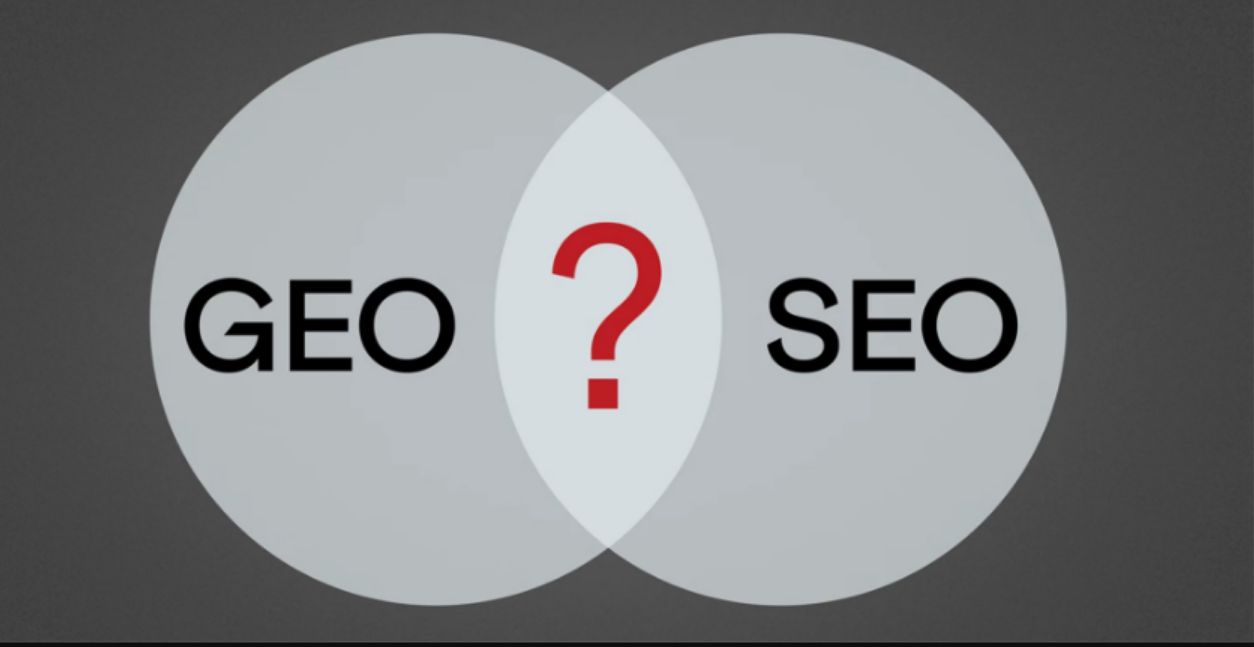
  • The Ultimate SEO Vs. GEO Guide for The 2026 Marketer

    The Ultimate SEO Vs. GEO Guide for The 2026 Marketer

    There has been a rapid increase in AI-powered search experiences like ChatGPT, Perplexity, and Google’s evolving Search Generative Experience (SGE).

    And businesses and content creators are facing a stark reality: ranking well in traditional search results is no longer the sole path to online discoverability.

    Leaders must now rethink their content through two distinct, yet interconnected lenses: SEO and GEO.

    What is SEO?

    Search Engine Optimization (SEO) is the well-established practice of improving a website’s visibility and ranking in traditional SERPs to drive organic traffic and ultimately, conversions.

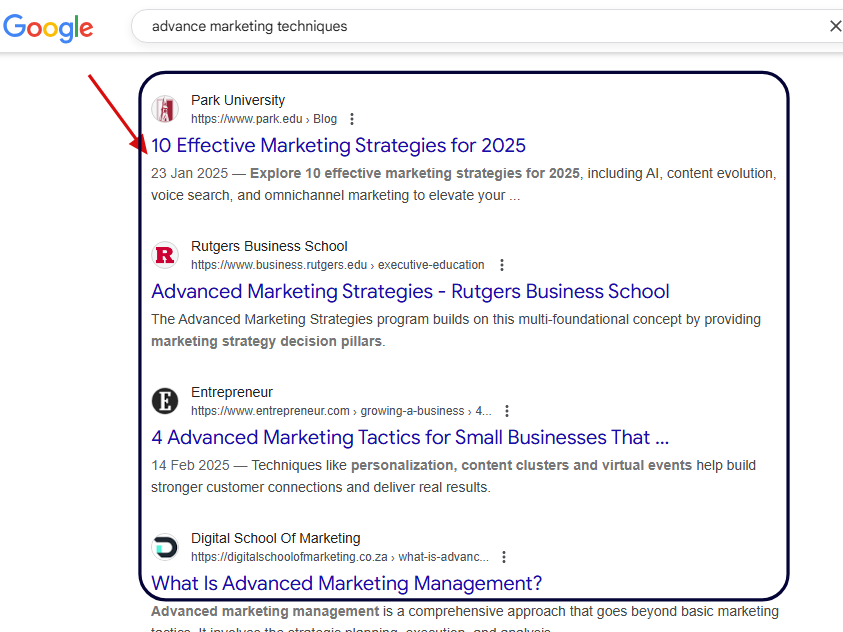
    Here is a visual example of the traditional SEO ranking system of blue links that direct users to your page.

    A screenshot of SERP page with a list of ranked sites

    The primary audience for traditional SEO has always been human searchers using platforms like Google, Bing and YouTube.

    Its evolution traces back to the early days of the internet, when basic algorithms analyzed keywords to determine relevance.

    Over decades, SEO has matured into a complex discipline, built upon these core pillars:

    • Technical SEO: Ensuring a website is crawlable, indexable and has a healthy technical foundation (e.g., site speed, mobile-friendliness, structured data implementation).
    • On-page SEO: Optimizing individual web pages for specific keywords and user intent (e.g., title tags, meta descriptions, headings, content quality, internal linking).
    • Off-page SEO: Building authority and trust through external signals like backlinks from reputable websites, brand mentions, and social signals.
    • Content Strategy: Creating authoritative and engaging content that answers user queries and satisfies their needs.

    What is GEO?

    Generative Engine Optimization (GEO) is the newer and more nuanced process of making your content retrievable, referenceable and directly cited by AI engines and large language models (LLMs).

    Unlike traditional SEO, which aims to get users to click on your link, GEO aims to have your content become the answer, or at least a highly credible source for an AI-generated answer.

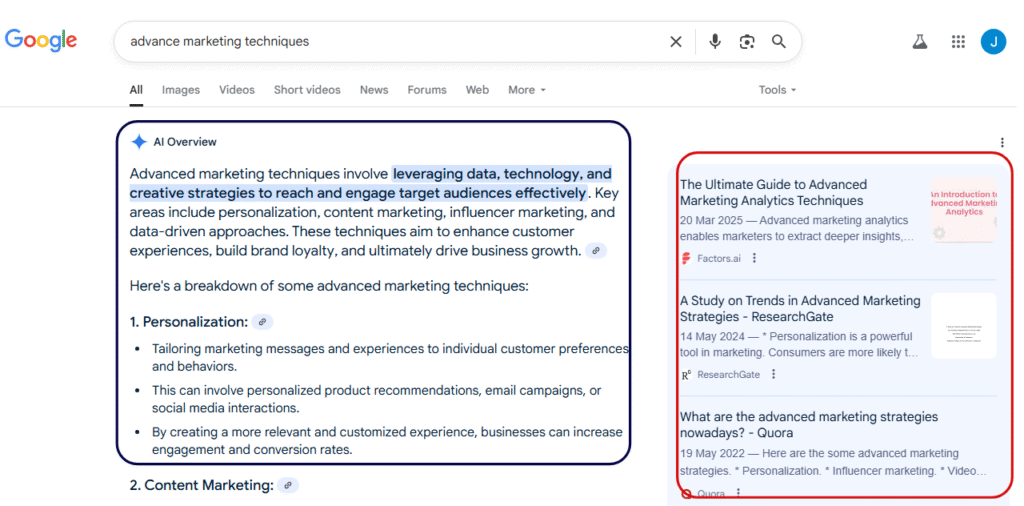
    To visualise the current AI search, here’s a screenshot that shows an AI overview summary on the left and the relevant cited pages on the right.

    A snippet view of how AI Overviews are presented in search engine.

    The audience for GEO is fundamentally different: it’s AI models themselves and by extension, the users interacting with AI agents and conversational interfaces.

    With GEO, the focus shifts from keywords in isolation to a deeper understanding of structured data, chunked facts, machine-readable formats and pervasive brand mentions.

    Key Differences Between SEO and GEO

    While both SEO and GEO aim for online visibility; their approaches, targets, and success metrics diverge significantly.

    Here’s a breakdown of their core differences:

    ElementSEOGEO
    User IntentHuman search queries (e.g., “best running shoes”)AI prompts, conversational queries, and agent tasks
    Ranking MechanismIndexing + Algorithmic SERP rankingRetrieval + LLM reasoning and summarization
    Optimization TargetSearch engine crawlers (Googlebot, Bingbot)Large Language Models (LLMs) like ChatGPT, Claude, Gemini, Perplexity
    Format FocusOptimized webpages, meta tags, links, comprehensive articlesData chunks, clean facts, structured formats (schema, tables, FAQs)
    MetricsRankings, organic traffic, click-through rate (CTR), conversionsMentions, citations, direct answers, embeddings, brand visibility within AI responses

    How GEO Impacts the Modern Marketing Funnel

    AI assistants fundamentally alter the traditional marketing funnel by introducing a new, critical discovery layer: zero-click discovery.

    A study by Wordstream shows that 58% of Google searches now result in zero clicks as consumers bypass traditional search results entirely.

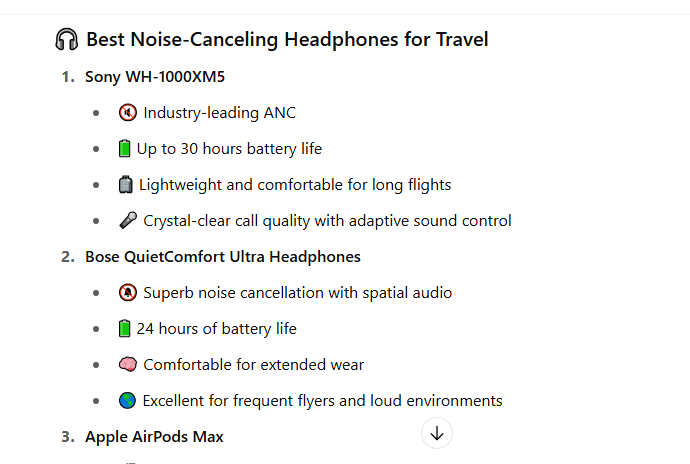
    • An example is when I asked an AI assistant: “What are the best noise-canceling headphones for travel?”

    Here is a snippet of the response from a list of 10 items ranked by quality:

    A screenshot example of how searchers can employ AI models for quick answers

    This shows that if your brand’s content isn’t visible to AI or detailed in a way that’s digestible by LLMs, you’re missing a massive chunk of the early-stage consumer journey.

    How SEO and GEO Work Together

    SEO and GEO are not mutually exclusive. Here is how they complement one another:

    • SEO Feeds GEO: Well-structured and optimized content that is easy for crawlers to understand and organize is more likely to be pulled into AI-generated summaries.
    • Programmatic Content For Dual-Purpose: Content generated programmatically for SEO scale (e.g., thousands of product variations or location pages) can be designed with GEO in mind to serve traditional search intent and AI prompts.
    • Brand Consistency and Trust: Both SEO and GEO benefit immensely from a consistent brand message, strong trust signals (E-E-A-T) and factual clarity.

    Practical Steps for Marketing Leaders

    Marketing leaders must employ sound strategies to prioritize both SEO and GEO initiatives.

    For SEO:

    Maintain a Strong Foundation

    • Invest in technical SEO and monitor your site health.
    • Adopt robust backlink strategy for authority,
    • Conduct a meticulous keyword mapping to ensure you’re targeting relevant human queries.

    Leverage Programmatic SEO for Scale

    Programmatic SEO is an efficient way to create content at scale when used strategically.

    Otherwise, you run the risk of creating thin content that does not appeal to user intent.

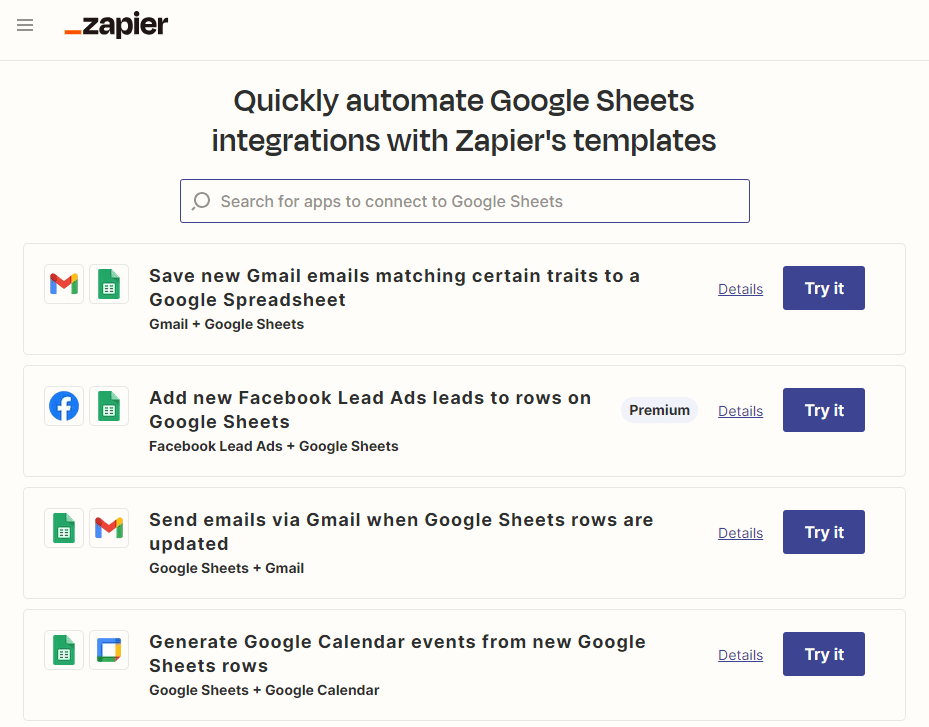
    Companies like Zapier have created thousands of landing pages for each product they integrate with using programmatic methods.

    A visual of Zapier's Programmatically producced content

    Monitor Traditional SERP Shifts

    Continuous monitoring of your site is essential. A Semrush study indicates that AI search visitors could surpass traditional search visitors by early 2028 or sooner.

    Keep a close eye on how Google’s AI Overviews and other generative features are impacting your organic clicks using tools like Ahrefs and Semrush.

    For GEO:

    Structure Content Relentlessly

    Break down complex information into easily digestible “fact blocks” that AI can readily identify and utilize.

    • Implement JSON-LD schema markup meticulously.
    • Use HTML tables, bulleted lists, and clear FAQ sections.

    Cultivate Brand Mentions Across Trusted Third-Party Sources

    AI models value collective intelligence and established authority.

    With strategic PR, you can:

    • Secure positive reviews on industry-leading platforms.
    • Build a strong network of brand citations on high-authority websites.

    Test Your Content’s Visibility in AI Platforms

    • Don’t just assume.
    • Actively search for your brand, products, and key topics in ChatGPT, Perplexity, Claude and Google’s AI Overviews.
    • Map out when and how your content is cited (or not cited) by these AI models.

    Publish Original Research and Definitive Guides

    To stand out, create content that offers:

    • Unique insights and perspectives
    • Proprietary data
    • Definitive answers to complex questions

    GEO Tools and Metrics to Track

    The measurement landscape for GEO is still in its early stages but rapidly evolving.

    Here are some tools to consider:

    1. Perplexity Pages / Pro Search

    This tool enables SEO professionals to research topics, create comprehensive content pages, and reference their own websites for link building.

    2. ChatGPT with Browse

    It analyzes existing content to identify optimization opportunities and generates SEO-optimized content by browsing current web data.

    When Browse is enabled, observe if ChatGPT directly links to or summarizes your content.

    3. LLM Retrieval Simulators

    These tools test and simulate how LLMs retrieve and process content for AI-powered search results from your site.

    4. AI Visibility Tools

    Platforms like Writesonic’s GEO, Profound, Peec AI, and Keyword.com are specifically designed to track brand mentions and visibility within AI-generated responses across various LLMs.

    They can help you monitor citation frequency, prominence, and even sentiment.

    5. Semantic SEO Tools

    These tools analyze entities, topics and relationships (beyond just keywords) to improve AI comprehension.

    The metrics to track include:

    • The frequency of brand/content citations in AI outputs
    • The position of your content within AI-generated summaries
    • Sentiment of the AI references
    • The types of queries that trigger your content as an AI source

    The Future: From SEO Teams to Visibility Teams

    The traditional “SEO team” must transition into a broader “AI Visibility Team.”

    This requires new skill sets and a reimagined workflow:

    • Content Engineers

    These professionals are essential for structuring content for machine readability and scalability.

    • AI Prompt and Retrieval Optimizers

    These are specialists who understand how users phrase queries to AI and how AI models retrieve information, enabling them to fine-tune content for optimal AI response.

    • Data Structuring Experts

    These professionals are skilled in implementing schema, creating robust content models and ensuring data integrity across complex content systems.

    Success will depend on how effectively organizations can structure their knowledge base to be consumed and cited by intelligent agents, not just crawled by traditional search bots.

    The Brands That Adapt Win

    The future of search is no longer just a list of blue links; it’s a combination of AI summarized answers, intelligent agents and interactive AI interfaces.

    While traditional SEO is still essential for driving conversions at the final stage of the customer journey, GEO is rapidly becoming critical at the initial, zero-click discovery phase powered by AI.

    Marketing leaders must recognize this shift and invest in both SEO’s foundational principles and GEO’s advanced content structuring to double their rewards; visibility and conversions.

    To ignore this, is to risk obsolescence.

  • Are AI SEO Agents the Future of SEO Teams? Pros and Cons Explained

    Are AI SEO Agents the Future of SEO Teams? Pros and Cons Explained

    The search engine optimization industry stands at pivotal crossroads with the widespread adoption of AI into different industries.

    As for your SEO strategy: the question is now whether AI SEO agents are it or not? The answer, is neither simple nor uniform, as we’ll see here.

    The global AI SEO software tool market is estimated to reach $4.97 billion by 2033 from $1.99 billion in 2024, indicating massive industry investment and adoption.

    In this article, I examine the role of AI in SEO teams, weighing the significant advantages against their inherent limitations.

    Traditional SEO vs AI SEO Agents Comparison

    The role of SEO professionals is shifting from manual execution to strategic oversight and AI collaboration.

    Before AI SEO agents, SEO specialists handled all optimization tasks manually, requiring significant time and expertise across multiple areas.

    Here is a comparison of the core traditional SEO roles with what AI SEO agent can do.

    SEO TaskTraditional SEO ApproachAI SEO Agent CapabilityStatus
    Technical AuditsManual crawling with tools like Screaming Frog, manual issue identification and prioritizationAutomated site scanning, instant issue detection, automated fix suggestions✅ Fully Automated
    Keyword ResearchHours of manual research using multiple tools, manual competitor analysisAI-powered keyword discovery, automated search volume analysis, instant competitor insights✅ Fully Automated
    Content CreationManual research, writing, and SEO optimizationAI-generated SEO-optimized content at scale✅ Fully Automated
    Link Building OutreachManual prospect research, personalized email writing, relationship managementAutomated prospect identification, AI-generated personalized outreach emails🟡 Partially Automated
    Performance ReportingManual data compilation from multiple sources, manual report creationAutomated data aggregation, real-time dashboards, AI-generated insights✅ Fully Automated
    Competitive AnalysisManual competitor research, manual gap analysisAutomated competitor monitoring, AI-powered opportunity identification✅ Fully Automated
    Strategy DevelopmentExperience-based decision making, manual trend analysisAI-driven strategy recommendations based on data patterns🟡 Partially Automated
    Local SEO ManagementManual GMB optimization, manual citation buildingAutomated listing management, AI-powered local optimization✅ Fully Automated
    Site Structure PlanningManual architecture design, manual URL planningAI-recommended site structures, automated internal linking strategies🟡 Partially Automated
    Crisis ManagementManual algorithm update response, manual penalty recoveryReal-time algorithm change detection, automated recovery recommendations🟡 Partially Automated

    Impact of AI SEO Agents on SEO Teams

    The integration of AI SEO agents is reshaping the structure, roles, and dynamics of SEO teams across organizations of all sizes.

    With a projection of 92 % of companies planning to increase their AI investments within the next 3 years, the implications for SEO professionals remain complex and multifaceted

    Transformation of Team Roles and Responsibilities

    Senior SEO professionals are evolving into AI strategy managers who oversee multiple agents and ensure alignment with business objectives.

    New positions like Quality Assurance Specialists emerge to monitor AI output and maintain brand consistency.

    Organizational Structure Evolution

    The organizational impact varies significantly by company size.

    Small-to-medium businesses can now achieve enterprise-level SEO results with a single professional supported by AI agents.

    Large enterprises are developing hybrid models where AI manages routine operations while humans focus on strategy and innovation.

    SEO agencies are experiencing the most dramatic changes, either adopting AI-first models to serve more clients with smaller teams or pivoting to high-touch strategic services that complement automation.

    Skills Development and Training Requirements

    Organizations must invest heavily in team development to succeed with AI integration.

    • AI literacy training for all team members.
    • Prompt engineering skills to effectively communicate with the AI agents
    • Creative problem-solving capabilities

    Performance Measurement and Management

    Organizations must develop hybrid metrics that fairly assess both human contributions and AI agent performance.

    Team management becomes more dynamic, requiring regular optimization of human-AI collaboration patterns and workflow adjustments based on performance data. Leveraging enterprise project management software can help streamline these adjustments and track collaboration efficiency over time.

    You need to organize an effective team meeting on mutually agreed time. Group meeting scheduler tools like Whenavailable helps management to find availability of every team member.

    Pros of Using AI SEO Agents

    Speed and Efficiency

    AI SEO agents can complete tasks in minutes that traditionally took hours or days. Keyword research, content optimization, and technical audits that once required extensive manual work are now automated and instantaneous.

    24/7 Operation

    Unlike human specialists, AI agents work continuously, monitoring rankings, tracking algorithm changes, and implementing optimizations around the clock without breaks or downtime.

    Consistency and Accuracy

    Eliminates human error in repetitive tasks like meta tag optimization, schema markup implementation and technical audits, ensuring consistent quality across all site pages.

    Cost Effectiveness

    Significantly reduces the need for large SEO teams, lowering operational costs while maintaining or improving output quality and speed.

    Comprehensive Coverage

    Can simultaneously handle technical SEO, content optimization, keyword tracking, competitor analysis and reporting without the specialization limitations that human teams often face.

    Predictive Analytics

    Advanced AI can forecast trends, predict algorithm changes, and recommend proactive strategies based on historical data patterns.

    Personalization at Scale

    Can create personalized SEO strategies for different audience segments, locations or user intents simultaneously across large websites.

    Cons: Limitations and Challenges

    Over-Optimization Risk

    Without human oversight, AI agents might over-optimize content, creating unnatural keyword stuffing or sacrificing user experience for search rankings.

    Relationship Building Deficiency

    Link building and digital PR still require authentic human relationships.

    These agents cannot genuinely network, build trust with publishers, or handle complex negotiations that require emotional intelligence.

    Context and Nuance Misunderstanding

    AI may miss subtle context clues, cultural nuances, brand voice requirements, or industry-specific considerations that human specialists intuitively understand.

    Ethical Blind Spots

    AI agents might engage in manipulative SEO tactics or ignore ethical considerations if they are not well calibrated with the industry guidelines.

    Dependence on Data Quality

    Poor or outdated data inputs lead to poor outputs.

    They can perpetuate biases, make incorrect assumptions, or fail when encountering scenarios outside their training parameters.

    Case Study: Advanced AI Integration

    Modern AI SEO platforms like ClickRaven demonstrate sophisticated integration capabilities that illustrate the potential for human-AI collaboration.

    ClickRaven AI SEO Agent exemplifies this by understanding entire site structures, building visual topical maps, identifying content gaps, and suggesting semantically relevant internal links.

    Such systems show how AI can enhance rather than replace human strategic thinking, enabling teams to focus on high-level strategy while AI handles comprehensive analysis and implementation tasks.

    This same principle applies beyond SEO. In high-stakes environments like post-merger integration, automation without context can create more risk than value. The most effective operators combine deep discovery, phased execution, and human judgment with technical systems that scale. For teams navigating complex integrations across CRM, ERP, and operational systems, the focus isn’t speed alone; it’s continuity, adoption, and risk control. To see how this philosophy is applied in practice, you can learn more.

    Conclusion

    The question of whether AI SEO agents represent the future of SEO teams cannot be answered with a simple yes or no. The evidence suggests a more nuanced reality.

    The rapid growth of the AI SEO market, combined with increasing business adoption and continuous technological advancement, suggests that this transformation is accelerating. Already, 85% of marketers use AI tools for content creation.

    The most successful implementations combine AI capabilities for data processing and automation with human oversight for strategy, creativity, and quality assurance.

  • What Is SEO Disaster Recovery and Why It Matters

    What Is SEO Disaster Recovery and Why It Matters

    DataReportal says that as of April 2026, there were 6.12 billion people around the world who were using the internet. This translates to 73.8% of the world’s total population, which makes it extremely important for businesses to have an online presence, as without it, their brand won’t be visible.

    An effective strategy is to use search engine optimization (SEO), which doesn’t always go smoothly. That is why it’s important to be knowledgeable about SEO disaster recovery.

    What Is SEO Disaster Recovery?

    SEO disaster recovery is when you restore organic search performance after major disruptions, such as:

    • Website outages
    • Failed migrations
    • Indexing problems
    • Botched deployments

    These issues can quickly damage your website ranking, traffic, and conversions if you don’t address them immediately.

    A strong recovery strategy should focus on minimizing downtime and preserving the technical signals that search engines rely on to crawl and rank a site properly. It should include:

    You should also have response workflows that allow teams to diagnose and resolve issues quickly.

    Why SEO Disaster Recovery Matters for Organic Traffic

    Organic search traffic can decline rapidly if technical errors go unnoticed. The following can remove important pages from search results within hours:

    • Deployment mistake
    • Accidental noindex tag
    • Server outage
    • Redirect failure

    Without a disaster recovery plan, it can take days or weeks to identify the problem and restore rankings, which can be costly. If you have predefined recovery procedures, your team can act quickly instead of troubleshooting under pressure.

    Building a Lightweight SEO Recovery Plan

    A lightweight SEO disaster recovery plan should focus on the most common technical risks that impact search performance.

    • Have a rollback strategy that lets your team quickly revert problematic deployments or website changes.
    • Redirect management and canonical tag safety nets are also critical. If incorrectly done, it can confuse search engines and cause indexing problems.
    • Your plan should also include monitoring systems for early detection of crawl errors, indexing drops, and manual actions.
    • Another key step is preserving server logs. These can provide valuable insight into crawler behavior and technical failures.

    The Importance of Monitoring and Recovery Drills

    Automated alerts from platforms can notify teams about:

    You can also identify problems quickly and prioritize fixes by monitoring keyword rankings, crawl activity and server uptime.

    Doing periodic restore drills is also important, as they can test whether your recovery procedures actually work under real conditions. You can simulate issues such as:

    • Broken redirects
    • Accidental noindex tags
    • Server outages

    These exercises help improve coordination between departments and ensure that everyone understands their responsibilities during an SEO emergency.

    Conclusion: Handle SEO Disasters Expertly

    You can never predict when SEO disasters happen, so having a good recovery plan can make things significantly better. Make sure to test your teams and have everyone know their roles so real emergencies can be handled smoothly.

    For more information about SEO, keep browsing our site.

  • How to Audit Your Website Authority Like an SEO Pro?

    How to Audit Your Website Authority Like an SEO Pro?

    Website authority is basically an SEO concept that is used to represent a domain’s strength, credibility, and trustworthiness in the SERPs. It reflects how capable a site is of performing well in the search engine results based on different factors rather than relying on a single metric. 

    Although Google has never acknowledged website authority as a ranking factor, it is still widely used in the field of SEO. In fact, SEO experts often recommend auditing your site’s authority from time to time. This involves evaluating topical relevancy, domain authority, backlink profile, and many more. 

    When done right, auditing can provide you with a roadmap to improve rankings, improve user engagement, and build long-term trust.

    So, in this blog post, we are going to break down how exactly you can audit your website authority like an SEO professional. 

    How to Audit Your Website Authority Like an SEO Expert

    Here are the things you need to consider when auditing website authority. 

    1. Benchmark Topical Relevancy

    The first thing you need to consider is topical relevancy. It helps determine how well your website demonstrates expertise in the targeted niche or industry. Google tends to prioritize websites that consistently publish relevant content for a specific audience, not those that offer unrelated information. 

    When reviewing topical relevancy, you must pay attention to these three elements: 

    • Content clusters
    • Internal linking 
    • Keyword gap

    Analyze whether your web content is well-organized into relevant topic clusters or not. A good cluster involves a pillar page (broad topic) supported by multiple related articles. Usually, it is said that a broad topic should have at least 8-12 interlinked blogs. 

    When it comes to internal links, these help search engine crawlers to discover relevant pages, ultimately strengthening the site’s topical authority. So, while auditing, you are required to check if articles contain enough internal links. 

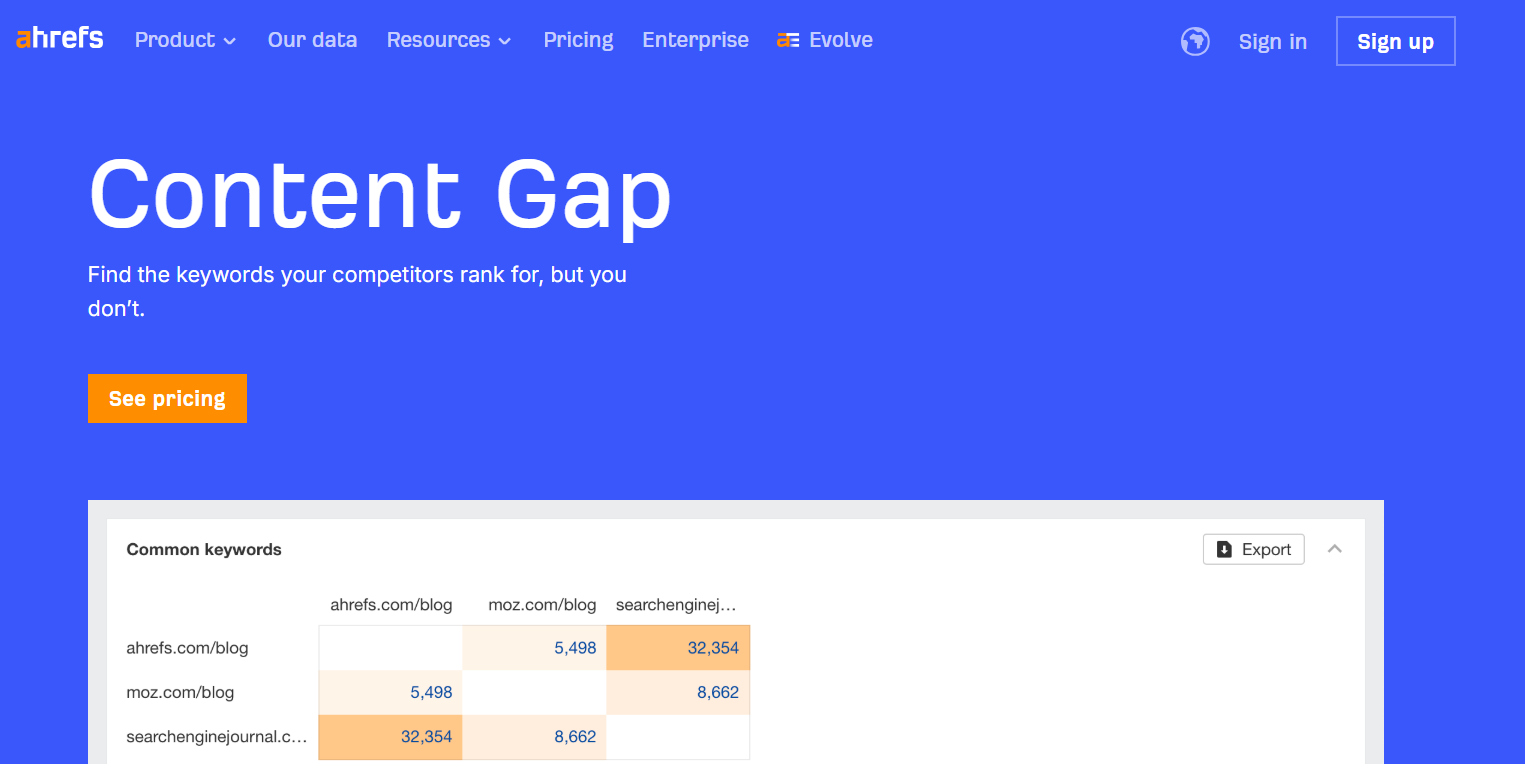
    Finally, identify the keywords that your competitors are using to gain visibility, but you are not. Tools like Ahrefs offer dedicated features to perform keyword gap analysis. 

    Ahrefs content gap screen

    The tool will help uncover missed opportunities within your content strategy, increasing the overall chances of rankings. 

    2. Review Backlink Profile

    Backlinks are widely considered a strong ranking factor, but it is also true that not all links are created equal. A good backlink can take your website’s performance to new heights, while a bad one can do the opposite.

    For this reason, it is considered essential to review the backlink profile when auditing your website’s authority. A good audit focuses on link quality, relevance, and diversity. Here are the things you need to watch out for:

    • First and foremost, determine how many unique websites are linking to your domain. A high number usually indicates a good profile. 
    • Analyze whether the linking websites are relevant to your target niche/industry. A single backlink from a relevant domain carries more weight and value than multiple ones coming from irrelevant sites. 
    • Also, pay attention to toxic or low-quality backlinks; these can cause serious harm to your site’s performance. Look for irrelevant domains, generic anchor text, and repetitive links from the same sites. 

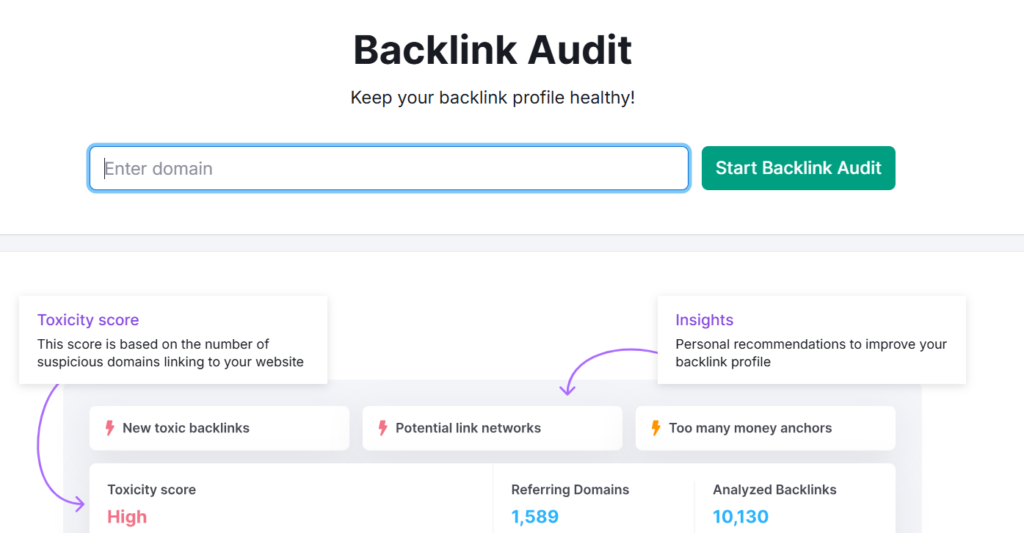
    Now, the question is, how can you perform all these at once? The answer is to rely on specialized SEO tools such as Semrush. It will provide detailed insights into a website’s backlink profile, simplifying the auditing process. 

    backlink audit

    Note that, while auditing, the quality of backlinks matters far more than the quantity. 

    3. Check for Domain Authority Score

    Domain authority (DA) is a third-party SEO score ranging from 0 to 100. It simply predicts the ranking potential of a site in the SERPs. It is essential to note that domain authority is not officially recognized as a “Ranking Factor” by Google. Still, it is widely considered a useful metric for auditing site authority. 

    A high score indicates that the site is considered valuable and trustworthy. Whereas a low score means the site is either new or facing difficulties in winning the search engine’s trust. 

    Different DA score ranges are generally interpreted as:

    • 1-20 (low)
    • 20-40 (average)
    • 50-60 (Good)
    • 60+ (Excellent)

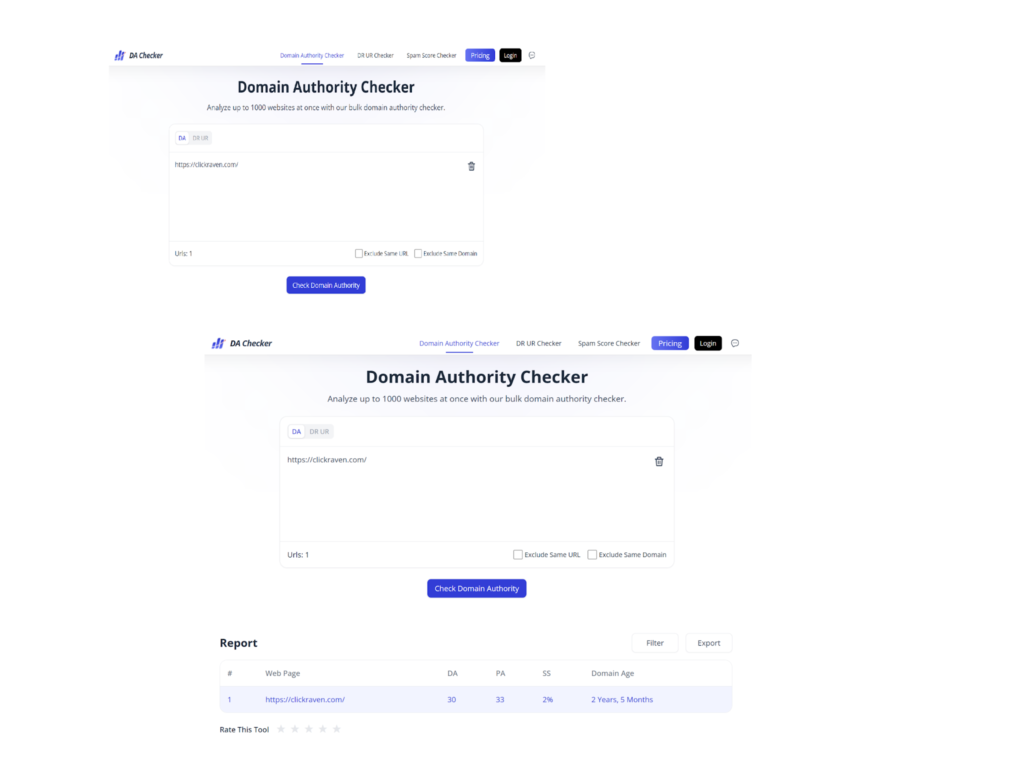
    You can use DA Checker to quickly check the domain authority score of your website. It is free, simple to use, and can process multiple URLs at once. Simply enter the domain address, click the button, and review the results.

    domain authority checker

    Instead of solely focusing on the DA score ranges mentioned above, it’s more useful to compare your score with that of your top competitors during the audit. This gives the number proper context. For example, a DA of 40 might be relatively strong in a low-competition niche, but the same score could be considered weak in a highly competitive space where leading sites have much higher authority.

    4. Check for Trust Signals

    trust signals

    Trust signals also play a key role in either making or breaking your site’s authority in SERPs. These help search engines understand whether your website is credible and trustworthy. So, when performing an audit, also consider these signals.

    Below, we have listed some important trust signals: 

    • About Us and Author Pages: Check if your website is clearly demonstrating who you are, what you do, and who actually creates content for your blog/business site. This will add transparency and also build confidence among both the audience and the search engine. 
    • Editorial Standards: Also, review your editorial standards. A well-written, accurate, and up-to-date content significantly boosts a website’s authority. 
    • Social Proof: Check if you have added endorsements or validations from other brands or satisfied customers. These also indicate the domain’s credibility and authority in the targeted niche.  

    So, these are a few major factors that you should look for when auditing your website for authority like an SEO professional. 

    Wrapping Up

    A PRO-level audit for website authority goes far beyond surface-level metrics (i.e., traffic, average position, etc.)

    It involves reviewing your domain’s topical authority, backlink profile, trust signal, and much more. This blog post has explained all these essential factors in complete detail. 

    Hopefully, you will find the information valuable and interesting!

  • 7 Expert Tips to Structure Pages for AI Citations and Real Leads

    7 Expert Tips to Structure Pages for AI Citations and Real Leads

    AI citations happen when large language models reference or summarize a page as a source in their answers. In simple terms, the page becomes part of the machine’s explanation. This matters because citations influence trust, shape buying research, and capture demand before a user even clicks.

    The goal is not visibility alone. Pages should earn citations and still drive real leads. The seven tips below focus on structure, intent, proof, and conversion placement. Teams that want to explore specialist packages for implementing AI tools in practice can visit Netpeak US to discover how structured AI SEO solutions are applied in real projects. This guide explains what actually works.

    Tip 1 — Answer First, Then Expand

    AI systems prioritize direct answers. Pages that open with a short, clear response have a higher chance of being quoted. Two or three lines that define or solve the core question make extraction easier.

    After the direct answer, depth can follow. Add context, examples, and clarifications below the opening summary. This structure helps human readers scan quickly while giving AI tools a clean quote-ready block.

    In practice, pages that lead with clarity outperform pages that build suspense. The key is to remove ambiguity from the first screen. A visitor should understand the main takeaway without scrolling. When the primary answer appears immediately, both AI systems and decision-makers gain confidence in the page’s usefulness.

    Tip 2 — Keep One Page, One Primary Intent

    Mixed intent pages confuse both users and retrieval systems. A page that tries to define, compare, and teach at the same time often lacks structure. AI tools struggle to extract a clear takeaway.

    Clear intent simplifies citation. It also improves conversion because users see exactly what they searched for. Common intent splits that deserve separate pages:

    • definition vs comparison;
    • “how to” vs “best tools”;
    • tutorial vs pricing breakdown;
    • beginner guide vs advanced strategy;
    • product overview vs implementation checklist.

    When each intent has its own page, internal links can connect them. This creates a clean knowledge hub. AI systems can then reference the right page for the right question.

    Tip 3 — Build Quote-Ready Sections

    Quote-ready sections are short blocks that summarize key points under descriptive headings. After each H2 or H3, add a micro-summary. This makes extraction easier and keeps the structure consistent.

    Many teams refine this approach inside broader AI marketing workflows, where content is planned around retrieval patterns instead of just keywords. Small structural shifts often increase citation frequency without rewriting entire pages. A simple tactic works well: include a one-sentence “In short” line after complex explanations. This improves both scannability and AI readability.

    Tip 4 — Use Headings That Read Like Questions People Ask

    Headings influence how AI tools retrieve information. Question-style headings mirror real search queries. They also help users understand what each section answers. Clear question patterns reduce ambiguity and increase the chance of being quoted. When a heading matches the wording a user might type into a search bar, retrieval becomes more accurate. Strong heading patterns include:

    • what is…;
    • how to…;
    • when should you…;
    • best way to…;
    • common mistakes in….

    Consistency matters. Keep headings specific and avoid vague titles like “Overview” or “Details.” When headings reflect real user language, retrieval becomes more precise. Over time, this structure also makes content easier to update, because each section clearly maps to one focused question rather than a broad theme.

    Tip 5 — Add Proof Without Turning the Page Into a Report

    AI citations favor pages that include constraints, criteria, and data points. Proof does not require a long research paper. It can include timeframes, ranges, definitions, and conditions that frame the statement clearly.

    For example, instead of saying “improves conversions,” clarify the context, such as which funnel stage, audience segment, or timeframe the result applies to. Light attribution helps too. Briefly mention what a number refers to, how it was measured, and under what conditions it applies.

    The goal is clarity, not volume. Concise proof strengthens authority and makes quoting safer for AI systems. It also reduces misinterpretation, because the claim stands on defined boundaries rather than general language. When proof is specific but compact, it supports both credibility and readability without overwhelming the page.

    Tip 6 — Place Conversion Paths Next to Value

    Citation alone does not generate leads. Conversion paths must sit close to high-value sections. After a definition or tutorial block, offer a logical next step. Conversion placements that don’t break trust:

    • contextual CTA after a how-to section;
    • template download below a checklist;
    • demo link after a comparison block;
    • audit offer following a diagnostic guide;
    • short consultation invite after a pricing explainer.

    Each placement should match intent. A reader comparing tools may prefer a checklist, while someone implementing a strategy may respond to a demo. Relevance keeps trust intact.

    Tip 7 — Control Quality When Using AI to Produce Content

    AI tools accelerate drafting, but they can introduce thin or repetitive pages. Editorial review remains essential. Every section should answer a real question and avoid vague claims.

    Teams must align outputs with entity consistency, factual accuracy, and structure. It helps to cross-check content against the guidance outlined in Google’s rules for AI-generated material. This ensures pages remain compliant and trustworthy. Quality control also includes regular updates. AI citations favor pages that stay current and precise.

    Conclusion

    Pages that earn AI citations and real leads follow a disciplined structure. They open with direct answers, focus on one primary intent, and include quote-ready sections that AI systems can extract cleanly. Clear question-based headings, concise proof, and well-placed conversion paths connect visibility with business results. When structure supports both retrieval and user intent, citations become more likely, and lead quality improves.

    Teams that treat AI visibility as an ongoing system usually test, refine, and document what works over time. In many practical cases, Netpeak US has applied this structured approach across different industries, validating which page formats and content models produce consistent outcomes. Rather than chasing trends, they focus on repeatable processes, careful implementation, and measurable impact.

  • How Brands Can Improve Visibility in LLM Search Results

    How Brands Can Improve Visibility in LLM Search Results

    Large language models (LLMs) are essential in the fast-changing digital field because of their ability to retrieve information and make decisions. LLMs are used in information-gathering processes in ways ranging from AI chatbots to virtual assistants. There is a different opportunity presented to businesses. Optimizing your brand’s online presence and understanding LLMs can help your brand differentiate from the competition in a market dominated by AI-based LLM usage.

    For companies looking to increase their AI-driven search performance, Dageno AI provides insights and strategies to ensure your brand is seen and recognized effectively.

    Recognizing LLM Search Engines and Their Implications

    LLMs search natural language based questions and choose relevant and credible data to provide answers. LLMs operate differently from “traditional” search engines, which perform keyword matching. They are capable of understanding a user’s “intent, meaning and context” LLMs search natural language based questions and choose relevant and credible data to provide answers.

    Simply having SEO knowledge is not enough. Sturdy, premium, adept and relevant data is more valuable than simply having noticeable, and well-structured data.

    LLMs are designed to recognize and process the following:

    • Relevant context in data
    • The credibility of the information presented
    • The recency of the data and updates
    • The organization and quality of the information

    In order to improve the chances of your brand being used in AI generated answers and suggestions, you can improve the quality of your brand data in AI generated answers and suggestions.

    Ways to Increase Brand Recognition

    Brand awareness is key for LLMs to promote products and services. Here are a few ways to improve brand awareness.

    1: High-quality and relevant content

    LLMs focus on high-quality content that is coherent and relevant to the query and the user. Write detailed content, guides and articles that discuss your niche and use a clear and logical structure to do so, with headings, bullet points, and a logical sequence for the content.

    • Automate your content while trying to match the user’s prompt.
    • Cover the whole context by covering the multiple facets of the topic.
    • Content should show the update to retain relevance and content accuracy.

    2: Metadata and structured data

    Data structuring allows LLMs to understand the covered content. They can improve prompts to search AI and integrate LLMs into products. Data structure and schema mark technical elements such as:

    • Product Data
    • Review and rating data
    • FAQ and how to tutorial
    • Event data

    If the meta data is properly implemented, AI prompts will consider and improve the content focus.

    3: Brand trust and credibility

    LLMs focus on reputable, credible and trustworthy sources. Brand trust and credibility impact AI recognition.  For teams producing AI-assisted content, running outputs through an AI detector before publishing can help the content meet authenticity standards that LLMs use as credibility signals.

    Relevant methods include:

    • Publishing original research
    • Reputable sources backlinks
    • Review
    • Reputable community social media engagement

    The reliability of the content is established by LLMs and helps gain LLMs recognition.

    4: Increase User Engagement

    Engagement metrics describe the relevance and usefulness. Over-the-top Language Models may consider user interactions as site visitors’ retrieved documents, and the AI system may focus on user interactions. Some of the ways we can achieve that include:

    • Straightforward and simple language
    • Content that is interactive, for example, quizzes and polls, and in the case of videos movement can be used to add interactivity
    • Navigation on the site, and the site’s engagement and responsive interface

    The engagement of human users is the direct positive impact but for AI systems, engaging your users signals that your brand is valuable.

    5: Track Performance and Optimize

    Keeping a regular feedback loop gives brands the opportunity to optimize their strategy regarding the analytical data. Focus on the reach of the content, the engagement, and the visibility of the content to the AI. Make modifications to the content, settings, and structure of your website. Additionally update the parameters in the documents to help your website align with the requirements of the LLM and user behavior.

    What Are The Positives When Prioritizing LLM Search Visibility?

    Optimizing LLM search results has a lot of positive outcomes.

    • Increasing brand awareness: Your brand appears in AI generated responses, even in the early stages of customer decision making.
    • Increasing trust and authority: LLM’s are capable of identifying trustworthy and reputable content. Recognized brands enhance their brand’s authority.
    • Increasing engagement: LLMs are designed to optimize content. This should increase customer engagement.

    Conclusion

    The increasing number of AI tools to drive search is a challenge and an opportunity. To remain relevant and useful to users, a search drive must be built on AI Optimized tools.

    Strategies to increase brand visibility in LLM search results. All powered tools driving search results will recommend, trust, and get business visibility and growth.

  • Top 7 Coupon Sites for SEO Tools

    Top 7 Coupon Sites for SEO Tools

    Ranking on page one is no longer just about strategy. It is about budget control. Premium SEO platforms, AI writing tools, backlink databases, and scraping infrastructure now cost more than ever. For agencies and independent consultants, ignoring those rising costs is a fast way to shrink profit margins.

    This is why discount hunting has evolved into a serious business function. Smart SEO professionals no longer treat coupons as small savings. They treat them as margin protection tools that compound over time.

    Why Discount Hunting Is Now a Competitive Advantage

    The SEO industry is dealing with subscription fatigue as nearly every essential tool runs on recurring billing. Most major platforms have increased pricing tiers, especially for advanced features and higher usage limits. Even small monthly hikes compound quickly when you rely on multiple tools.

    For agencies managing dozens of campaigns, those increases translate into serious annual overhead. Startup founders and ecommerce operators face the same pressure while trying to scale organic growth efficiently. Software expenses can quietly erode profit margins if they are not actively managed.

    Securing recurring discounts changes the cost structure without sacrificing capability. The savings can be reinvested into content production, technical improvements, or customer acquisition. Disciplined expense control has become a genuine competitive advantage in modern SEO.

    How the SaaS Coupon Ecosystem Actually Works

    Most professional coupon platforms operate through affiliate tracking systems. SaaS providers give them unique links or promo codes, and the platform earns a commission when a user subscribes through that link. In return, the customer receives a discounted price. This performance based model keeps both the software company and the coupon platform aligned.

    Promotions usually come in several formats, including recurring percentage discounts, annual billing reductions, and limited time sales. Some newer tools also launch lifetime deals to attract early adopters. The most reliable coupon sites actively verify these offers and remove expired codes, which saves users from checkout frustration and wasted time.

    Evaluation Framework for Professional Coupon Sites

    Not all coupon platforms offer the same level of reliability. Some list outdated promotions and rarely remove expired codes, which wastes time for busy professionals. A structured evaluation process helps separate serious platforms from generic directories.

    This ranking prioritizes code accuracy and update frequency. It also considers tool coverage depth, exclusive partnerships, and clarity around billing terms. Clean navigation and transparent conditions are essential for confident subscription decisions.

    Top 7 Coupon Sites for SEO Tools

    The following platforms stand out for their relevance to digital marketers and SEO professionals. Each one has been evaluated based on accuracy, update consistency, and practical value for recurring SaaS subscriptions. Whether you manage multiple client accounts or operate solo, these sites can help reduce software overhead without compromising performance.

    1. SaveMyCent

    SaveMyCent focuses heavily on digital marketing and SaaS discounts, which makes it highly relevant for SEO professionals. Instead of mixing random retail offers, it prioritizes software deals that agencies and consultants actually need. That specialization reduces noise and speeds up decision making.

    The platform maintains consistent updates around major SaaS promo cycles, which improves code reliability. Discounts are usually presented with clear billing and plan details, helping users avoid surprises at checkout. For professionals managing recurring subscriptions, that clarity adds real value.

    2. ProxyCoupons

    ProxyCoupons focuses on SEO infrastructure and software driven tools, making it especially useful for technical marketers. It regularly features discounts on proxies, scraping platforms, and data services alongside mainstream SEO suites. For agencies running automation or large scale campaigns, that niche coverage can reduce a significant operational expense.

    The platform updates promotions around active sales cycles and limited time campaigns. Percentage based discounts are common, which can create meaningful savings on recurring subscriptions. For professionals monitoring monthly overhead closely, that responsiveness makes it a practical resource.

    3. ClipMyDeals

    ClipMyDeals provides a broader aggregation model that includes software alongside other categories. Its strength lies in comparison efficiency. Users can quickly scan multiple available promotions for a single tool without visiting separate vendor pages.

    The platform works well during research phases when evaluating different SEO tools. Startup founders and freelance consultants can identify percentage discounts, trial extensions, or seasonal offers in one consolidated view. It is best used as part of a layered validation approach rather than a standalone authority.

    4. Saver.com

    Saver.com maintains a large scale coupon database with consistent refresh cycles. Its SEO and SaaS section is active enough to provide relevant promotions. The platform often surfaces trending deals, which helps users discover new AI driven tools offering introductory pricing.

    Community interaction adds another layer of confidence. Users frequently report whether codes are working or expired, keeping listings current. For content creators exploring new workflow tools, this feedback mechanism improves decision speed.

    5. DontPayFull

    DontPayFull operates with a high volume aggregation strategy. It frequently lists multiple promotional paths for the same SEO tool, including student discounts, seasonal sales, and first time user incentives. That diversity increases the chance of finding a working deal.

    Usage data is often displayed alongside codes, showing how frequently they succeed. This transparency helps freelance consultants prioritize which promotions to test first. For recurring subscription tools, that small efficiency gain matters.

    6. CreativeBin

    CreativeBin takes a more curated approach to digital and marketing software. Its selection tends to align well with SEO professionals who also rely on design, analytics, and productivity tools. This cross category alignment supports building a complete marketing stack.

    The platform occasionally highlights bundled discounts across complementary tools. That structure can produce higher aggregate savings compared to single tool promotions. For agencies expanding service offerings, this broader lens is valuable.

    7. TenereTeam

    TenereTeam combines business focused technology discounts with a clean interface. SEO tools appear within its broader tech ecosystem, making navigation straightforward. The layout avoids clutter, which speeds up the search process.

    The platform maintains competitive discounts for major SaaS brands while preserving a simple presentation style. Freelance consultants and small teams who prefer minimal friction often appreciate this streamlined experience. As always, checkout validation remains essential before committing to annual billing.

    Which Platform Fits Your Operational Model

    Agencies managing multiple clients generally benefit from focused SaaS platforms like SaveMyCent and ProxyCoupons. Their emphasis on infrastructure and marketing tools aligns with high volume subscription needs. Before committing to discounted subscriptions, it also helps to review the broader landscape of available SEO software through a detailed SEO tools comparison to ensure the savings align with long term strategy. Reliability and update frequency become crucial at scale.

    Solo consultants and bloggers may find broader discovery platforms such as Saver.com or CreativeBin more flexible. These sites help uncover emerging tools offering early stage discounts. That discovery angle supports experimentation without overspending.

    Startups and ecommerce operators should prioritize platforms that clearly outline renewal terms and annual savings. Long term visibility over subscription costs simplifies financial planning. Matching platform strengths to operational needs produces the best results.

    Practical Tips for Validation and Stacking

    Always test coupon codes at final checkout before completing payment. Some promotions only apply to specific tiers or geographic regions. Reading the fine print prevents costly billing mistakes.

    Timing plays a critical role in maximizing savings. Black Friday, Cyber Monday, fiscal year resets, and mid year SaaS promotions often produce the deepest recurring discounts. Planning purchases around these windows improves cost efficiency.

    In some cases, stacking is possible. Applying a promotional code on top of an already discounted annual plan can significantly reduce total cost. This layered approach is how experienced SEO agencies maintain lean operational budgets.

    Conclusion

    Managing SEO software costs is part of staying competitive. Subscription prices will continue rising, but smart operators know how to reduce that pressure without sacrificing performance. The key is combining timing, validation, and consistent research before every purchase. When approached strategically, discount hunting becomes a reliable way to protect margins and scale sustainably.

  • Essential Tips for Creating an Effective Digital Marketing Budget

    Essential Tips for Creating an Effective Digital Marketing Budget

    Writing a budget takes time, and you need to know where your money goes. A solid plan stops you from spending too much on things that do not work. Every dollar counts when you want to grow a brand online.

    Use data to guide your choices and keep your team on track. This guide covers how to set up a plan that yields results. Focus on the numbers that matter most to your specific business model.

    Define Your Primary Objectives

    Setting goals is the first step in any plan. You must know what you want to buy with your marketing dollars. Some teams want more clicks on their ads, and other teams want people to sign up for a newsletter.

    Clear goals prevent you from wasting money and help you measure your progress when you have a target. Do not try to do everything at once: just pick two or three big goals for the year. Small goals can work with a leaner spend.

    Analyze Your Historical Data

    Most managers prefer to start with what worked last season. Those who handle their accounting with Afino or other reliable local professionals find that having organized records makes this process much faster. High-quality data tells you which ads brought in the most profit.

    Identify the channels that failed to perform. Cut the spending on those areas to save cash and move that money to the winners. Past performance shows you the habits of your customers so that you can see when they shop and what they like.

    Understand Projected Market Growth

    Competition for eyes on a screen is at an all-time high. Ad space is limited, and more brands want it. The global digital marketing market might hit $786.2 billion by 2026. You are fighting for space against thousands of other brands.

    Prices for keywords can jump without warning. Stay ahead of the curve by watching these trends. Plan for higher costs in your early drafts. It is better to have extra money than to run out in June.

    Calculate Your Percentage Of Revenue

    Deciding on a total number is often the hardest part. Many companies look at their total sales to find an answer. A survey of marketing officers showed that average budgets stay around 7.7% of company revenue.

    Smaller companies might spend a higher percentage to grow fast, whereas older companies might spend less to keep their spot. Talk to your finance team about what is possible. They can tell you how much profit you have to play with. Balance your dreams with the reality of your bank account.

    Prepare For B2B Spending Increases

    If you sell to other businesses, be ready to spend more. Your rivals are already planning to hike their budgets. Around 83% of B2B decision makers will increase their spending next year. This means your rivals will have more money to use against you.

    You must keep up to maintain your market share, and lagging could cost you valuable leads. Focus on quality over quantity in this space. B2B sales take longer and need more touchpoints. A larger budget helps you stay in front of the buyer for the whole journey.

    Allocate Funds Across Diverse Channels

    Never put all your cash into just one ad platform. Diversification keeps your brand safe if one site changes its rules. Check your data to see which mix works best. Some brands thrive on video, and others do better with short text posts. Testing different mixes will show you the right path for your specific niche.

    Consider these different areas for your spending:

    • Paid search ads for quick leads
    • Social media for building a community
    • Email marketing for keeping current fans
    • Content creation for long-term growth

    Focus on your strengths first. If you have a great writer, spend more on blogs. If you have a great video team, spend more on YouTube.

    Monitor Your Performance Metrics

    A budget is not something you set and forget. Small changes can save you thousands of dollars over a year. Watch your cost per lead carefully: if it gets too high, pause that campaign. Look for ways to make your ads more efficient.

    Marketing is a game of constant testing, as what worked in January might fail in July. Being flexible with your money allows you to jump on new opportunities. Keep a small reserve fund for testing new ideas that pop up mid-year.

    Building a digital marketing plan provides a map for your growth. Use data and market trends to make the best choices. Stay focused on your goals and watch your metrics. This approach helps you get the most value for every cent spent.

    A well-planned budget turns your vision into a reality for your business. Practice patience as you learn what works for your brand. Success comes to those who plan for the long term.

  • How Data-Driven Inventory Planning Fuels Sustainable Ecommerce SEO Growth

    How Data-Driven Inventory Planning Fuels Sustainable Ecommerce SEO Growth

    Most online stores lose money every day due to poor inventory decisions. You are either out of best sellers or buried in products nobody wants. Both problems silently murder your growth. For SEO-driven businesses, a stockout doesn’t just mean a lost sale; it means your high-ranking product pages are now leading to “out of stock” messages, which can damage your search engine authority over time.

    Looking to grow your ecommerce store without spending money on inventory that just piles up? Data-driven replenishment planning eliminates the guesswork and substitutes cold, hard facts. You can:

    • Stop running out of best sellers
    • Free up cash tied in dead stock
    • Predict demand before it spikes

    And use that data to grow your store and improve its search visibility the smart way.

    The Real Cost Of Bad Inventory Decisions

    The cost of bad stock control is much greater than most retailers realise. Worldwide, stockouts cost retailers $1.2 trillion every year in lost sales alone. And that’s just the immediate impact. It does not account for the customers you lose forever.

    When customers can’t find what they want, they don’t wait around. 69% of online shoppers abandon their purchase and shop with a competitor instead. You spend money on ads and SEO to bring in traffic, the customer adds to cart, and then you lose them because of a stocking mistake.

    Overstocking is just as costly. Your money is tied up on the shelf, you’re paying for storage you don’t need, and you end up discounting product to move it, which crushes your margins.

    That’s why forward-thinking retailers are leveraging data to get it under control.

    What Is Data-Driven Replenishment Planning?

    Replenishment planning is determining precisely when to reorder, how much to reorder, and which products to replenish first.

    Most retailers do this wrong using intuition, a simple spreadsheet, or simply reordering when they see something is low. None of that cuts it anymore.

    Data-driven replenishment planning is different. Modern demand planning solutions pull in real numbers from your store: sales velocity, seasonality, supplier lead times, and stock on hand. They then forecast what your customers will want weeks or months ahead, giving you data-driven confidence rather than guesswork.

    Companies using AI forecasting see 3-7% gains in revenue per year. That’s tangible growth achieved by getting your stock levels right.

    The Core Benefits For Ecommerce Stores

    This is how data-driven replenishment planning helps your store.

    Better Cash Flow

    Cash flow is the lifeblood of every ecommerce store. If your money is tied up in slow-moving stock, you can’t invest in:

    Data-driven planning tells you where your cash is sitting and where it’s going (from slow moving SKUs to fast-moving ones). Shift the spend on goods that move, and your cashflow will improve dramatically.

    Optimizing the ecommerce checkout process also supports healthier cash flow by reducing cart abandonment, accelerating completed purchases, and helping revenue reach your business faster.

    Fewer Stockouts (And Fewer Lost Sales)

    The insidiousness of stockouts is that most retailers don’t see their total impact. You see the sale you lose, but you don’t see the customer who goes elsewhere for good, the bad review they write, or the friend they tell.

    Data-driven systems automatically establish intelligent reorder points based on actual demand data. They identify SKUs that are at risk of stockout before the fact. That way you can replenish before the issue occurs.

    Smarter Buying Decisions

    Ever ordered way too much of something because you “had a feeling” it would sell? Gut feel is wrong more times than you want to admit. Data-driven planning takes the guesswork and replaces it with real sales patterns. You order based on what your customers are buying, not what you hope they will buy.

    Improved Customer Experience

    Happy customers come back. Stocked-out customers don’t. Sell your bestsellers everyday and your customers will know you are consistent. In time, this will build customer loyalty, higher repeat purchase rates, and better word-of-mouth. That’s a sustainable growth which isn’t reliant on increasing ad spend every month.

    Sustainable Scaling

    Stock problems get worse as you grow. More products, more channels, more orders. The mistakes you make now will be 10x worse when you double in size. Data-driven planning sets you up to scale without the chaos.

    How To Start Building A Data-Driven Strategy

    Get Your Data In One Place

    Start by pulling together all your sales data. This includes daily and weekly sales, stock levels, supplier lead times, and returns. If your data is spread across multiple sources like spreadsheets, your store, and a notebook, get everything in one system before you do anything else. ERP tools can also be used to centralize and manage this data.

    Track The Right Metrics

    You can’t improve what you don’t measure. The most important metrics are:

    • Stockout rate
    • Inventory turnover
    • Sell-through rate
    • Days of inventory on hand

    Top-performing stores keep stockout rates between 2-5%. Where does your store sit?

    Use Forecasting Tools

    Forecasting tools extrapolate from your history what is likely to occur next, considering seasonality, promotions, and trends. Just choose a tool that can fit your store and start with 20 of your top SKUs. Nail those down and keep moving.

    Review And Adjust Regularly

    Replenishment planning is not “set and forget”. Markets evolve, trends change, and suppliers make mistakes. The best stores review their plan weekly or monthly and adjust according to what is actually happening.

    Final Thoughts

    Data-driven replenishment planning is one of the smartest moves any ecommerce store can make today. It tackles the two biggest stock problems at once, running out and over-stocking, by using product-specific numbers.

    To quickly recap:

    • Stockouts and overstocks cost ecommerce stores billions every year
    • Data-driven replenishment planning fixes both problems at once
    • The benefits include better cash flow, fewer lost sales, and sustainable scaling
    • Start small with clean data, the right metrics, and a forecasting tool

    The retail winners in the next few years will not be those with the largest ad budgets. They will be the ones managing their inventory like it’s a precision machine.

    Start small. Get your numbers right. And watch how your store grows.

  • 23 SEO Tips to Help You Rank Higher in 2026

    23 SEO Tips to Help You Rank Higher in 2026

    1. Keyword Optimize your content.

    2. High quality content.

    3. Structure your content well.

    4. Seek the featured snippets.

    5. Optimize your Page Titles.

    6. Optimize Your Meta descriptions.

    7. Keep your URLs short, tidy, and readable (memorable?).

    8. Get backlinks and Niche Edits from high-authority sites.

    9. Optimize your page speed.

    10. Add internal links to your content.

    11. Add high-quality – high authority external links to your content.

    12. Use high-quality and well-optimized visuals.

    13. Do a technical site audit often.

    14. Audit your content often.

    15. Study the competition to find content gaps.

    16. Study the competition to find link gaps.

    17. Reduce your bounce rate.

    18. Remove dead non-trafficked pages.

    19. Use related keywords in your content.

    20. Update old content.

    21. Leverage SEO tools for unseen wins or optimizations and to track SEO KPIs.

    22. Leverage blogger outreach to find guest post opportunities.

    23. Improve organic CTR (Found on Google Search Console).

  • Why Theme Choice Is a Technical SEO Decision, Not Just Design

    Why Theme Choice Is a Technical SEO Decision, Not Just Design

    Want your online store to rank higher and sell more?

    Start with your theme. Most store owners overlook their theme entirely or choose a theme solely based on how it looks: colors, structure and the visual experience. That’s a huge mistake and it’s exactly where the problem starts.

    Face it, your theme is one of the most important technical SEO decisions you’ll make. A bad theme slows your site down, buries your rankings, and quietly kills your sales. A good theme does the opposite.

    Here’s how it all breaks down.

    Why Your Theme Is a Technical SEO Decision

    Think of your theme as the engine under the bonnet of your website. You won’t see it, but it dictates page speed, code quality and crawlability for Google.

    And those things are exactly what Google rewards.

    Speed is central to conversion rate optimization. A slow theme means longer load times, annoyed shoppers and customers leaving before they purchase. Lightweight build is therefore crucial, hence why specialist Hyva Theme development services are highly sought after by stores focused on conversion rate optimization.

    Studies prove it. Google partnered with Deloitte and discovered that simply shaving off 0.1 seconds of mobile load time increased retail conversions by 8.4%. That’s how much your theme will impact your conversions.

    How Theme Speed Affects Conversion Rate Optimization

    Your theme determines how quickly your pages load. Page speed is one of the biggest factors in conversion rate optimization right now.

    Think about it:

    For every second your customer waits, another second they consider walking out. The slower your store, the less sales you will make.

    Google research reveals that sites that take longer than three seconds to load, lose 53% of their visits. More than half of your traffic gone, because your page was too slow.

    And here’s the kicker:

    It’s usually not the hosting or the images. The culprit of slow speed is frequently the theme. It dumps bulky code, additional scripts and bulky styling on every page.

    Faster theme = more conversions.

    The Hidden Cost of Code Bloat

    Most themes come packed with features you will never use.

    Sliders, sticky bars, fancy widgets, and mega-menus the size of small countries. They look awesome in the demo but they add layers of obese code behind the scenes.

    And that bloat hurts you in three big ways:

    • Slows your site down – Every additional script increases load time and dilutes your conversion rate optimization.
    • Confuses Google – Messy code is hard to crawl or decipher.
    • Harms your Core Web Vitals – Google’s speed and stability metrics that go directly into rankings.

    Clean code allows search engines to determine whether your content is worthy of being ranked. The same principal applies to your theme. A theme that is clean and lightweight leaves Google with less to digest and far more reason to rank you.

    Messy code is like an unkempt factory floor, hard to navigate, inefficient and uninviting. Customers won’t want to browse your store, and Google won’t be eager to direct traffic there either.

    How Your Theme Shapes Your Rankings

    Speed, structure and user experience all factor into where Google ranks you. Your theme dictates all of the above.

    Choose a heavyweight theme and you are already handicapped before you start. Choose one that’s quick and cleanly coded and you’ve already given yourself a head start before you’ve written any content.

    Picture this: Two stores selling identical products at the same prices using identical content. One has a theme that takes six seconds to load. The other has a fast theme that loads in under two seconds.

    Which one do you think ranks better on Google or performs better on conversion rate optimization?

    The faster one wins every time.

    What To Look For When Choosing A Theme

    How do you select a theme that is SEO and sales friendly?

    Here’s what matters most:

    • Lightweight code – the less code there is, the faster everything loads.
    • Mobile-first design– majority of shoppers browse on their mobile devices.
    • Fast load times – Select themes optimized for high speed. Bonus points if they mention passing Google PageSpeed Insights.
    • Clean structure – well-organised code that search engines can crawl with ease.

    This is why frontend frameworks became so popular on Magento platforms. They remove the bulky outdated code leaving you with clean fast code.

    The outcome? Faster page loads, customers staying longer and better conversion rate overall.

    Choose a theme that doesn’t just look good, but also performs well.

    Speed and Good Design Are Not Mutually Exclusive

    Here’s a myth worth busting.

    Many store owners believe that in order for a theme to be fast, it has to be bland. This is completely false.

    Great themes can be beautiful and lightning fast. It’s all in the build. Good developers eliminate bloat without skimping on style. Clean design, smooth layouts and smart features all remain.

    It’s what happens behind the scenes that makes the difference. Every line of code has to justify itself. Nothing should unnecessarily bog down the page.

    You get both aesthetics and speed, and over time, your conversion rate optimization improves month after month.

    The Bottom Line

    Your theme is more than aesthetics. It’s an SEO factor that affects your speed, rankings & conversions.

    A quick recap:

    • Your theme controls your site speed and your code quality
    • Speed is one of the biggest factors in conversion rate optimization
    • Bloated code damages both your rankings and your Core Web Vitals
    • A fast, lightweight theme hands you an edge before you even start

    An optimized site that is fast works for you by ranking higher, loading faster, and converting more visitors into customers.

    So before you fall in love with a sleek-looking design, ask yourself one crucial question: does it load fast?

  • Scaling Your SEO: Why Outsourced Support Gives You a Competitive Edge

    Scaling Your SEO: Why Outsourced Support Gives You a Competitive Edge

    For modern brands, digital growth has become a necessity rather than an option. Yet keeping pace with search algorithms demands more time and resources than most companies can spare.

    Staying ahead of the competition means finding ways to grow your presence without burning out your internal staff. Many businesses are turning to external experts to manage this workload effectively.

    Building an SEO Growth Mindset

    Scaling a business often leads to growing pains in the marketing department. You can achieve better results by scaling with TSAGroup.com.au or similar experts instead of trying to handle every task alone. This allows your team to focus on core operations, and experts manage the technical details instead.

    Working with an external team provides a fresh perspective on your current strategy. It prevents your internal staff from feeling overwhelmed by the constant changes in search requirements.

    Maintaining this balance is the key to sustainable long-term growth. It makes sure that no part of your digital presence falls behind as you expand.

    Managing Your Marketing Budget Wisely

    Financial planning is a top priority for any growing enterprise. Hiring a full team of specialists creates high overhead costs for a company.

    Choosing to outsource is frequently a more cost-effective path than building a full internal department. This approach saves money on recruitment and training expenses.

    Keeping costs low allows for more investment in other areas of the business. You get access to professional tools and expert marketing support without paying for individual monthly licenses.

    Accessing Specialized Talent Pools

    The world of SEO is becoming increasingly complex. It involves everything from data analysis to creative writing and web development.

    Research indicates that SEO agencies currently hold about 55% of the market share for these specialized services. This suggests that more companies trust external teams for their technical needs.

    Tapping into these resources gives you an immediate time advantage. You do not waste months trying to find and train the right talent.

    Staying Ahead of Future Market Changes

    The digital economy shows no signs of slowing down in the coming decade. Technology continues to evolve, making the competitive field even more crowded for everyone.

    A market forecast recently predicted that the search industry will grow to $155.91 billion by 2035. This massive growth means businesses must be ready for new challenges and higher competition by staying agile.

    Scalable support models provide the flexibility needed to adapt as new search trends emerge. Companies that prepare early will be better positioned to capture new opportunities and maintain a strong digital presence.

    Streamlining Content Production

    High-quality content is the backbone of any successful online strategy. Writing and optimizing hundreds of pages is a massive undertaking for a small team.

    Outsourcing these tasks locks in a steady flow of updates for your website. You can maintain a consistent voice without sacrificing your daily schedule or performance levels.

    Professional writers understand how to balance reader interest with search requirements to keep visitors engaged on your site longer.

    Improving Your Technical Infrastructure

    Back-end issues often prevent even the best content from ranking well. Speed, mobile responsiveness, and site structure are all critical factors for your success.

    Technical teams focus on several areas to improve performance such as:

    • Regular site audits to find and fix broken links
    • Optimization of image sizes to improve loading speeds
    • Fixes for crawl errors that prevent pages from appearing

    An external team resolving these technical hurdles promptly creates a better experience for your users. It signals to search engines that your site is reliable and authoritative for your industry.

    Tracking Your Success

    Data is the only way to know if your strategy is actually working. Tracking keyword rankings and traffic patterns requires constant monitoring and analysis.

    Dedicated experts provide detailed reports that highlight your progress every month. They can interpret complex metrics to show you exactly where your investment goes. When agencies partner with white label seo services, these detailed reports arrive branded with the agency’s own logo and formatting, allowing them to present professional insights to clients without revealing the fulfillment partner behind the work.

    Reviewing these insights helps you make informed decisions for the future. You can pivot your strategy based on real numbers rather than guesses or old data.

    Conclusion

    Scaling your digital presence is a journey that requires the right partners. Choosing to work with external support simplifies the process and delivers better long-term value for your brand.

    Taking this step allows you to reclaim your time while reaching more customers. It is the modern standard for businesses that want to lead their industry and grow their reach.

  • How Long Does SEO Take to Work? (And Why It Feels So Slow)

    How Long Does SEO Take to Work? (And Why It Feels So Slow)

    If you’ve just started working on your website’s SEO and are wondering when you’ll start seeing results, you’re not alone. Almost every founder, blogger, or marketer has asked this same question: How long does SEO take to work?

    And the frustrating answer?

    It depends.

    But that’s not helpful, right? So in this guide, I’ll walk you through exactly what’s going on behind the scenes, what affects how fast (or slow) you rank, and how to know if your SEO is on the right track. Think of this like a map—one that shows you where the slow curves, steep hills, and acceleration lanes are.

    Let’s start at the beginning.

    Why Does SEO Take So Long to Work?

    Imagine planting a seed.

    You water it, give it sunlight, and care for it daily. But the next day? It still looks like a pot of dirt. That’s SEO.

    SEO works kind of like farming. You’re not buying results like you would with ads. You’re building authority, relevance, and trust with Google—over time.

    Here’s why it takes a while:

    • Google doesn’t instantly trust your website. Especially if it’s new, Google needs time to figure out who you are and if you’re a reliable source.
    • There are millions of websites. If you’re writing about something lots of other websites are also covering (like “best laptops” or “how to lose weight”), you’re in a tough race.
    • Google uses hundreds of factors to rank websites. Things like your content, your website’s speed, how many other websites link to you, and how easy your site is to read and navigate.
    • Google needs time to find and understand your content. Even if you publish a great blog post, it can take days or weeks before Google fully crawls, indexes, and evaluates it.

    So SEO isn’t just about writing and waiting. It’s about doing the right things consistently and patiently.

    How to Get SEO Results Faster

    Now, while SEO takes time, there are things you can do to speed things up a little bit. Think of these like adding fertilizer to your plant—it doesn’t make it grow in one day, but it helps.

    1. Choose Easier Keywords to Compete For

    Let’s say you’ve just opened a tiny coffee shop in a big city. If you try to compete with Starbucks on day one, you’ll get crushed. But if you focus on your local street or neighborhood—boom, now you have a chance.

    That’s what low-competition and long-tail keywords are.

    Instead of going for “digital marketing,” try something like “digital marketing for handmade soap businesses.”

    Tools like Ahrefs, Semrush, or even Google’s autocomplete can help you find these gems.

    2. Understand What the Searcher Really Wants (Search Intent)

    Let’s say someone types “best running shoes.” Do they want a history of shoes? No—they want recommendations.

    Google tries really hard to match what people mean when they search—not just the words they type.

    So before you write, Google the keyword yourself and look at the top results:

    • Are they listicles? (“Top 10 Running Shoes”)
    • Are they reviews? (“Nike vs. Adidas”)
    • Are they how-tos? (“How to choose running shoes”)

    Match the type of content you create with what’s already ranking. That’s what Google thinks people want.

    3. Fix the Hidden Tech Problems on Your Site

    Even if your writing is great, your website needs to be technically sound.

    Think of it like a beautiful house built on a weak foundation—it looks good, but it’s risky.

    Technical SEO means:

    • Making sure your pages load fast
    • Making sure your site works well on mobile phones
    • Fixing broken links
    • Avoiding duplicate content
    • Making sure search engines can find your pages (via sitemaps and clean code)

    You can use tools like Google Search Console, Screaming Frog, or Sitebulb to find and fix problems.

    4. Keep Publishing Great Content—and Clean Up the Bad Stuff

    Content is your fuel.

    You need to publish regularly, but more importantly—you need to publish helpful content. That means:

    • Giving real answers
    • Showing examples
    • Keeping it updated

    At the same time, go through your old posts. If something is thin, outdated, or useless—either fix it or delete it.

    And if you have 3 articles saying the same thing? Combine them into one powerful guide and redirect the old ones.

    5. Get Links—Internally and From Other Sites

    Links are like votes.

    If other good websites link to your content, Google sees you as trustworthy.

    You can get these by:

    • Guest posting
    • Being featured in niche blogs or news sites
    • Creating content that’s good enough to be cited naturally

    Also, don’t forget to link between your own pages. It helps Google understand your site structure and keeps people exploring.

    5 Things That Determine How Fast You’ll See Results

    You can do everything right and still see slow results if these factors aren’t working in your favor:

    1. Your Budget and Resources

    If you’re doing everything yourself in your spare time, results will come slower. If you have a team creating content, fixing your site, and building links, things move faster.

    2. Your Domain’s Age and History

    Older websites that have built up a good reputation usually rank faster. New sites? They need to prove themselves.

    If your domain has been penalized before (maybe someone used spammy tactics in the past), that can also slow you down.

    3. How Search-Engine-Friendly Your Website Is

    If your website has poor navigation, no clear structure, or messy code, Google has a hard time figuring it out. Clean things up:

    • Use proper headings (H1, H2, etc.)
    • Make sure your URLs are simple and descriptive
    • Write good page titles and meta descriptions

    4. How Fast Google Can Crawl and Index Your Site

    Sometimes Google takes a long time to discover your pages. You can help by:

    • Submitting new pages to Google Search Console
    • Having a sitemap
    • Avoiding pages blocked by robots.txt or “noindex” tags by mistake

    5. The Competition in Your Industry

    Trying to rank for fitness, health, finance, or tech? Expect slower results. These are ultra-competitive.

    But if you’re targeting something specific like “SEO for landscaping companies in Phoenix,” you might see traction within weeks.

    What a Real SEO Timeline Looks Like (Month by Month)

    Let’s say you’ve just started your SEO campaign. Here’s what to expect in the first six months:

    Month 1: Research and Audit

    You begin by:

    • Auditing your website
    • Researching your keywords
    • Looking at what your competitors are doing
    • Making a game plan

    Not much happens on the surface this month, but this research is your blueprint.

    Month 2: Fixing and Preparing

    You fix tech issues, set up Google tools, and maybe redesign a few parts of your site.

    You’ll also start writing your first pieces of content.

    But traffic? Still probably flat. That’s normal.

    Month 3: Content Starts Rolling Out

    Now the fun begins.

    You start publishing helpful blog posts, improving service pages, and setting up internal links. If you’ve done outreach, maybe you get your first backlinks.

    A few keywords might creep onto page 2 or 3 of search results.

    Month 4: First Signs of Life

    Now you start seeing actual growth.

    • You get more impressions in Google Search Console
    • A few posts show up on page 1 (usually for long-tail keywords)
    • You might start getting a trickle of traffic

    Keep going. This is where most people give up—but you’re just warming up.

    Month 5: Acceleration

    You’re in a groove now.

    • Content is consistent
    • You’re building links and getting mentions
    • You’ve removed bad pages and improved your site structure

    Traffic starts climbing. Maybe 300–1000 monthly visitors. Leads or sales might start trickling in.

    Month 6: Compounding Growth

    This is when it gets fun.

    Your old posts are ranking higher. Your new posts get indexed faster. Your site starts earning trust.

    If you’ve done things right, you might be seeing:

    • 2–5x the traffic you had in month 3
    • Consistent keyword wins
    • Some page 1 rankings for higher-volume queries

    So… When Will I Rank #1?

    If you’re asking, “When will I be number one on Google?”—pause.

    It’s not about ranking #1 for everything. It’s about building a steady stream of traffic that grows month after month.

    Realistically:

    • In a low-competition niche with great execution? You might see real results in 3–6 months.
    • In a competitive niche? Expect 9–12 months before you hit serious traction.

    But the cool part?

    Once it works, it works on autopilot. No ads. No chasing trends. Just reliable, compounding organic traffic.

    Final Thoughts

    SEO is not a quick fix. It’s a long-term investment. But if you stick with it, the rewards are huge.

    You’ll build trust, get traffic while you sleep, and eventually—rankings, leads, and authority will come to you.

    So be patient. Keep learning. Keep publishing.

    Your future self will thank you.

  • What Separates the Best B2B SaaS SEO Agencies from General Marketing Firms

    What Separates the Best B2B SaaS SEO Agencies from General Marketing Firms

    In the high-stakes B2B software market, general marketing often fails to translate technical value into revenue. Unlike broad brand awareness, SaaS growth relies on a compounding investment in organic search that builds permanent equity.

    Recent data from 2026 highlights this impact, with organic search generating 44.6% of all B2B revenue, making it the single largest revenue channel according to industry benchmarks. In fact, specialized SaaS SEO campaigns now achieve an average 702% ROI with a break-even point in just seven months. Understanding this timeline is essential for leaders looking to transition from renting expensive ad space to owning their market’s search results.

    Deep Domain Expertise vs. Surface-Level Knowledge

    The primary difference between a specialist and a generalist is their approach to “Product-Led SEO.” Specialized agencies dive deep into how your software actually works, identifying features that solve specific user problems rather than just chasing high-volume, generic keywords. This level of expertise allows them to create content that bridges the gap between a technical manual and a marketing brochure, making your product the hero of the search result.

    Furthermore, the technical edge of a SaaS-specific agency is unmatched when it comes to complex site architectures. They understand the unique challenges of managing app subdomains, intricate integrations, and dynamic pages that general firms might overlook. This technical proficiency ensures that your platform is not only visible but also structurally optimized to handle the specific demands of a scaling software-as-a-service business.

    Choosing the Right Partner: A Direct Comparison

    Navigating the crowded world of digital marketing can be overwhelming, especially when every firm claims they can “rank you on page one.” However, for a software company, a general approach often leads to a lot of traffic that simply doesn’t convert into paying users. Finding the best B2B SEO Agencies for SaaS requires looking for a partner that understands the specific nuances of the subscription economy. These experts don’t just look at search volume; they look at how a user moves from a search query to a product demo and, ultimately, to a long-term contract.

    A common mistake founders make is hiring based on general popularity rather than niche performance. To avoid this, many industry leaders now treat specialized directories like The SaaS Hackers as their primary vetting tool to find proven experts. By using this curated hub to identify agencies that speak the language of MRR, churn, and LTV, you ensure your marketing budget is an investment in growth rather than a gamble on generic visibility.

    Comparison Table: Generalist vs. SaaS Specialist

    FeatureGeneral Marketing FirmB2B SaaS SEO Agency
    Primary GoalGeneral brand awarenessMRR, ARR, and SQL growth
    Keyword FocusHigh-volume, broad termsHigh-intent, product-led terms
    Content TypeGeneral interest blogsDetailed solution-based guides
    ReportingClicks and ImpressionsPipeline and Conversion Rate

    Choosing the right partner means selecting a team that views your website as a sales engine rather than just a digital brochure. A specialized agency will bridge the gap between “getting found” and “getting signed,” providing the technical and strategic depth needed to thrive in a competitive market. This direct comparison highlights why moving away from a generalist model is often the first step toward achieving a truly scalable and efficient organic growth strategy.

    Content Strategy: High-Intent vs. High-Volume

    A specialized SaaS SEO agency shifts the focus from vanity metrics to high-intent “Bottom-of-Funnel” content. Instead of generic “Top 10” listicles that attract casual readers, they prioritize “Comparison” and “Alternative” pages that capture users who are actively looking to switch or purchase a solution. This strategy ensures that your content library is filled with assets that directly contribute to your sales pipeline and demo requests.

    Additionally, this approach focuses on authority building for high-level decision-makers. The best firms create in-depth whitepapers and solution-based guides that speak directly to the concerns of CTOs and VPs. By providing high-level value to those who hold the budget, a specialized agency helps you establish market leadership and trust within your specific software category.

    The Compound Effect of Specialized SEO

    When you work with a specialized agency, you aren’t just buying traffic; you are building a “moat” around your brand. By dominating the search results for your niche’s most critical terms, you create a defensive barrier that is incredibly difficult for competitors to replicate. This long-term equity means that your organic presence continues to grow and deliver leads even if your direct marketing spend fluctuates.

    The compound effect of this strategy leads to sustainable, predictable growth. Unlike paid advertising, where the flow of leads stops the moment you stop paying for clicks, a strong SEO strategy provides a consistent foundation for your business. Owning your category’s search results allows you to scale more efficiently, as your cost-per-acquisition naturally drops while your authority in the market rises.

    Conclusion

    Recognizing the difference between general marketing and specialized SaaS SEO is the key to efficient scaling in 2026. By choosing a partner that understands the nuances of the B2B software lifecycle, you ensure your growth is built on a foundation of data-driven results. Investing in expertise is the most direct path to turning your website into a powerful lead-generation engine. True category leaders choose partners who speak the language of software growth.

  • Why I Started Checking Search Console Data Before Making Any SEO Moves

    Why I Started Checking Search Console Data Before Making Any SEO Moves

    I’ve been managing content for online casinos for about 3 years now, and honestly, you can’t fix what you don’t measure.

    Most teams I’ve worked with treat Google Search Console like a report card they check once a month. They peek at the numbers, nod, then close the tab. But there’s a huge gap between having information and actually knowing what to do with it. Seeing “347 clicks last week” doesn’t tell you which pages are bleeding traffic or why that one article suddenly stopped ranking.

    So here’s what changed for me.

    Last April, I was working with a casino seo agency that showed me how they were using Search Console data differently, not just reading it but actually interpreting what the numbers meant for our business goals and content strategy.

    The Problem With Raw Data

    Dashboards are useless without context.

    dashboard presentation

    I remember staring at a 23% drop in impressions one Tuesday afternoon, having no idea whether that was normal fluctuation, a penalty, or something breaking on the backend.

    Search Console data doesn’t tell you “hey, you’ve got three pages competing for the same keyword” or “that guide you published in January is slowly dying”. You’re supposed to figure that out yourself.

    What I Actually Needed

    Most of us, don’t have 4 hours a day to manually track spreadsheets. I needed someone to just tell me what was wrong.

    In my experience, the 3 things that matter when you’re trying to grow organic traffic are:

    How I Use Search Console Data Differently

    Separate brand traffic from true organic growth

    I’ve found that separating brand searches from everything else changes the whole picture. If 80% of your traffic comes from people typing your casino name directly, you’re not really growing, you’re just catching people who already know you exist.

    Track content decay on a weekly basis

    In my case, I had a slots guide that ranked position 4 for about 8 months. Then it started slipping, position 7 then 12 and finally to page two. I didn’t notice until we’d lost 890 clicks per month, and yeah, I went back and counted every single one because I was pretty frustrated with myself.

    Now I track it weekly. Sometimes daily if we just launched something new.

    Don’t overlook small fixes

    Sometimes fixing a meta description pulls in 40 more clicks without changing your ranking at all. Simple fixes like just making the snippet more clickable can add up pretty fast when you’re consistent.

    Conclusion

    All in all, what I’m saying is data without interpretation is just noise. You need something that actually tells you what to look at and why it matters right now.

  • Image SEO: How to Optimize ALT Text, Size, and Load Speed (Without the Tech Headache)

    Image SEO: How to Optimize ALT Text, Size, and Load Speed (Without the Tech Headache)

    Most people don’t think of images when they hear “SEO.”

    But here’s the truth: optimized images can boost your rankings, speed up your website, and even help you show up in Google Images.

    That means more clicks, more traffic, and a better experience for your visitors.

    In this guide, we’re not just going to throw buzzwords at you. We’ll walk through how to optimize images for SEO step-by-step, like you’re sitting next to someone explaining it over coffee.

    Whether you’re running a blog, a small business website, or an online store, this guide is for you.

    1. What Is ALT Text (and Why Should You Care)?

    Imagine you’re blind and using a screen reader to browse the web. When it gets to an image, it reads a short line of text that tells you what’s in that image. That line is the “ALT text.”

    But screen readers aren’t the only ones reading it. Google uses ALT text to understand what your images are about. And if it can’t understand your images, it won’t show them in search results.

    Why ALT Text Matters:

    • It makes your site accessible for visually impaired users (a legal and ethical must!)
    • It gives Google extra context for ranking your pages
    • It helps your images appear in Google Image search, driving extra traffic

    How to Write Great ALT Text:

    1. Be descriptive: Describe exactly what’s in the image.
    2. Be concise: You don’t need a paragraph. One sentence is plenty.
    3. Be natural: Include keywords only if they make sense. Don’t stuff them in.

    Examples:

    • ❌ image123.jpg
    • ✅ close-up of a chocolate cake with strawberries on top

    How to Add ALT Text:

    • In WordPress: When uploading an image, look for the “ALT text” field
    • In HTML: Add alt=”your description here” inside the <img> tag

    How to Check Your ALT Text:

    • Right-click the image > Inspect (in Chrome)
    • Look for alt=”…” in the image code

    2. How (and Why) to Compress Your Images

    Ever been on a site that loads painfully slow? Big, bloated images are often the cause.

    Image compression reduces the file size so your site loads faster—without making the image look ugly.

    Why This Helps SEO:

    Tools to Compress Images (Before Uploading):

    WordPress Plugins That Do It Automatically:

    • ShortPixel
    • Imagify
    • Smush

    Pro Tip:

    Always compress before uploading. Uploading large images and relying only on plugins means wasted space and processing time.

    How to Test If Images Are Too Large:

    3. Choosing the Right File Format (It Actually Matters)

    Not all image formats are created equal. Some are great for photos, others for simple graphics.

    Common Formats:

    • JPEG/JPG: Great for detailed photos, keeps file size small
    • PNG: Best for logos or graphics with transparency (but bigger file sizes)
    • WebP: Modern format that’s smaller and high-quality (use if supported)

    What to Do:

    • Use JPEG for photos
    • Use PNG for icons, logos, and transparent backgrounds
    • Use WebP whenever possible—it’s lighter and loads faster

    Most image optimization tools let you convert formats easily.

    Bonus Tip:

    Don’t upload screenshots as PNG if they’re just full-color photos. Convert them to JPEG.

    4. Resize Images to Match Their Display Size

    Let’s say your site shows product photos at 600px wide. But you upload a 3000px-wide image. That’s 5x bigger than needed.

    Your page wastes time loading extra pixels nobody ever sees.

    Why This Matters:

    • Large images waste bandwidth
    • They slow your page down
    • Visitors on slow internet will hate it

    How to Fix It:

    • Use a tool like Canva, Photoshop, or even Preview (Mac) to resize images before upload. If your image needs more canvas space before resizing, an image extender can expand the borders with AI before you finalise dimensions
    • Aim for display size ×2 (for high-res screens)

    Example: If your layout shows images at 800px, upload them at 1600px max

    How to Check:

    • Right-click > Inspect > look at the actual display size vs file size

    5. Enable Lazy Loading for Images

    Lazy loading means your images won’t load until someone scrolls to them.

    This speeds up the first view of your page—which Google loves.

    Why Use Lazy Loading:

    • Improves Core Web Vitals (important for SEO)
    • Loads only what’s needed when it’s needed
    • Speeds up the “above-the-fold” experience

    How to Implement Lazy Loading:

    • In HTML: Add loading=”lazy” to your <img> tags
    • In WordPress: Use plugins like:
      • WP Rocket
      • Autoptimize
      • LiteSpeed Cache

    How to Test Lazy Loading:

    • Open a page with lots of images
    • Open dev tools > Network tab > Refresh
    • Scroll slowly—images load as you scroll

    Quick Checklist (Print or Save This):

    • ✅ Write ALT text for every image
    • ✅ Compress images before uploading
    • ✅ Use JPEG for photos, PNG for logos, WebP when possible
    • ✅ Resize images to actual display size (x2 for retina)
    • ✅ Turn on lazy loading for images

    Final Thoughts

    Images are often the heaviest part of a webpage—and the most overlooked when it comes to SEO.

    But now you know how to:

    • Make them faster
    • Make them readable to Google
    • Make them work for your rankings, not against them

    Best of all? You didn’t need to learn any code.

    If your site is still slow or your images are unoptimized, start small. Pick one of these tips today, and do another one tomorrow. SEO is about stacking small wins—and image SEO is an easy place to start.

    Need help with your specific site? Let me know. I’ll walk you through it.

  • Measuring What Works in Online Growth and Audience Engagement

    Measuring What Works in Online Growth and Audience Engagement

    For a while, online growth looked easy to measure. Traffic went up, followers went up, clicks came in, and everyone nodded like the machine was working. A dashboard full of rising lines can do that to people. It gives off this false calm. Numbers move, so surely something valuable is happening.

    But growth online has a habit of lying in broad daylight. You can pull in more visitors and still weaken your position. You can get shares from people who never come back. You can build an audience that reacts a lot and buys nothing. That disconnect is where measurement starts getting less tidy and more useful.

    So the real question is not whether something increased. It is whether the increase changed anything that matters over time. That sounds obvious, maybe too obvious, yet a lot of teams still drift toward surface metrics because surface metrics are easy to screenshot and easy to praise.

    Content Performance Needs a Harder Look

    Content teams often measure production and call it performance. Articles published, videos posted, newsletters sent. Output has value, sure. But output is not proof of effect.

    A better measurement frame asks what the content did after it went live. Did it attract qualified traffic? Did it rank for terms that matched actual business intent? Did it lead to deeper browsing, signups, demo requests, or product understanding? Did it keep paying off after the first week?

    Even then, there is room for confusion. A high-traffic article might pull in the wrong audience. A lower-traffic article might quietly drive stronger leads. That trade-off matters, especially now when people chase broad reach and then wonder why revenue does not move.

    Questions around search make this harder too. Plenty of marketers want to decode things like how google ranks content in 2026, but the obsession with ranking mechanics can distract from the simpler issue: once people land on the page, does the content help enough to move them closer to trust?

    If the answer is no, the ranking win is thinner than it looks.

    More Attention Does Not Always Mean More Progress

    Attention looks like progress because it is visible. It gives people a quick story to tell. This post performed. That reel took off. Traffic doubled on Tuesday. Fine. Maybe it mattered. Maybe it didn’t.

    A spike can come from curiosity, outrage, bad targeting, or a lucky headline that pulled the wrong people in. None of those are growth by themselves. They are moments. Sometimes useful moments. Sometimes noise dressed as traction.

    This is where online teams get pulled into bad habits. They start optimizing for what they can see fast. Click-through rate. Reach. Watch time. Open rate. Again, none of these are useless. The problem starts when they become the goal instead of a clue.

    A clue points somewhere. A goal swallows the whole strategy.

    You Need to Know What “Working” Means Before You Measure It

    This part sounds boring, which is probably why people skip it. Before measuring growth or engagement, define what success actually looks like for the business. Not in a vague “brand awareness” way. In a real way.

    Is the point to bring in qualified leads? Increase repeat visits? Turn readers into subscribers? Move more users from content into product pages? Get existing customers to stay active longer? These are not interchangeable. They produce different content, different channels, different benchmarks, different timelines.

    If a company has not made that clear, its measurement system usually turns into a junk drawer. A few social numbers, some traffic stats, maybe a conversion chart, all sitting side by side without a real argument connecting them.

    That happens a lot, actually. Teams collect data before they decide what question the data is supposed to answer.

    Good Metrics Change Behavior Inside the Team

    This part gets missed. Metrics do not only describe performance. They shape behavior. If a team is rewarded for clicks, it will chase clicks. If it is rewarded for follower growth, it will find ways to attract followers, whether those followers matter or not. If it is rewarded for qualified actions and repeat engagement, the work tends to sharpen.

    So the measurement system is not neutral. It pushes the team toward certain choices. That is why bad metrics can quietly wreck good strategy. They pull people toward easy wins, short loops, and content that looks alive for a day and dead by next week.

    Not Everything Valuable Shows Up Right Away

    One reason online measurement causes so much confusion is that some of the most important effects arrive late. Brand familiarity grows slowly. Trust grows slower. A good content system can seem underwhelming for months before it starts compounding. Community work often looks inefficient until referrals and repeat attention start piling up.

    That delay makes people impatient. They cut the channel too early, or they switch tactics because the faster numbers looked better. It is hard to blame them. 

  • Checklist: 25 Technical SEO Fixes to Run on Any Website (Explained Like You’re 5)

    Checklist: 25 Technical SEO Fixes to Run on Any Website (Explained Like You’re 5)

    If you’ve ever wondered why your website isn’t showing up on Google—or why it’s not bringing in traffic—chances are, technical SEO is the missing piece.

    And don’t worry, I’m explaining this like you’re five. Because that’s how simple technical SEO should be.

    Let’s go through 25 key fixes one by one, like a friendly guide walking you through the backstage of your website.

    1. Make Sure Google Can See Your Website

    What it is: Think of Google like a visitor at your house. If your door is locked, they can’t come in. Your website has a special file called robots.txt that tells search engines what they’re allowed to see. If it says “stay out,” then Google won’t look at anything.

    Why it’s important: If Google can’t access your site, it won’t be able to rank it. That means nobody will find you in search.

    How to fix it:

    1. Type yourwebsite.com/robots.txt in your browser.
    2. Look for a line that says Disallow: /—that blocks everything.
    3. If it’s there, change it to Allow: / or delete the line.

    How to test it:

    • Go to Google Search Console
    • Use the URL Inspection Tool
    • Type in your homepage URL
    • If it says “URL is on Google,” you’re good. If not, check your robots.txt again.

    2. Submit a Sitemap

    What it is: A sitemap is like a table of contents for your website. It lists all the pages you want Google to know about.

    Why it’s important: It helps Google crawl your site more efficiently. Especially useful for new websites or large sites with lots of pages.

    How to fix it:

    1. If you’re using WordPress, install Yoast SEO or Rank Math.
    2. These plugins automatically create a sitemap for you (usually at yourwebsite.com/sitemap_index.xml).
    3. Log into Google Search Console
    4. Click on Sitemaps on the left
    5. Paste your sitemap URL and click submit

    How to test it:

    • Google will show “Success” under submitted sitemaps
    • It will also tell you how many pages were discovered

    3. Fix Broken Links (404 Errors)

    What it is: A broken link is like giving someone directions to a store that no longer exists. When they get there, they hit a dead end, also known as a 404 error page.

    Why it’s important: Broken links frustrate visitors and tell Google your site isn’t well-maintained. Too many of them can hurt your rankings.

    How to fix it:

    1. Use tools like Screaming Frog, Ahrefs, or Google Search Console
    2. Find all pages or links that return a “404 Not Found” error
    3. Decide how to fix them:
      • If the page still exists, update the link to the correct URL
      • If the page was deleted, either remove the link or redirect it to a related page

    How to test it:

    • Click each link to make sure it opens a real page
    • Use a free broken link checker like BrokenLinkCheck.com

    4. Ensure Mobile-Friendliness

    What it is: Your website needs to work well on mobile phones. That means it should load quickly, text should be readable without zooming, and buttons should be easy to tap.

    Why it’s important: Most people use their phones to browse. If your site doesn’t work on a phone, they’ll leave. Google also checks mobile experience before deciding to rank your site.

    How to fix it:

    • Use a responsive theme that automatically adjusts to different screen sizes
    • Make fonts large enough to read on a small screen
    • Avoid using pop-ups or elements that cover content

    How to test it:

    5. Speed Up Your Website

    What it is: Imagine clicking on a website and waiting 5 seconds for it to load. Annoying, right? Slow sites lose visitors fast.

    Why it’s important: Page speed affects user experience and rankings. Google wants to show fast-loading sites.

    How to fix it:

    • Compress large images using tools like TinyPNG
    • Use a caching plugin (e.g., WP Rocket or W3 Total Cache)
    • Use a reliable, fast hosting provider
    • Limit heavy scripts (especially those that load ads, popups, or animations)

    How to test it:

    6. Use HTTPS, Not HTTP

    What it is: HTTPS is a secure version of HTTP. It keeps your site safe by encrypting data.

    Why it’s important: Google uses HTTPS as a ranking signal. Plus, browsers now mark HTTP sites as “Not Secure,” which scares visitors away.

    How to fix it:

    1. Get a free SSL certificate from your hosting provider (most offer this)
    2. Use a plugin like Really Simple SSL (if on WordPress)
    3. Set up a redirect so all traffic goes from HTTP to HTTPS

    How to test it:

    • Visit your site and make sure the URL starts with https://
    • Look for a padlock icon next to your URL in the browser

    7. Remove Duplicate Content

    What it is: Duplicate content means having the same content on more than one page. For example, if two pages have the same product description word-for-word.

    Why it’s important: Google gets confused. It might not know which page to rank—or it might ignore both.

    How to fix it:

    • Merge similar pages into one stronger page
    • Use a canonical tag (a special code that tells Google which version is the “main” one)
    • Avoid copying content from other websites

    How to test it:

    • Use Siteliner.com to scan for duplicates
    • Or use Copyscape to make sure your content is original

    8. Set a Preferred Version of Your Website

    What it is: Some websites can be accessed in multiple ways:

    Google treats these like different sites unless you tell it otherwise.

    Why it’s important: If you don’t choose one preferred version, Google may split your rankings between them.

    How to fix it:

    • Set up 301 redirects from all alternate versions to one preferred version
    • Choose the same preferred domain in Google Search Console

    How to test it:

    • Type all four versions in your browser and check that they all redirect to one version (e.g., https://example.com)

    9. Fix Redirect Chains

    What it is: A redirect is when one URL automatically takes you to another. A redirect chain is when a URL redirects to another, and then that one redirects again—and maybe again.

    Why it’s important: Each hop in the chain slows things down. Google might stop following the chain altogether.

    How to fix it:

    • Use Screaming Frog or Ahrefs to find redirect chains
    • Update links to point directly to the final URL in the chain
    • Example: Instead of A → B → C → D, go straight from A → D

    How to test it:

    • Enter a URL into Screaming Frog and look for chains in the report
    • Click links manually and watch the browser bar—if it jumps through more than one URL, you have a chain

    10. Remove Unnecessary Redirects

    What it is: Sometimes, people link to a page that’s redirecting—but they could have just linked to the final page directly.

    Why it’s important: Each redirect slightly delays page loading. Clean, direct links are better for users and search engines.

    How to fix it:

    • Find links on your site that point to redirecting URLs
    • Update them to link directly to the final page

    How to test it:

    Click the link and watch the browser bar. If it hops to another page, and then another, you need to fix it.

    11. Fix Orphan Pages

    What it is: An orphan page is a page on your site that nobody links to. It’s floating out in space with no path leading to it.

    Why it’s important: If there’s no link to the page, Google (and visitors) might never find it. It’s like building a great room in a house but forgetting to add a door.

    How to fix it:

    • Use tools like Screaming Frog or Ahrefs to find orphan pages
    • Add internal links to those pages from other relevant articles or your main menu
    • For example, if you have a blog post about “summer shoes,” and your orphan page is about “summer sandals,” link them together!

    How to test it:

    • Crawl your site again with Screaming Frog to make sure those pages are now linked from at least one other page

    12. Add Structured Data (Schema Markup)

    What it is: Structured data is extra information you add to your website’s code that helps Google understand what your content is about—like telling Google, “Hey, this is a recipe!” or “This is a product!”

    Why it’s important: It can help you appear in fancy search results, like star ratings, FAQs, and product details. These are called “rich results” and they catch more attention.

    How to fix it:

    • Use plugins like Schema Pro or Rank Math if you’re on WordPress
    • Or use Google’s Structured Data Markup Helper to generate the code manually

    How to test it:

    13. Use Descriptive, Unique Titles on Every Page

    What it is: The title tag is what shows up as the big blue link in search results. It tells people (and Google) what your page is about.

    Why it’s important: If your titles are boring, duplicate, or missing, nobody will click on your results—and Google might not rank them well.

    How to fix it:

    • Make sure every page has a title that is clear, unique, and includes relevant keywords
    • Keep titles under 60 characters so they don’t get cut off

    How to test it:

    • Use Screaming Frog to find pages with missing or duplicate title tags

    14. Write Unique Meta Descriptions

    What it is: This is the short summary that appears below the title in search results. It doesn’t directly impact rankings, but it affects whether someone clicks.

    Why it’s important: Good meta descriptions = more clicks. More clicks = more traffic.

    How to fix it:

    • Write a 1–2 sentence summary for each page
    • Include keywords naturally
    • Make it sound like a mini-ad or teaser

    How to test it:

    • Check the HTML of your pages or use SEO plugins
    • Use Screaming Frog to find missing or duplicate meta descriptions

    15. Use Only One H1 Heading Per Page

    What it is: An H1 tag is your page’s main headline. It’s like the book title. Other headings (H2, H3, etc.) are chapter or section titles.

    Why it’s important: Having multiple H1s confuses search engines. They want to know: what is this page mainly about?

    How to fix it:

    • Check your page editor (like WordPress) and make sure there’s only one H1
    • Use H2 and H3 for subheadings

    How to test it:

    • Use a browser extension like SEO Meta in 1 Click or Web Developer Toolbar

    16. Avoid Thin Content

    What it is: Thin content means pages with very little useful information—usually under 300 words, or just fluff.

    Why it’s important: Google wants to rank pages that actually help people. If your page is too short or empty, it probably won’t rank.

    How to fix it:

    • Add more useful content: answer common questions, include visuals, write real examples
    • Merge thin pages into one better resource if they’re about the same thing

    How to test it:

    • Use Screaming Frog or Ahrefs to find pages with very low word counts

    17. Use Clear, Clean URLs

    What it is: A clean URL is short and easy to read. Example: yourwebsite.com/blue-running-shoes is better than yourwebsite.com/page?id=4738201.

    Why it’s important: Clear URLs are better for users and give Google more context.

    How to fix it:

    • Go into your site settings and make sure URLs use words, not numbers
    • Remove unnecessary words like “and,” “the,” or weird characters

    How to test it:

    • Just look at your URLs. Are they readable? Descriptive?

    18. Check for Crawl Errors

    What it is: Sometimes Google tries to visit your pages and runs into errors (like 404s, server errors, or blocked pages).

    Why it’s important: If Google can’t access your pages, it can’t index them. And if they’re not indexed, they won’t appear in search.

    How to fix it:

    • Go to Google Search Console
    • Click on Pages > Why pages aren’t indexed
    • Fix the issues shown (usually broken links, incorrect redirects, or blocked content)

    How to test it:

    • After fixing, re-submit the pages in Search Console and wait for them to be re-crawled

    19. Avoid Mixed Content (HTTPS + HTTP)

    What it is: If your website is HTTPS (secure) but still loads images or scripts over HTTP (non-secure), that’s called mixed content.

    Why it’s important: It creates security warnings in browsers and breaks trust. Google also dislikes insecure setups.

    How to fix it:

    • Update image, script, and stylesheet URLs to HTTPS
    • Use plugins or search-and-replace tools to do this in bulk

    How to test it:

    20. Minimize JavaScript That Blocks Content

    What it is: JavaScript can be useful, but too much of it—or poorly used code—can slow down your site and hide content from Google.

    Why it’s important: If important content can’t be seen or loaded quickly, your rankings suffer.

    How to fix it:

    • Defer non-essential scripts
    • Remove scripts you don’t need
    • Use a plugin to load scripts asynchronously

    How to test it:

    • Run PageSpeed Insights and check if “Reduce unused JavaScript” appears in the suggestions

    21. Add ALT Text to Images

    What it is: ALT text is a short description added to your images. Google can’t “see” pictures, so this helps it understand them.

    Why it’s important: Improves SEO, helps visually impaired users, and allows your images to show in Google Images.

    How to fix it:

    • For every image, add a clear and simple description in the “ALT text” field
    • Use your main keyword if it makes sense naturally

    How to test it:

    • Right-click the image > Inspect, and check for the alt="..." attribute

    22. Compress Large Images

    What it is: Large image files slow down your page speed.

    Why it’s important: Slow pages = bad rankings and unhappy users.

    How to fix it:

    • Use tools like TinyPNG, ShortPixel, or ImageOptim
    • Save images in WebP or compressed JPEG/PNG format

    How to test it:

    • Use PageSpeed Insights or GTmetrix and look for “Efficiently encode images” in the report

    Here is the full image SEO guide you can follow to ensure your images are well optimized for search engines.

    23. Use Pagination Properly

    What it is: When you split a long list (like blog posts or products) into multiple pages, that’s pagination.

    Why it’s important: If not done correctly, search engines may not crawl your full content, or may treat each page as duplicate content.

    How to fix it:

    • Add rel=”next” and rel=”prev” tags in the HTML (developers can help)
    • Or use a “Load more” button instead of numbered pages

    How to test it:

    • Use Screaming Frog or view source code to confirm the presence of pagination tags

    24. Block Low-Value Pages from Indexing

    What it is: Some pages (like thank-you pages, login pages, internal searches) don’t need to show up in Google.

    Why it’s important: Indexing junk pages wastes crawl budget and can dilute your site’s relevance.

    How to fix it:

    • Add a noindex meta tag to those pages
    • Or block them in robots.txt

    How to test it:

    • Search site:yourdomain.com/page-url in Google to see if it’s indexed

    25. Check Core Web Vitals

    What it is: These are three performance metrics Google uses:

    • LCP (Largest Contentful Paint): how fast the main content loads
    • FID (First Input Delay): how fast the page responds to interaction
    • CLS (Cumulative Layout Shift): does stuff jump around as it loads?

    Why it’s important: Good scores = better rankings and happier users

    How to fix it:

    • Optimize images and fonts
    • Reduce JavaScript
    • Improve server response times

    How to test it:

    • Go to Google Search Console > Core Web Vitals
    • Run a test on PageSpeed Insights or use Chrome’s Lighthouse tool

    Final Tip

    Don’t try to fix everything in one day. Start with the basics: speed, crawlability, and mobile-friendliness. Fix 2–3 things per week, and before you know it, your site will be faster, cleaner, and ranking better.

    Bookmark this guide. Run through it every few months. Your future self—and your rankings—will thank you.

  • How Programmatic Advertising Enhances SEO Strategies

    How Programmatic Advertising Enhances SEO Strategies

    A slow page can waste good traffic fast. People click, wait, and leave before they see your offer. That hurts paid results and organic growth at the same time. It also makes good content work harder than it should.

    That is why many teams now plan paid media and SEO together. Both channels depend on strong pages, clear intent, and useful content. A good starting point is understanding programmatic advertising. It helps explain how automated buying supports better targeting and cleaner campaign decisions.

    Why Programmatic Advertising Helps SEO

    Programmatic advertising uses software to buy ad space. It speeds up the buying process and trims manual work. It also helps brands reach people with stronger intent signals. That makes campaign feedback faster and easier to study.

    This helps SEO because paid campaigns can show what people respond to first. Teams can test offers, headlines, and audience groups before building more pages. That saves time and reduces guesswork. It also gives content teams clearer direction.

    The IAB UK guide to programmatic explains how automated buying connects advertisers and publishers through data and bidding. That system helps marketers place ads based on timing, price, and audience fit. For SEO teams, those signals can guide content choices with more confidence. They also support smarter page planning from the start.

    Programmatic and SEO work well together for a few simple reasons.

    • Paid campaigns show which headlines get clicks from real people
    • Audience data can reveal which topics attract stronger interest
    • Device trends can expose weak mobile experiences faster
    • Placement trends can show where your message connects best
    • Test results can shape page titles and content angles

    These insights give SEO teams better input. Instead of guessing, they can work from live response data. That often leads to pages with clearer intent. It can also improve content structure and message fit.

    Better Audience Data Leads To Better Content

    Good SEO starts with people, not just keywords. You need to know what people want and when they want it. Programmatic campaigns can help show that. They respond quickly to audience behavior, device use, and content context.

    This does not replace keyword research. It adds another layer of proof. When people respond to one message more often, that signal is useful. When one audience group stays longer on a page, that tells you something too. Those patterns can shape better content decisions.

    A few areas often stand out first.

    1. Headline Angles

    A winning ad headline can inspire a better page title. It can also shape subheads and opening lines. If people click one promise more often, that idea deserves attention. SEO teams can use that signal to sharpen content.

    2. Search Intent Gaps

    Some keywords look strong in tools but fail on the page. Programmatic data can help explain why. One audience may want a guide, while another wants a fast answer. That gap helps writers match the page to real intent.

    3. Mobile Behavior

    Many paid clicks come from phones. If mobile visitors leave fast, the page may feel too heavy. The copy may also feel too dense. These patterns can help teams simplify layouts and tighten content.

    When teams review both channels together, they often spot useful trends.

    1. Some topics bring traffic but not strong engagement
    2. Some pages attract clicks but fail to hold attention
    3. Some offers work better for one audience segment
    4. Some landing pages perform well only on desktop
    5. Some content needs a clearer next step

    Those findings help SEO teams build pages with more purpose. They can also refresh old content with stronger language. Over time, that leads to more relevant traffic. It also supports better page quality across the site.

    Landing Page Speed Shapes The Result

    Programmatic can send the right visitor to your page. But it cannot fix a slow or messy experience. If the page stalls, people leave early. That hurts paid results right away. It can also weaken engagement signals that support organic growth.

    Google explains that Core Web Vitals track loading, responsiveness, and visual stability. These signals help site owners measure page quality in real use. Good scores support a smoother visit and a better user experience. They also help teams see where a page needs work. You can review that guidance in Google’s Core Web Vitals documentation.

    Page speed affects more than one metric. It touches how users feel during the visit. If the page moves fast, people stay calmer and more focused. If the layout jumps around, trust drops fast. That can hurt both conversions and search performance.

    A quick page speed check can help teams spot issues early. It shows load time, page size, and request counts in a simple view. That makes it easier to see whether the problem sits in the page, not the campaign. It also helps teams test changes with clearer benchmarks.

    Here are a few page issues that often hurt both paid and organic results.

    • Large image files that delay the first view
    • Extra scripts that slow page response
    • Layout shifts that move buttons or text
    • Weak mobile design that hides the next step
    • Long blocks of copy with poor spacing

    These problems can make good campaigns look weak. They can also drag down pages that deserve better results. When teams fix speed and layout issues, they give content a fair shot. That helps every channel work harder.

    Shared Reporting Makes Better SEO Plans

    Many teams still track paid and SEO in separate reports. That keeps useful signals apart. Paid teams may see click trends, while SEO teams watch rankings. But the full picture only appears when both sides compare notes. That is where better planning starts.

    A shared view helps teams spot what is helping and what is hurting. If both channels struggle on one page, the issue may sit on the page itself. If one message works in ads and search, that theme deserves more focus. This kind of review helps teams spend time where results are more likely.

    Some of the best insights come from simple comparisons.

    1. Message Fit

    When the same headline angle works in ads and search, it shows clear demand. Teams can build around that theme. They can also create supporting pages with better focus. That helps content stay useful and connected.

    2. Page Quality

    If both channels send traffic but users leave early, the page needs work. The issue may sit in speed, layout, or clarity. A weak opening can also cause drop off. Shared reporting makes those patterns easier to see.

    3. Budget Choices

    Some queries cost too much in paid search. But they may still deserve long term SEO work. Other topics may perform well in programmatic while search pages grow. That balance helps teams plan smarter across both channels.

    You can also track website performance metrics to support these reviews. Metrics like load time, bounce rate, and page size help explain why users stay or leave. When that data sits next to campaign results, the picture gets clearer. Teams can then make updates with stronger evidence.

    What Teams Can Take From This

    Programmatic advertising can support SEO in practical ways. It helps teams test messages, learn from audience behavior, and spot page issues faster. Those lessons can shape stronger content and better landing pages. They can also reduce waste across both channels.

    The best results come when paid media, SEO, and page performance work together. A fast page gives traffic a fair chance. Good reporting helps teams see what users respond to. When those parts line up, growth feels more steady and a lot less random.

    Photo by Mikael Blomkvist

  • Why Smart SEO Teams Use Guest Posting for Sustainable Traffic Growth

    Why Smart SEO Teams Use Guest Posting for Sustainable Traffic Growth

    Most of the SEO tactics that dominated the last decade have quietly lost ground. Directory submissions stopped moving rankings in 2020. Comment-linking hasn’t worked in five years. Private blog networks keep triggering manual actions. What’s survived, and actually strengthened, is editorial guest posting on real publications with real audiences. For SEO teams trying to build durable traffic rather than short-term spikes, this is the tactic that keeps performing quarter after quarter.

    Photo by Atlantic Ambience on Pexels

    The reason comes down to what Google now weights. Authoritative contextual backlinks from relevant publications remain one of the strongest ranking signals, and they’re increasingly hard to fake. That’s why using a guest posting service to build traffic to your site sits closer to the center of serious SEO strategies than it did five years ago. The approach isn’t glamorous, but it’s measurable and repeatable. Here’s how teams actually use it.

    Why Does Guest Posting Still Work in 2026?

    Three reasons the tactic has stayed effective while others have fallen away.

    The first is signal scarcity. Because bad link tactics keep getting devalued by Google’s algorithm updates, the pool of “legitimate” link signals keeps shrinking. Editorial placements on real publications stand out more than ever because there’s less noise around them.

    The second is search context. Google’s AI-powered features, Search Generative Experience, AI Overviews, and the increasingly personalized results, pull from pages that are mentioned authoritatively elsewhere. A guest post on a relevant publication is exactly the kind of “authoritative third-party mention” these systems prefer.

    The third is traffic compounding. A well-placed guest post doesn’t just produce a backlink, it can drive referral traffic for months or years after publication, especially on publications that rank well for their niche keywords. That dual benefit (SEO plus direct traffic) is rare among link-building tactics.

    What Makes a Guest Post Worth the Effort?

    Five quality markers separate genuinely valuable guest posts from ones that waste budget:

    1. Publication topical relevance. The publication’s audience should overlap materially with your target customers. Tangential industries don’t count.
    2. Editorial control by a real team. Sites that publish anything for money aren’t editorial. Sites with editors who reject weak pitches are.
    3. Contextual link placement. The backlink should appear in body text where it adds genuine reader value, not in a bio box or footer.
    4. Descriptive anchor text. Generic “click here” links are dead weight. The anchor should describe what the link points to.
    5. Natural publication cadence. Sites with a long history of guest contributors look natural to Google; new sites that suddenly start accepting paid placements don’t.

    Any one of these missing is a warning sign. Two missing means the placement is probably net-negative for your SEO even if the link goes live. The Click Raven guide on bad links is a useful checklist for ruling out toxic sources before committing to a placement.

    How Should You Measure Guest Post Value?

    Writer publishing a guest post article on a laptop keyboard
    Photo by Polina on Pexels

    Three metrics worth tracking on every placement are:

    Domain diversity

    A guest post from a publication you haven’t earned a link from before is more valuable than a second or third placement on the same site. Most SEO teams target 80 percent new referring domains per month.

    Organic traffic delta on linked pages

    The page the guest post links to should show measurable ranking improvement and traffic lift within 3 to 6 months. If you’re placing consistent guest posts with strong anchors and nothing moves, something upstream in the strategy is broken.

    Branded search volume

    Guest posts on tier-1 publications typically lift branded searches (people searching your company name) within 2 to 4 weeks of publication. That’s a leading indicator for the downstream conversion impact.

    According to Google’s guidance on link best practices, the signals search engines value most are the signals that come from genuinely earned placements, which is exactly what a well-executed guest posting program produces.

    What Are the Common Mistakes?

    Here are some of the failure modes to avoid:

    • Picking publications by DR alone. A high-DR irrelevant site is less valuable than a medium-DR relevant one
    • Writing for the link rather than the reader. If the article’s only purpose is housing the link, editors will reject it
    • Over-optimizing anchor text. Exact-match commercial anchors on every placement looks algorithmic; vary it naturally
    • Publishing in bulk. Twenty placements in one month looks more suspicious than twenty placements spread across six months
    • Ignoring post-publication promotion. A placement that gets zero social amplification signals the site isn’t actually invested
    • Skipping link monitoring. Guest posts sometimes disappear. Check quarterly that your links are still live

    The Pew Research Center’s internet and technology research provides broader context on media consumption patterns that shape which publications actually reach the audiences SEO teams are trying to capture.

    What to Remember

    • Editorial guest posting outperforms most other link-building tactics for durable ranking gains
    • Five quality markers separate valuable placements from ones that waste budget
    • Track referring domain diversity, traffic deltas, and branded search lift to measure real value
    • Most common mistakes are avoidable with clear quality criteria and a steady cadence
    • Consistent publishing over 6+ months produces better outcomes than any short-term push

    The Bottom Line for SEO Leaders

    Guest posting is one of the few tactics where the ROI has genuinely improved over the last five years. Less competition for high-quality placements, stronger algorithmic weighting of editorial signals, and better measurement tooling make it the cornerstone of most serious SEO programs. For teams still treating it as a side experiment, the data is now clear enough that it belongs at the center of the link-building strategy.

    Frequently Asked Questions

    How many guest posts per month does a growing brand need?

    Six to twelve high-quality placements per month is the range most established SEO teams target for consistent growth. For more on sizing the monthly number to your niche, see the Click Raven guide on monthly backlink volume. Quantity below four creates slow progress; above fifteen starts to look unnatural to Google’s quality systems.

    Can small businesses do guest posting in-house or should they outsource?

    For businesses under ten employees, outsourcing usually wins on cost and speed. Outreach and relationship management is time-intensive work that specialized agencies do faster than in-house teams can ramp.

    What’s the typical cost per guest post placement?

    Quality placements run $200 to $1,500 each depending on the publication’s domain rating, topical fit, and audience size. Tier-1 business publications run higher; niche industry blogs run lower.

    How long until guest posting impact shows in organic traffic?

    Three to six months is typical for measurable ranking movement, with full impact visible in the six-to-twelve month window. Short-term spikes are unusual; the value is in the compounding effect over time.